
Building an ESP32 GPS tracker with NMEA parsing using the NEO-6M module is one of the most exciting and practical IoT projects you can undertake. Whether you want to track vehicles, monitor assets, build a fleet management system, or create a personal safety device, the ESP32 + NEO-6M GPS combination delivers accurate location data at a very affordable cost. In this detailed tutorial, we will cover everything from hardware wiring to complete NMEA sentence parsing and real-time GPS data transmission to the cloud.
Understanding GPS and NMEA Protocol
The NEO-6M is a GPS receiver module made by u-blox. It receives signals from GPS satellites and outputs location data as NMEA 0183 sentences over a serial UART interface. NMEA (National Marine Electronics Association) is a standardized protocol that all GPS modules use to communicate position, velocity, time, and satellite information.
Common NMEA Sentence Types
| Sentence | Data Provided |
|---|---|
| $GPGGA | Fix data: lat, lon, altitude, satellites, time |
| $GPRMC | Recommended minimum data: lat, lon, speed, heading, date |
| $GPGSV | Satellites in view: elevation, azimuth, SNR |
| $GPGSA | DOP and active satellites |
| $GPVTG | Track and ground speed |
A raw $GPRMC sentence looks like this:
$GPRMC,123519,A,1845.2356,N,07302.4683,E,000.0,360.0,041124,,,A*77Manually parsing these comma-separated fields with checksum validation is complex. That is where the TinyGPS++ library comes in.
NEO-6M Module Specifications
- Receiver type: 50 channels, GPS L1 C/A code
- Time-To-First-Fix (cold start): 27 seconds typical
- Position accuracy: 2.5m CEP (Circular Error Probable)
- Update rate: 1Hz default (configurable to 5Hz)
- Interface: UART at 9600 baud (default)
- Supply voltage: 3.3V / 5V (most modules have onboard regulator)
- Operating current: ~45mA during acquisition, ~35mA tracking
Hardware Setup: ESP32 + NEO-6M Wiring
The NEO-6M communicates via UART (serial), which is straightforward to connect to the ESP32. The ESP32 has three hardware UART ports, so no software serial is needed.
Components Required
- ESP32 development board (NodeMCU-32S or similar)
- NEO-6M GPS module (with antenna)
- GPS active antenna (if not included with module)
- Jumper wires
- Optional: 18650 battery shield for portable operation
Wiring Diagram
| NEO-6M Pin | ESP32 Pin | Notes |
|---|---|---|
| VCC | 3.3V or 5V | Check your module’s voltage range |
| GND | GND | Common ground |
| TX | GPIO16 (RX2) | GPS TX → ESP32 RX |
| RX | GPIO17 (TX2) | GPS RX → ESP32 TX (optional) |
We use UART2 (Serial2) on the ESP32 to avoid conflicts with the programming UART (UART0). Place the GPS module near a window or outdoors to get a satellite fix — it won’t work indoors without a clear sky view.
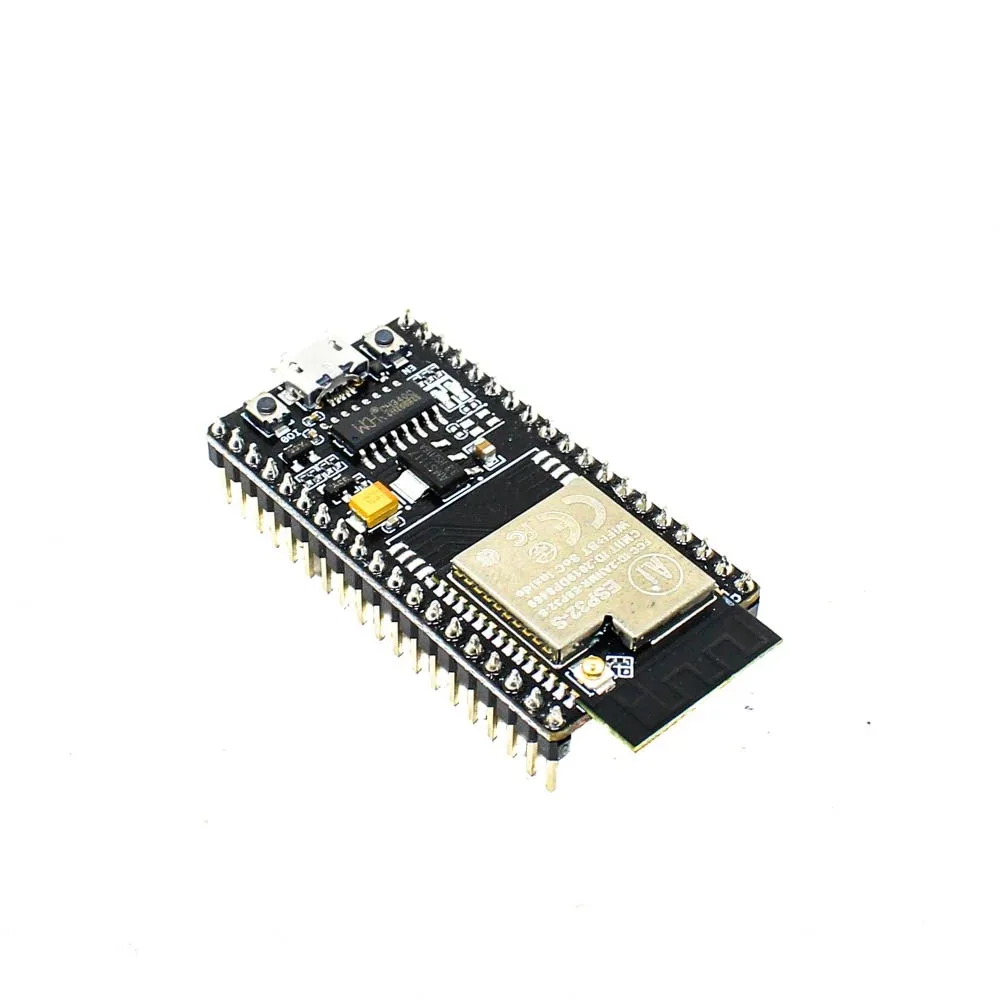
Ai Thinker NodeMCU-32S ESP32 Development Board – IPEX Version
The NodeMCU-32S with IPEX antenna connector is the ideal board for GPS tracker projects — use the external antenna for better WiFi range while the NEO-6M handles GPS.
Using TinyGPS++ Library for NMEA Parsing
TinyGPS++ is the most popular library for parsing NMEA sentences on Arduino and ESP32. It handles all the complex parsing, checksum verification, and unit conversion automatically.
Installing TinyGPS++
In Arduino IDE Library Manager, search for TinyGPSPlus by Mikal Hart and install it. In PlatformIO, add:
lib_deps =
  mikalhart/TinyGPSPlus @ ^1.0.3
Key TinyGPS++ Functions
| Function | Returns |
|---|---|
| gps.location.lat() | Latitude in decimal degrees |
| gps.location.lng() | Longitude in decimal degrees |
| gps.altitude.meters() | Altitude in meters |
| gps.speed.kmph() | Speed in km/h |
| gps.course.deg() | Course/heading in degrees |
| gps.satellites.value() | Number of satellites in use |
| gps.hdop.value() | Horizontal dilution of precision |
| gps.location.isValid() | True when a valid fix is obtained |
Complete ESP32 GPS Tracker Sketch
Here is a complete, working ESP32 GPS tracker sketch that parses NMEA data from the NEO-6M and displays it on the Serial Monitor:
#include <TinyGPSPlus.h>
#include <HardwareSerial.h>

// GPS Module wired to ESP32 UART2
#define GPS_RX_PIN 16
#define GPS_TX_PIN 17
#define GPS_BAUD   9600

TinyGPSPlus gps;
HardwareSerial gpsSerial(2); // UART2

void setup() {
  Serial.begin(115200);
  gpsSerial.begin(GPS_BAUD, SERIAL_8N1, GPS_RX_PIN, GPS_TX_PIN);

  Serial.println("ESP32 GPS Tracker Starting...");
  Serial.println("Waiting for GPS fix (go near a window)...");
}

void displayGPSData() {
  Serial.println("--- GPS Data ---");
  if (gps.location.isValid()) {
    Serial.printf("Latitude:  %.6fn", gps.location.lat());
    Serial.printf("Longitude: %.6fn", gps.location.lng());
    Serial.printf("Google Maps: https://maps.google.com/?q=%.6f,%.6fn",
                  gps.location.lat(), gps.location.lng());
  } else {
    Serial.println("Location: Acquiring fix...");
  }

  if (gps.altitude.isValid())
    Serial.printf("Altitude:  %.1f mn", gps.altitude.meters());

  if (gps.speed.isValid())
    Serial.printf("Speed:     %.1f km/hn", gps.speed.kmph());

  if (gps.course.isValid())
    Serial.printf("Course:    %.1f degreesn", gps.course.deg());

  if (gps.satellites.isValid())
    Serial.printf("Satellites: %dn", gps.satellites.value());

  if (gps.hdop.isValid())
    Serial.printf("HDOP:      %.2fn", gps.hdop.value() / 100.0);

  if (gps.date.isValid() && gps.time.isValid()) {
    Serial.printf("Date/Time (UTC): %02d/%02d/%04d %02d:%02d:%02dn",
                  gps.date.day(), gps.date.month(), gps.date.year(),
                  gps.time.hour(), gps.time.minute(), gps.time.second());
    // IST = UTC + 5:30
    int istHour = (gps.time.hour() + 5) % 24;
    int istMin  = gps.time.minute() + 30;
    if (istMin >= 60) { istMin -= 60; istHour = (istHour + 1) % 24; }
    Serial.printf("Time (IST):      %02d:%02d:%02dn", istHour, istMin, gps.time.second());
  }

  Serial.println("----------------");
}

void loop() {
  // Feed GPS data to TinyGPS++
  while (gpsSerial.available() > 0) {
    char c = gpsSerial.read();
    gps.encode(c);
  }

  // Print data every 5 seconds
  static unsigned long lastPrint = 0;
  if (millis() - lastPrint > 5000) {
    lastPrint = millis();
    displayGPSData();

    // Check if GPS is receiving sentences at all
    if (millis() > 10000 && gps.charsProcessed() < 10) {
      Serial.println("WARNING: No GPS data received. Check wiring!");
    }
  }
}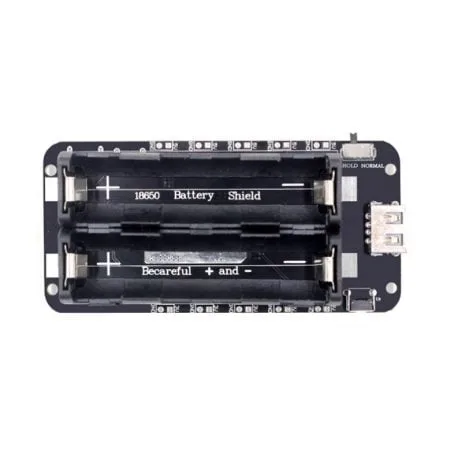
2 x 18650 Battery Shield V8 for ESP32/ESP8266 – 5V/3A
Power your ESP32 GPS tracker portably with this dual 18650 battery shield — provides up to 5V/3A for hours of continuous GPS tracking in the field.
Sending GPS Data to Google Maps / Firebase
A GPS tracker is most useful when it sends location data to the internet so you can view it on a map. Here is how to POST GPS coordinates to Firebase Realtime Database:
#include <WiFi.h>
#include <HTTPClient.h>
#include <ArduinoJson.h>
#include <TinyGPSPlus.h>

const char* FIREBASE_URL = "https://your-project.firebaseio.com/tracker/location.json?auth=YOUR_SECRET";

void sendLocationToFirebase(double lat, double lng, float speed, int sats) {
  if (WiFi.status() != WL_CONNECTED) return;

  JsonDocument doc;
  doc["lat"] = lat;
  doc["lng"] = lng;
  doc["speed_kmph"] = speed;
  doc["satellites"] = sats;
  doc["timestamp"] = millis();

  String payload;
  serializeJson(doc, payload);

  HTTPClient http;
  http.begin(FIREBASE_URL);
  http.addHeader("Content-Type", "application/json");
  int code = http.PUT(payload); // PUT overwrites; use POST for history log
  Serial.printf("Firebase response: %dn", code);
  http.end();
}

// In loop(), call this when you have a valid fix:
if (gps.location.isValid() && gps.location.isUpdated()) {
  sendLocationToFirebase(
    gps.location.lat(),
    gps.location.lng(),
    gps.speed.kmph(),
    gps.satellites.value()
  );
}
Improving GPS Accuracy and Fix Time
The NEO-6M’s cold start time (first fix) can be 30-60 seconds in open sky. Here are tips to improve performance for Indian outdoor conditions.
- Use a good antenna: The ceramic patch antenna that comes with most NEO-6M modules is adequate, but an active GPS antenna (with amplifier) dramatically improves indoor performance and fix time.
- Backup power for faster fixes: The NEO-6M has a battery backup pin. Connect a 3V coin cell to maintain satellite almanac data. This reduces warm start time from 27s to under 5 seconds.
- AssistNow Online: u-blox provides an assisted GPS service (AssistNow) that dramatically reduces TTFF. The ESP32 can download satellite prediction data via WiFi and upload it to the NEO-6M via UART.
- Increase update rate: Configure the NEO-6M for 5Hz updates using UBX protocol commands for smoother vehicle tracking.
- HDOP threshold: Only use GPS data when
gps.hdop.value() < 200(i.e., HDOP < 2.0) for acceptable accuracy.
Powering Your GPS Tracker on Battery
A real GPS tracker must run on battery. Here is how to optimize power consumption for the ESP32 + NEO-6M combination.
Power Consumption Breakdown
- ESP32 active (WiFi on): ~160mA
- ESP32 modem sleep: ~20mA
- NEO-6M acquiring: ~45mA
- NEO-6M tracking: ~35mA
- Total continuous: ~200mA
With dual 18650 batteries (6000mAh), you get approximately 30 hours of continuous tracking. Use these strategies to extend battery life:
- Wake ESP32 every 1 minute, get GPS fix, send to Firebase, sleep again
- Put NEO-6M into power-saving mode between fixes
- Use ESP32 deep sleep between transmissions

4 x 18650 Battery Shield V8/V9 for ESP32/ESP8266 with On-Off Button
For long-duration GPS tracking, this 4-cell 18650 shield provides over 60 hours of continuous tracking on a single charge — essential for vehicle and asset tracking.
Frequently Asked Questions
Q1: Why is my NEO-6M GPS not getting a fix indoors?
GPS signals are extremely weak (about 20 watts broadcast from 20,000km away!) and are easily blocked by buildings, concrete, and metal. For testing, place your setup near an open window or take it outside. Once a fix is obtained, the module maintains it reasonably well near windows.
Q2: Can I use the ESP32 GPS tracker for vehicle tracking in India?
Yes, the ESP32 + NEO-6M is widely used for vehicle tracking in India. The NEO-6M works well in Indian cities, though tall buildings can cause multi-path errors. For commercial vehicle tracking, consider adding a GSM/4G module (like SIM800L or SIM7600) for cellular connectivity instead of WiFi, enabling tracking anywhere on the road.
Q3: How do I convert GPS coordinates to a Google Maps link?
Use this format: https://maps.google.com/?q={latitude},{longitude}. For example, Mumbai coordinates: https://maps.google.com/?q=19.0760,72.8777. You can generate this link in your ESP32 code and send it via WhatsApp or Telegram using their APIs.
Q4: What is HDOP and what value is acceptable?
HDOP (Horizontal Dilution of Precision) indicates GPS accuracy based on satellite geometry. Values under 1.0 are excellent, 1-2 are good, 2-5 are moderate, and above 5 is poor. For most applications, only use location data when HDOP < 3.0 (TinyGPS++ reports HDOP as an integer multiplied by 100).
Q5: Can I use the ESP32 GPS tracker with Google Maps API to show a live map?
Yes! You can build a web dashboard using Firebase Realtime Database that listens for new GPS coordinates and updates a Google Maps marker in real time. The Google Maps JavaScript API is free for moderate usage and integrates seamlessly with Firebase.
Build Your GPS Tracker Today
The ESP32 + NEO-6M GPS tracker is one of the most useful projects an Indian maker can build — whether for vehicle tracking, asset monitoring, or adventure logging. Get all the components you need from Zbotic, shipped anywhere in India.


Add comment