
The ESP-NOW protocol tutorial you have been waiting for is here. ESP-NOW is Espressif’s proprietary peer-to-peer wireless communication protocol that lets ESP32 and ESP8266 modules talk to each other directly — no WiFi router, no internet connection, no cloud subscription needed. It operates at the MAC layer of the 802.11 standard, enabling fast, low-latency, low-power data exchange between up to 20 paired devices. For Indian makers building sensor networks, remote controls, or distributed IoT systems, ESP-NOW is one of the most practical tools available.
What Is ESP-NOW and How Does It Work?
ESP-NOW was developed by Espressif and first appeared in the ESP8266 SDK. It has since been fully supported on the ESP32, ESP32-S2, ESP32-S3, ESP32-C3, and other variants in the family. At its core, ESP-NOW is a connectionless communication protocol that bypasses the entire TCP/IP WiFi stack.
Instead of the usual WiFi handshake — association, authentication, DHCP, TCP connection — ESP-NOW sends short data frames (up to 250 bytes per packet) directly between devices identified by their MAC addresses. The communication happens at the physical layer, meaning it is extremely fast (latency as low as 1–2 ms) and works even when there is no WiFi infrastructure around.
Key technical characteristics of ESP-NOW:
- Payload: Up to 250 bytes per message
- Peers: Up to 20 registered peer devices
- Encryption: Optional AES-128 CCMP encryption (up to 6 encrypted peers)
- Range: Up to 480 metres in open air (tested)
- Latency: Typically 1–5 ms
- Operating band: 2.4 GHz (channel selectable)
- Coexistence: Can run simultaneously with WiFi in station or AP mode
ESP-NOW vs. Traditional WiFi: When to Use Which
| Criteria | ESP-NOW | WiFi (TCP/IP) |
|---|---|---|
| Requires Router | No | Yes |
| Latency | 1–5 ms | 50–500 ms |
| Max Payload | 250 bytes | Unlimited (TCP) |
| Max Peers | 20 | Limited by router |
| Power Consumption | Very low | Higher |
| Internet Access | No (without bridge) | Yes |
| Encryption | AES-128 (optional) | WPA2/WPA3 |
| Best For | Local sensor networks, remote controls | Cloud IoT, web dashboards |
Use ESP-NOW when your devices need to communicate locally without internet infrastructure — for example, a set of soil moisture sensors spread across a farm field reporting to a central gateway, or a wireless button controller managing multiple smart lights without depending on your home router being online.
Hardware You Need to Get Started
For this tutorial, you need at least two ESP32 development boards or modules. Any ESP32 variant works — the classic ESP32, ESP32-C3, ESP32-S3, etc. You can even mix and match, since ESP-NOW is compatible across the ESP family.

Ai Thinker NodeMCU-32S-ESP32 Development Board – IPEX Version
A full-featured ESP32 development board with an IPEX antenna connector for excellent range — buy two to get started with ESP-NOW peer-to-peer communication right away.
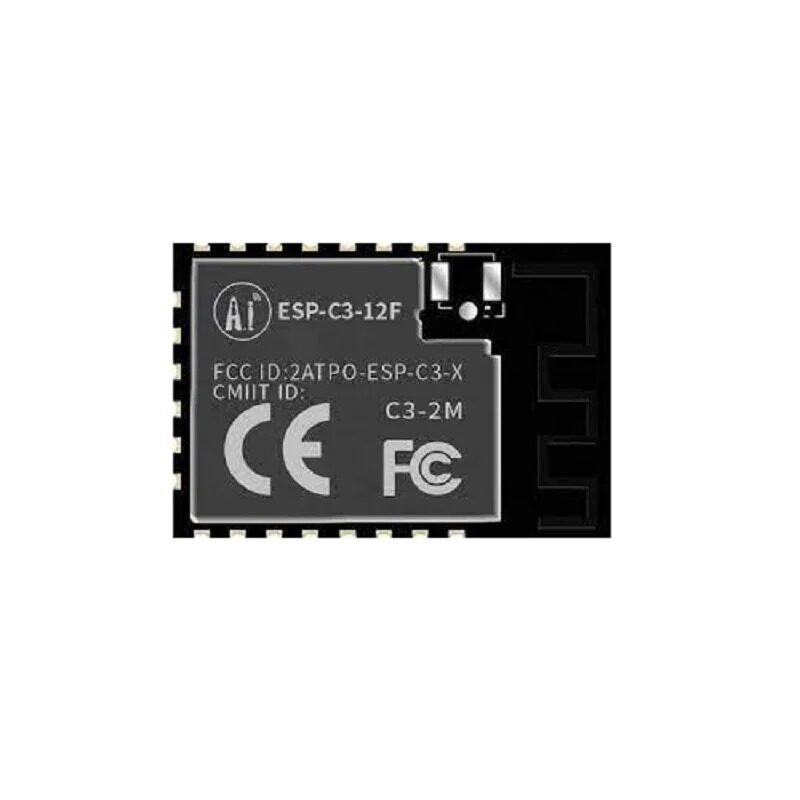
Ai-Thinker ESP32-C3-12F Wi-Fi + BLE Module
The ESP32-C3-12F supports ESP-NOW and is a cost-effective option for building battery-powered sensor nodes in a multi-device ESP-NOW network.
You will also want a sensor like a DHT11 or BME280 for the transmitting node, and optionally an OLED display or serial monitor for the receiving node to display data.
Tutorial: One-Way Data Transmission
Let us start with the simplest case: one ESP32 (the sender) transmitting temperature data to another ESP32 (the receiver). Before writing code, you need the MAC address of the receiver board.
Step 1: Get the Receiver’s MAC Address
Upload this simple sketch to the receiver board to print its MAC address:
#include <WiFi.h>
void setup() {
  Serial.begin(115200);
  WiFi.mode(WIFI_STA);
  Serial.println(WiFi.macAddress());
}
void loop() {}
Note the MAC address (e.g., AA:BB:CC:DD:EE:FF).
Step 2: Sender Code
#include <esp_now.h>
#include <WiFi.h>

uint8_t receiverMAC[] = {0xAA, 0xBB, 0xCC, 0xDD, 0xEE, 0xFF}; // Replace with your receiver MAC

typedef struct {
  float temperature;
  float humidity;
} SensorData;

SensorData data;
esp_now_peer_info_t peerInfo;

void onSent(const uint8_t *mac_addr, esp_now_send_status_t status) {
  Serial.println(status == ESP_NOW_SEND_SUCCESS ? "Delivery OK" : "Delivery FAIL");
}

void setup() {
  Serial.begin(115200);
  WiFi.mode(WIFI_STA);
  esp_now_init();
  esp_now_register_send_cb(onSent);
  memcpy(peerInfo.peer_addr, receiverMAC, 6);
  peerInfo.channel = 0;
  peerInfo.encrypt = false;
  esp_now_add_peer(&peerInfo);
}

void loop() {
  data.temperature = 30.5; // Replace with real sensor reading
  data.humidity = 65.0;
  esp_now_send(receiverMAC, (uint8_t *)&data, sizeof(data));
  delay(2000);
}
Step 3: Receiver Code
#include <esp_now.h>
#include <WiFi.h>

typedef struct {
  float temperature;
  float humidity;
} SensorData;

SensorData incomingData;

void onReceive(const esp_now_recv_info_t *recv_info, const uint8_t *data, int len) {
  memcpy(&incomingData, data, sizeof(incomingData));
  Serial.printf("Temp: %.1f°C  Humidity: %.1f%%n",
    incomingData.temperature, incomingData.humidity);
}

void setup() {
  Serial.begin(115200);
  WiFi.mode(WIFI_STA);
  esp_now_init();
  esp_now_register_recv_cb(onReceive);
}

void loop() {}
Tutorial: Two-Way Communication Between Two ESP32s
Two-way ESP-NOW communication is achieved by registering each device as a peer on the other, and having both devices register both send and receive callbacks. This enables acknowledgement-based systems, remote control with feedback, or bidirectional sensor data exchange.
The key pattern is:
- Both devices call
WiFi.mode(WIFI_STA)andesp_now_init() - Each device registers the other’s MAC as a peer using
esp_now_add_peer() - Each device registers both
esp_now_register_send_cb()andesp_now_register_recv_cb() - On receiving data, a device can immediately send back a response using
esp_now_send()
A practical use case for two-way ESP-NOW: a handheld remote control (sender) sends a command to a robot (receiver). The robot executes the command and sends back its battery level and status to the remote’s display — all without any router in the loop.
Building a Multi-Node Sensor Network
One of the most powerful applications of ESP-NOW is a star topology sensor network where multiple sensor nodes all report to a single gateway. The gateway can optionally be connected to WiFi to forward data to a cloud service like ThingSpeak or Home Assistant.

DHT20 SIP Packaged Temperature and Humidity Sensor
The DHT20 offers improved accuracy over DHT11 and uses I2C interface — perfect for multi-node ESP-NOW sensor arrays where each node monitors temperature and humidity.
Architecture for a 5-node weather monitoring network:
- 5 sensor nodes: Each has a BME280 (temperature, humidity, pressure) and runs on battery via an 18650 shield. Each node wakes from deep sleep, reads the sensor, sends data via ESP-NOW to the gateway, then goes back to sleep.
- 1 gateway node: Always on, connected to home WiFi. Receives data from all 5 sensor nodes via ESP-NOW callbacks and posts to an MQTT broker or HTTP API.
The gateway uses a broadcast address (FF:FF:FF:FF:FF:FF) as its peer so it can receive from any ESP-NOW sender, while each sensor node has the gateway’s MAC hard-coded as its peer. This is the classic star pattern and scales to 20 nodes before hitting the ESP-NOW peer limit.

GY-BME280-3.3 Precision Altimeter Atmospheric Pressure Sensor Module
The BME280 measures temperature, humidity, and barometric pressure in one compact I2C module — ideal for each sensor node in your ESP-NOW weather monitoring network.
Range, Reliability, and Power Consumption Tips
ESP-NOW’s range depends heavily on the antenna used and the environment. Here are practical tips for maximising your network reliability:
Improving Range
- Use modules with external antenna connectors (like the ESP32-C3-12F) and add a 2.4 GHz antenna for greater range
- Use the
esp_wifi_set_max_tx_power()function to set maximum transmit power:esp_wifi_set_max_tx_power(84)sets it to 21 dBm - Keep sensor nodes elevated and away from metal objects and concrete walls
- In tested open-field conditions, ESP-NOW with a PCB trace antenna reaches 100–200m reliably; with an external antenna, 400–480m is achievable
Channel Alignment
If your gateway is also connected to WiFi as a station, ESP-NOW must use the same channel as the WiFi AP. When the gateway connects to your router on channel 6, all ESP-NOW communication must also happen on channel 6. Make sure all sensor nodes set peerInfo.channel = 0 (which means use the current channel) rather than hard-coding a different channel number.
Power Saving on Sensor Nodes
For battery-powered nodes, combine ESP-NOW with deep sleep. The typical duty cycle is: wake → enable WiFi → register peer → send one packet → check delivery callback → enter deep sleep. This entire sequence takes about 300–500 ms, consuming roughly 100–150 mA during that window. On a 2000 mAh 18650 cell, sending data every 5 minutes gives over 6 months of battery life.
Frequently Asked Questions
Can ESP-NOW and WiFi work at the same time on ESP32?
Yes, but with a constraint. When the ESP32 is connected to a WiFi router as a station, ESP-NOW must operate on the same channel as the router. You can send ESP-NOW packets while the WiFi connection is active, which is useful for gateway nodes that both relay ESP-NOW sensor data and push it to the internet over WiFi.
Is ESP-NOW secure?
ESP-NOW supports AES-128 CCMP encryption, but only for up to 6 peers simultaneously. For encrypted communication, both sender and receiver must share a 16-byte key set via peerInfo.encrypt = true and the LMK (Local Master Key). For non-critical sensor data on a private property, unencrypted ESP-NOW is typically acceptable.
What is the maximum number of nodes in an ESP-NOW network?
Each ESP32 can register up to 20 peers. In a star topology, your gateway can receive from up to 20 sensor nodes. In a mesh-like topology with forwarding, you can technically reach more nodes, but ESP-NOW does not have built-in mesh routing — you would need to implement that logic yourself, or use ESP-MESH instead.
Does ESP-NOW work between ESP32 and ESP8266?
Yes, ESP-NOW is cross-compatible between ESP32 and ESP8266 devices, as long as they are on the same 2.4 GHz channel. This means you can use cheaper ESP8266 modules as sensor nodes and an ESP32 as the gateway without any issues.
How do I handle packet loss in ESP-NOW?
ESP-NOW provides a delivery callback with a success or failure status. For critical data, implement an acknowledgement + retry loop: if the send callback returns failure, re-queue the packet and retry after a short delay. For non-critical sensor data (like temperature readings), packet loss of 1–2% is usually acceptable and can simply be ignored.
Start Building Your Wireless Sensor Network Today
Get ESP32 boards, sensors, and accessories for your ESP-NOW projects from Zbotic — fast delivery across India, quality products, and competitive prices.






Add comment