
Drone Return to Home (RTH): Setup, Modes & Troubleshooting
Return to Home (RTH) is arguably the most important safety feature on any autonomous drone. When your drone loses radio contact, gets out of range, or you simply press the RTH button, the drone should reliably fly back to its launch point and land safely — without any further input from you. When it works correctly, RTH is a life-saver. When it is incorrectly configured, it can lead to fly-aways, crashes into trees, or drones landing on people.
This comprehensive guide explains how RTH works, the different RTH modes available, how to set it up correctly in ArduCopter (and what DJI users should check), and how to systematically diagnose RTH problems when they occur.
How Return to Home Works
RTH relies on GPS to know two things: where the drone is right now, and where it needs to go (the home point). When RTH is triggered, the flight controller executes a sequence of steps:
- Record current position (if not already flying a mission)
- Ascend to RTH altitude (if below it) to clear obstacles
- Navigate to home point using GPS waypoint navigation at cruise speed
- Decelerate as it approaches home, transitioning to position hold
- Descend and land using barometer + rangefinder (if available)
- Disarm motors after landing is confirmed
The quality of every step depends on GPS accuracy, compass calibration, barometer calibration, and the correct configuration of RTH parameters. A failure in any one of these areas can cause RTH to behave unexpectedly.
RTH Modes Explained
Simple RTH (Basic)
The drone climbs to RTH altitude, flies directly to the home point, and lands. Straightforward, but does not account for obstacles between current position and home. Suitable for open-field operations with no obstacles.
Smart RTH (Obstacle-Aware)
Used in consumer drones like DJI that have obstacle avoidance sensors. Before navigating home, the drone builds a brief picture of what is in its path and plans a route around detected obstacles. Note that this feature is NOT available on DIY ArduCopter builds by default — it requires additional obstacle avoidance hardware and integration.
Low Battery RTH
Triggered automatically when battery voltage drops below a threshold. The drone calculates whether it has enough battery to return to home and land, and initiates RTH if the answer is yes. If battery is critically low, it may initiate an immediate landing in-place rather than attempting to return home.
Signal Loss RTH (Failsafe RTH)
Triggered when the RC link is lost for a configurable duration (typically 1–3 seconds). This is the most common practical scenario — the drone flies out of range or behind an obstruction. The drone executes RTH automatically.
GPS Glitch RTH
Some flight controllers have a separate failsafe for GPS quality degradation. If the drone is in a position-hold mode and GPS accuracy suddenly drops (HDOP rises above threshold), the FC may switch to altitude-hold mode and await manual control, or may attempt RTH if configured to do so.
Precision Landing (Advanced RTH)
An advanced variant where the drone uses a downward-facing camera and a visual target (AprilTag or LED landing pad) to land with centimetre-level precision on the exact home point rather than just approximate GPS coordinates. Used in agricultural and delivery applications where landing accuracy matters.
Prerequisites for Reliable RTH
RTH is only as reliable as the systems that support it. Check all of these before relying on RTH in any serious operation:
1. Valid Home Point Set
The home point is recorded at the moment of arming (on ArduCopter) or on first GPS lock (on some systems). The drone must have had GPS lock before arming. If you arm without GPS lock, no home point is set and RTH cannot work correctly.
Best practice: Never arm until Mission Planner or your OSD shows a solid GPS lock with at least 8 satellites and HDOP below 2.0.
2. Compass Calibration
The compass tells the flight controller which direction is north, and therefore which direction is “towards home.” A poorly calibrated or magnetically interfered compass causes the drone to fly in the wrong direction during RTH — potentially straight away from home instead of towards it.
Calibrate the compass in the same location where you will fly. Recalibrate when you move to a significantly different location, especially in India where regional magnetic variation can be noticeable over large distances.
3. Correct RTH Altitude
The RTH altitude must be set high enough to clear all obstacles between your current position and the home point. If RTH altitude is set to 20m but there is a 30m tree between the drone and home, the drone will fly into the tree.
4. Adequate Battery for RTH
The battery must have enough charge to execute the full RTH sequence. Flying to maximum range with minimum battery remaining is a common cause of RTH-related incidents where the battery dies before the drone makes it back.
5. GPS Signal Quality at Home Point
The home point coordinates must be recorded with good GPS accuracy. If the drone armed in a location with poor GPS (e.g., under a concrete ceiling or near a metal building), the recorded home point may be 10–20m from the actual launch point, causing the drone to land in the wrong spot.
RTH Setup in ArduCopter
ArduCopter calls RTH “Return to Launch” (RTL). Here are the key parameters to configure:
RTL Altitude Setting
RTL_ALT: The altitude (in cm) to which the drone climbs before returning home. Default is 1500cm (15m). Set this to the highest obstacle height in your area plus a 10m safety margin. For tree-covered Indian terrain, 50m (5000cm) is a common setting.RTL_ALT_FINAL: The altitude (in cm) at which the drone hovers above home before final descent. Default 0 (immediate landing). Set to 200–500cm if you want to pause and verify before landing.
Failsafe Configuration
FS_THR_ENABLE: Throttle failsafe enable. Set to 1 (RTL) or 2 (continue mission then RTL).FS_THR_VALUE: The PWM value below which throttle failsafe activates. Typically set to 975 (just below the lowest valid throttle signal).FS_GCS_ENABLE: Ground station failsafe — if telemetry link is lost for the set time. Set to 2 (RTL) for operational flights.FS_BATT_ENABLE: Battery failsafe. Set to 2 (RTL when low, land when critical).FS_BATT_VOLTAGE: Battery voltage threshold for RTL. For a 4S LiPo, 14.0–14.2V (3.5V/cell) is a common RTL trigger.FS_BATT_MAH: Alternatively, set a milliamp-hour remaining threshold. When this much capacity remains, RTL triggers. Recommended for long-range flights where you need a precise energy budget.
Landing Detection
LAND_SPEED: Descent speed during landing phase (cm/s). Default 50 (0.5 m/s). Increase for faster landing in emergency situations (up to 100 cm/s).LAND_SPEED_HIGH: Initial descent speed from RTL altitude down to LAND_ALT_LOW altitude. Default 250 cm/s.LAND_ALT_LOW: Altitude (cm) at which the drone slows to LAND_SPEED for final approach. Default 1000 (10m).
GPS Failsafe
FS_GPS_ENABLE: GPS failsafe action. Set to 2 (AltHold) or 3 (Land) depending on whether you prefer altitude hold with manual control or automatic landing if GPS is lost during flight.
Setting the Correct RTH Altitude
RTH altitude is the single parameter that most directly affects whether RTH succeeds safely or ends in a crash. Setting it too low risks obstacle collisions; setting it unnecessarily high wastes battery and time.
Method 1: Survey Your Site
Before each flight, walk or drive around your intended flight area and note the height of the tallest obstacles between any possible drone position and the home point. Add 10m of clearance to this height and set that as your RTH altitude.
Method 2: Terrain-Based RTH
ArduCopter supports terrain following during RTL using the RTL_ALT set relative to terrain (requires digital elevation model data on the FC via SD card or telemetry). This is more complex to set up but provides automatic obstacle clearance on uneven terrain — useful for hill surveys in places like Himachal Pradesh or the Western Ghats.
Method 3: Conservative Fixed Altitude
For unknown or frequently changing environments, set RTH altitude to 80–100m. This clears almost all natural obstacles in Indian terrain except in mountainous regions. The extra battery use for altitude gain is a worthwhile safety trade-off.
Failsafe Triggers: When RTH Activates
Understanding exactly what triggers RTH in your system prevents surprises during flight:
RC Signal Loss (Throttle Failsafe)
Your RC transmitter sends a signal continuously while on. When the signal is lost (range, obstacle, interference), the RC receiver either sends a specific low throttle PWM value or sends no signal at all. ArduCopter monitors for either condition and triggers the failsafe after the signal has been lost for FS_THR_VALUE threshold for 1+ seconds.
To test: With drone on the ground and props off, switch off your transmitter. Verify in Mission Planner that FS_THR is triggered within 1–2 seconds.
Battery Failsafe
ArduCopter monitors battery voltage via the power module. When voltage drops below FS_BATT_VOLTAGE, the battery RTL triggers. When it drops below a second, critical threshold (BATT_CRT_VOLT), ArduCopter initiates an emergency landing in place regardless of position.
GCS (Ground Station) Failsafe
If your telemetry link is lost while flying a mission that depends on GCS connection, this failsafe activates. For most recreational and survey flights, this is less critical but should be configured for BVLOS or autonomous mission flights.
GPS Accuracy and Its Impact on RTH
RTH landing accuracy depends entirely on GPS accuracy. Standard single-frequency GPS (as used in most hobby Pixhawk GPS modules) has a typical accuracy of 2–5m CEP (Circular Error Probable). This means the drone will land within 2–5m of the home point in typical conditions. In poor GPS conditions, accuracy degrades to 10–20m.
For applications where RTH landing precision matters (landing on a specific pad, inside an enclosure, or avoiding obstacles near the home point), consider these improvements:
- RTK GPS: Real-time kinematic GPS can achieve 1–2cm accuracy. Expensive but available for professional builds. F9P-based modules from Ardusimple and similar vendors are popular in India.
- GPS averaging: ArduCopter can be configured to average the GPS position over multiple seconds before recording the home point, reducing single-sample GPS noise.
- Optical flow: A downward-facing camera combined with optical flow sensor provides position hold accuracy independent of GPS, especially useful near the home point during final descent.
- Landing beacons: Some advanced systems use IR or LED-based beacons at the landing pad that the drone detects with a downward camera for precision final approach.
RTH Considerations for India
Magnetic Anomalies
India has several regions with significant magnetic anomalies (iron ore deposits in Jharkhand and Chhattisgarh, volcanic basalt in the Deccan Plateau). These affect compass readings and can cause RTH direction errors. Always calibrate the compass on-site and verify it against a known north direction before critical flights in these regions.
Urban Environments
Flying in Indian cities involves multi-storey buildings, power line infrastructure, cell towers, and construction cranes. Set RTH altitude to at least 50m above the tallest structure in your immediate operating area. Never rely on RTH clearing a multi-storey building that was not there during planning.
GPS Quality Under Tall Canopies
Flying under tree canopy (common in agricultural monitoring missions in Kerala, Karnataka, and northeast India) significantly degrades GPS accuracy. Always gain GPS lock in a clear area before flying under any canopy. Set the home point before moving under the trees.
Monsoon Conditions
Heavy cloud cover during the monsoon season does not significantly affect GPS signal for ground-level receivers, but can reduce satellite count by 1–2 satellites. Combined with increased wind during monsoon, RTH altitude settings should be increased for monsoon flying.
DGCA No-Fly Zones
RTH flies back to the home point in a straight line. If this line passes through a DGCA-designated no-fly zone (red zone around airports, security installations), the RTH path could be a regulatory violation even if unintentional. Always verify that your RTH path is clear of restricted airspace. Set home points away from zone boundaries.
Troubleshooting RTH Problems
Problem: Drone Flies in Wrong Direction During RTH
Cause: Compass interference or miscalibration. The FC thinks north is a different direction than actual north, so it navigates home in the wrong direction.
Fix: Recalibrate compass in the field away from metal objects and electronics. Check for magnetic interference from ESCs and power cables near the GPS/compass module. If interference is unavoidable, relocate the GPS module on a longer mast.
Problem: Drone Climbs to Incorrect RTH Altitude
Cause: RTL_ALT is in centimetres, not metres. Setting it to 50 instead of 5000 gives 0.5m RTL altitude, not 50m.
Fix: Verify RTL_ALT is set in centimetres. 5000 = 50m. Check with a Mission Planner test of the full RTH sequence from 10m altitude before relying on it operationally.
Problem: Drone Lands Metres Away from Home Point
Cause: Normal GPS accuracy limitation. Standard GPS accuracy is 2–5m. Wind during descent also pushes the drone off course slightly.
Fix: Accept 2–5m as normal. For better accuracy, use RTK GPS, optical flow, or a visual landing target. Ensure your home point is clear of obstacles for a 5m radius.
Problem: RTH Triggers Unexpectedly During Flight
Cause: Intermittent RC signal (throttle failsafe triggering). Often caused by RC transmitter battery low, RC antenna orientation, or flying near interference sources (power lines, cell towers, other 2.4GHz devices).
Fix: Check RC transmitter battery. Use a long-range RC system (ExpressLRS, TBS Crossfire) for flights beyond 300m. Monitor RSSI in Mission Planner during test flights. Switch to 900MHz RC for better penetration in urban environments.
Problem: Drone Descends Too Fast During RTH Landing
Cause: LAND_SPEED or LAND_SPEED_HIGH set too high, or battery low causing emergency descent.
Fix: Reduce LAND_SPEED_HIGH to 150–200 cm/s and LAND_SPEED to 30–40 cm/s for smooth landings. If battery-caused: increase battery failsafe thresholds and reduce flight distances.
Problem: Home Point Not Set After Arming
Cause: Armed without GPS lock, or GPS lock was lost immediately before arming.
Fix: Enable the GPS failsafe that prevents arming without GPS lock: ARMING_CHECK = 1 (check all). This prevents arming if GPS is not healthy. Never arm in manual override of GPS check for any flight where RTH is needed.
Recommended Products from Zbotic
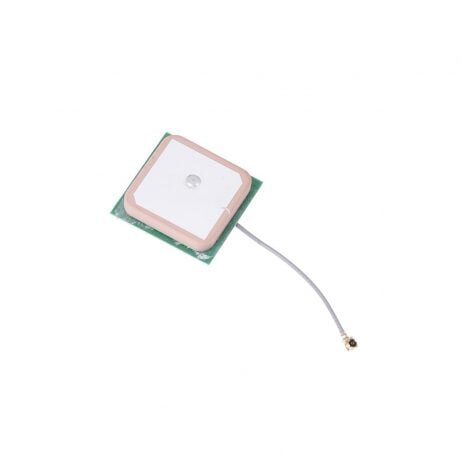
28dB High Gain Ceramic Active GPS Antenna (NEO-6M/7M/8M)
A high-gain GPS antenna ensures fast satellite lock and strong signal during flight — the foundation of accurate RTH. Works with all popular NEO-series GPS modules used in ArduCopter builds.
View on Zbotic
3DR 100mW Radio Telemetry 915MHz for APM/PX4/Pixhawk
Monitor RTH in real time from Mission Planner. See GPS lock quality, home point coordinates, battery status, and RTH progress live on your laptop — essential for verifying RTH works correctly during test flights.
View on Zbotic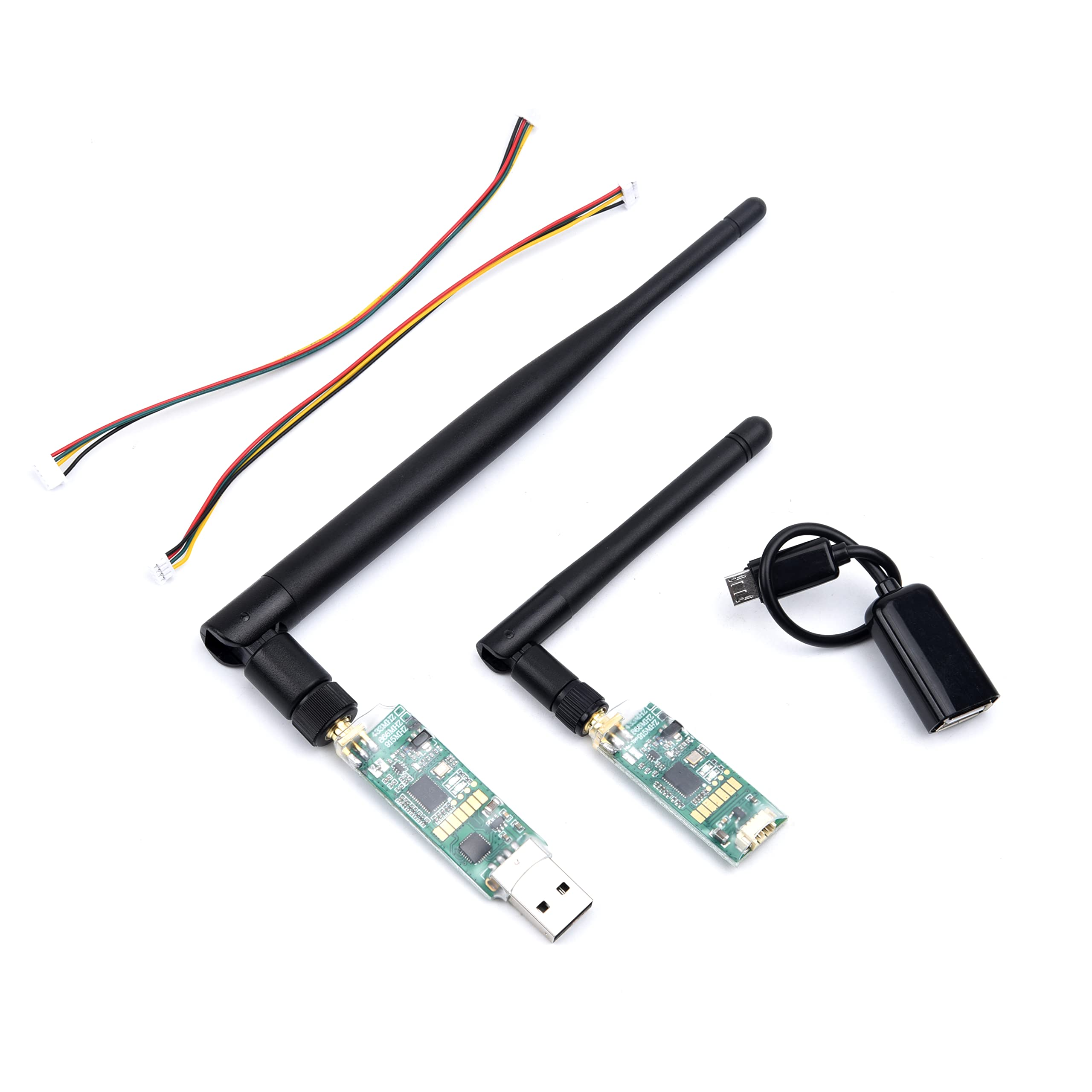
3DR Single TTL MINI Radio Telemetry 433MHz 500mW for Pixhawk/APM
Higher power 433MHz telemetry with 500mW output for longer range monitoring. Pairs with Mission Planner to monitor RTH and all flight parameters at extended distances from the ground station.
View on Zbotic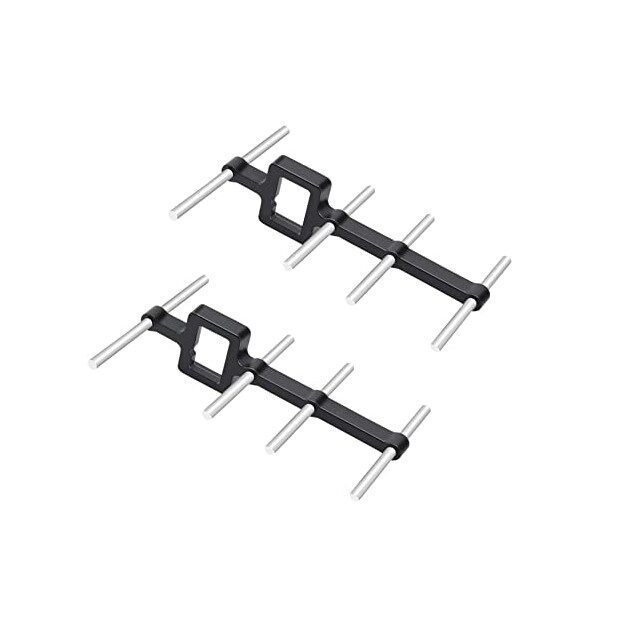
2.4GHz Yagi-UDA Drone Signal Booster
Extend your RC control range with a Yagi directional antenna. A stronger RC link reduces the chances of signal loss triggering an unwanted RTH during normal operations, giving you more control range.
View on Zbotic
110cm Fast-Fold Landing Pad / Helipad for RC Drone
A clearly marked landing pad at your home point makes RTH landings precise and safe. The high-visibility surface protects electronics from ground debris and provides a visual reference during RTH approaches.
View on ZboticFrequently Asked Questions
Can I override RTH manually?
Yes. In ArduCopter, switching to any manual mode (Stabilize, AltHold, Loiter) during RTH immediately cancels RTH and gives you full control. This override capability is why it is important to always keep your RC transmitter on and in range during autonomous operations. In DJI drones, pushing any stick during RTH typically cancels it as well, but confirm this in your specific model’s manual.
What happens if GPS fails during RTH?
If GPS signal is lost during RTH, ArduCopter will switch to AltHold mode (maintaining altitude but drifting with the wind) or Land mode (descending in place) depending on your FS_GPS_ENABLE setting. The drone cannot navigate home without GPS. This is why barometric altitude is important — even without GPS, the drone can maintain a safe altitude until GPS is recovered.
How accurate is RTH landing in India?
With standard GPS (M8N/M9N modules), RTH landing accuracy in India is typically 2–5m from the home point in good conditions. In urban areas with building reflections causing multipath GPS error, accuracy can degrade to 5–10m. Using RTK GPS or a visual landing target system can improve this to under 50cm.
Should I set RTH altitude higher in monsoon season?
Yes. During monsoon conditions, higher winds increase the horizontal drift during descent, and cloud cover can cause brief GPS accuracy degradation. Increasing RTH altitude by 20–30% during monsoon season and reducing maximum flight radius are both prudent adjustments.
Does RTH work without a GPS lock at time of arming?
No. RTH requires a valid home point which is set on first GPS lock. If you arm without GPS lock (which should be prevented by arming checks), no home point is recorded and RTH will not function correctly. Some flight controllers will fly to the last known GPS position before lock was lost, but this is unreliable. Always ensure GPS lock before arming.
Can I use RTH as a way to land automatically every time?
You can, but it is not recommended as the sole landing method. RTH is a safety fallback, not a precision landing system. For regular auto-landings, use ArduCopter’s AUTO mission mode with a landing waypoint at the home point, which gives you more control over approach angle, speed, and descent rate than the default RTH profile.
Conclusion
Return to Home is one of the most powerful safety features in the modern drone pilot’s toolkit, but it requires careful setup to be reliable. Take the time to configure every parameter correctly, test RTH with a spotter present before relying on it in a real mission, and verify compass calibration and GPS accuracy before every flight.
In India’s diverse operating environments — from Gujarat’s open plains to Mumbai’s urban canyons to the high-altitude meadows of Uttarakhand — the correct RTH altitude and failsafe configuration will vary. Learn your specific operating environment, set your parameters accordingly, and RTH will give you the confidence to fly further and explore more, knowing you always have a reliable way home.
Upgrade Your Drone’s Safety System with Zbotic
GPS modules, telemetry radios, signal boosters, and landing pads — everything to make your drone’s RTH system reliable. Fast delivery across India.
Shop Drone Safety Components at Zbotic






Add comment