
Drone photogrammetry has transformed how Indian industries approach land surveying, construction monitoring, agricultural planning, and infrastructure inspection. Where traditional surveying with ground equipment once took days, a skilled drone operator with the right software can capture and process accurate 3D maps of large areas in hours. The technology has become accessible enough that small businesses, independent surveyors, and even research institutions across India are adopting it rapidly.
At the heart of any drone mapping workflow are two critical software choices: the flight planning and data processing platform. Two names dominate the conversation — DroneDeploy (cloud-based, subscription) and WebODM (open-source, self-hosted). This comprehensive guide explains how drone photogrammetry works, compares both platforms in depth, and helps you build a complete mapping workflow suited to Indian conditions.
1. What is Drone Photogrammetry?
Photogrammetry is the science of extracting geometric information — distances, areas, volumes, and 3D shapes — from photographs. When applied to drones, the process involves flying a systematic grid pattern over an area while a camera captures hundreds or thousands of overlapping images. Specialized software then analyses these images to reconstruct a detailed 3D model of the terrain or structure.
The key outputs of a drone photogrammetry mission include:
- Orthomosaic: A geometrically corrected, bird’s-eye-view mosaic map with consistent scale throughout. Think of it as a high-resolution satellite image, except you captured it yourself at much higher resolution.
- Digital Surface Model (DSM): A 3D elevation model showing the height of everything in the scene, including buildings, trees, and terrain.
- Digital Terrain Model (DTM): Like a DSM but with above-ground features filtered out, showing only the ground surface.
- Point Cloud: A dense collection of 3D points representing every visible surface in the scene. Can be used in CAD, BIM, or GIS software.
- 3D Mesh: A textured 3D model suitable for visualization, presentations, or engineering analysis.
The accuracy achievable depends on the drone’s GPS precision, camera quality, flight altitude, and use of Ground Control Points (GCPs). With proper GCPs and a quality mapping drone, horizontal accuracy of 2–5 cm and vertical accuracy of 3–10 cm is achievable — good enough for most professional applications.
2. How Photogrammetry Works: The Technical Workflow
Understanding the underlying process helps you make better decisions about hardware and software. The photogrammetry pipeline has several distinct stages:
Stage 1: Mission Planning
Before flying, you define the survey area on a map and set flight parameters: altitude (which determines Ground Sampling Distance, or GSD), front overlap (80–90% recommended), side overlap (70–80% recommended), and camera angle (usually 90° nadir/straight down, sometimes oblique for 3D building capture).
Stage 2: Ground Control Points (GCPs)
GCPs are marked points on the ground whose precise GPS coordinates are measured using a GNSS RTK receiver. These are then identified in the drone images during processing to provide an absolute reference, dramatically improving accuracy. For professional surveys, a minimum of 5 GCPs distributed across the area is standard.
Stage 3: Image Capture
The drone executes the planned grid flight autonomously, triggering the camera at regular intervals. At 80m altitude with 80/70 overlap, a typical 10-hectare agricultural field might require 200–400 images.
Stage 4: Feature Matching (SfM)
Software uses Structure from Motion (SfM) algorithms to identify common features across overlapping images and calculate the 3D position of thousands of points. This stage is computationally intensive.
Stage 5: Dense Point Cloud Generation
Multi-View Stereo (MVS) algorithms create a dense point cloud from the matched features, placing millions of 3D points to represent every visible surface.
Stage 6: Mesh, DSM, and Orthomosaic Generation
The point cloud is processed into a 3D mesh, which is then used to generate the DSM and orthomosaic. The final outputs are exported as GeoTIFF, LAS, OBJ, or other formats compatible with GIS and CAD software.
3. Hardware Requirements for Mapping Drones
You do not need a DJI Phantom 4 RTK to do useful photogrammetry in India. The right hardware depends on your accuracy requirements and budget:
Entry-Level: Consumer Drones with Integrated Cameras
Drones like the DJI Mini 3 Pro or DJI Air 3 can produce serviceable photogrammetry results for visual inspection and basic mapping. Accuracy is limited by the built-in GPS (no RTK), typically 50–100cm horizontal without GCPs. Suitable for agriculture monitoring, small construction sites, and educational purposes.
Professional: Fixed-Wing and Heavy-Lift Mapping Platforms
For large-area surveys (50+ hectares), fixed-wing drones offer longer flight times and more efficient coverage. Custom-built multirotor platforms with modular payload bays allow swapping between RGB cameras, multispectral sensors, and LiDAR units. Agricultural frames like the EFT E410P or E416P can be adapted for survey missions with appropriate camera mounts.
Camera Considerations
Sensor size matters. A Sony A6000-class APS-C sensor will outperform a small 1/2.3″ sensor for photogrammetry, especially in varied lighting conditions. If you are building a custom mapping drone, consider a mirrorless camera with a fixed focal length lens (24mm or 35mm full-frame equivalent) for consistent, distortion-free images.
4. DroneDeploy: Cloud-Based Professional Mapping
DroneDeploy is a San Francisco-based company that offers an end-to-end drone mapping platform as a cloud subscription service. It is arguably the most polished commercial drone mapping tool available, with a strong user base in agriculture, construction, and energy sectors.
Key Features
- Automated flight planning: iOS and Android apps for in-field mission planning with automatic grid generation. Works with DJI, Parrot, and other SDKs.
- Cloud processing: Upload images and DroneDeploy’s servers process the photogrammetry. No local computing power required.
- Collaboration tools: Share maps with clients via browser links. Mark up maps, add annotations, measure distances and volumes.
- Integrations: Connects with Procore, Autodesk BIM360, Esri ArcGIS, and other enterprise platforms.
- AI-powered analysis: Automated crop health analysis (NDVI), stockpile volume measurement, progress tracking for construction.
- Plant identification and change detection using machine learning.
Pricing (2025)
DroneDeploy operates on a tiered annual subscription:
- Starter: ~USD 329/year — limited maps and processing area
- Business: ~USD 1,649/year — unlimited maps, advanced analysis
- Enterprise: Custom pricing — multi-user, advanced integrations, dedicated support
At current exchange rates (₹84–86/USD), the Starter plan costs roughly ₹28,000/year and the Business plan around ₹1,40,000/year. For Indian small businesses and independent surveyors, this is a significant recurring cost.
Strengths
- Extremely easy to use — minimal photogrammetry knowledge required
- No powerful local computer needed (cloud processing)
- Regular feature updates and strong customer support
- Enterprise-grade security and compliance
Weaknesses
- Recurring subscription cost is high for Indian market
- Data is stored on US servers — potential concern for sensitive survey data
- Limited customization of processing parameters
- Requires stable internet for upload (problematic in rural India)
5. WebODM: Open-Source Powerhouse
WebODM is an open-source drone mapping platform built on top of OpenDroneMap (ODM), a community-developed photogrammetry engine. It provides a web browser interface to the ODM processing pipeline, making it accessible without command-line knowledge.
Installation Options
- Local installation: Run WebODM on your own Windows, macOS, or Linux machine using Docker. Free, but requires a powerful computer.
- WebODM Lightning: DroneDeploy’s commercial hosted version of WebODM — pay-per-processing or subscription. A middle ground between free and DroneDeploy.
- Cloud VPS: Deploy WebODM on an AWS, Azure, or DigitalOcean instance for on-demand processing power. Particularly useful for Indian users with access to AWS ap-south-1 (Mumbai) region.
Key Features
- Full photogrammetry pipeline: Point cloud, mesh, DSM, DTM, orthomosaic generation — all the standard outputs.
- Advanced processing options: Fine-tune SfM quality, point cloud density, mesh resolution, and more. Professionals can squeeze better results by tuning parameters for specific scenes.
- GCP import: Full support for importing GCP files in standard formats.
- 2D map viewer: Built-in map viewer with measurement tools.
- 3D model viewer: Browser-based 3D point cloud and mesh viewer.
- API access: Fully scriptable via REST API for automation and integration.
- Plugin system: Extend WebODM with custom processing pipelines.
Hardware Requirements for Local Processing
WebODM’s processing demands are significant. Recommended specs for local processing:
- CPU: 8-core modern processor (Intel Core i7/i9 or AMD Ryzen 7/9)
- RAM: 32GB minimum; 64GB for large datasets (500+ images)
- GPU: NVIDIA GPU with 8GB+ VRAM (CUDA acceleration significantly speeds up processing)
- Storage: NVMe SSD — photogrammetry projects easily occupy 10–50GB each
Processing Times (approximate, 500 images)
| Hardware | Processing Time |
|---|---|
| i5 laptop, 16GB RAM, no GPU | 8–14 hours |
| i9 desktop, 32GB RAM, RTX 3070 | 2–4 hours |
| AWS c5.4xlarge (16 vCPU, 32GB) | 3–5 hours |
| AWS g4dn.2xlarge (8 vCPU, NVIDIA T4) | 1.5–3 hours |
Strengths
- Zero licensing cost — process unlimited projects
- Data stays on your infrastructure — critical for government or defence-adjacent surveys
- Highly configurable processing parameters
- Strong community and active development
- Works offline once installed
Weaknesses
- Steeper learning curve than DroneDeploy
- Requires significant local hardware investment or cloud management knowledge
- No built-in flight planning app — need separate tools like Mission Planner or QGroundControl
- Less polished UI compared to commercial alternatives
6. DroneDeploy vs WebODM: Direct Comparison
| Criteria | DroneDeploy | WebODM |
|---|---|---|
| Cost | ₹28K–1.4L/year | Free (self-hosted) |
| Ease of Use | Excellent | Moderate |
| Data Privacy | US servers | Full control |
| Output Quality | Excellent | Excellent (tunable) |
| Offline Capability | No | Yes |
| Flight Planning | Built-in app | Separate tool needed |
| Customization | Limited | Extensive |
| Enterprise Integration | Excellent | Via API (custom dev) |
| Best For | Teams, enterprise clients | Independent surveyors, research |
7. Building a Drone Mapping Workflow for India
Here is a practical step-by-step workflow for drone photogrammetry in the Indian context:
Step 1: Define the Use Case and Accuracy Requirement
Agriculture monitoring (crop health, irrigation mapping) tolerates 50–100cm accuracy. Construction site volumetrics need 5–15cm. Engineering surveys for roads or buildings require 2–5cm. Your accuracy requirement determines whether you need GCPs and what grade of drone to use.
Step 2: Obtain Necessary Permissions
Use the Digital Sky portal to check the zone category (green, yellow, or red) for your survey area. Yellow zones require prior approval. Areas near airports, military installations, and international borders require special permissions that can take weeks to process. Plan ahead.
Step 3: Ground Control Points (for high-accuracy work)
If accuracy better than 50cm is required, lay out GCPs before the flight. Mark them clearly (40×40 cm checkerboard targets work well on flat surfaces). Measure their coordinates using a GNSS RTK receiver or survey-grade GPS. In India, Trimble, Leica, and Hi-Target RTK receivers are commonly used by survey firms.
Step 4: Flight Planning
For DJI drones, use DroneDeploy’s app or DJI Pilot for automated grid missions. For ArduPilot-based drones (common for custom agricultural builds), use Mission Planner’s Survey wizard. Key settings: 70–80m altitude, 80% front overlap, 70% side overlap for standard mapping. Increase to 90/80 for complex terrain or dense vegetation.
Step 5: Data Collection and Backup
After landing, immediately back up images to an external drive. SD cards fail. Label your image sets clearly with date, location, and flight number. Keep raw images unedited — photogrammetry software needs the original EXIF data (including GPS tags) intact.
Step 6: Processing
Load images into DroneDeploy or WebODM, import GCP coordinates if applicable, and start processing. For WebODM, recommended settings for most agricultural/construction scenarios: feature-quality high, point-cloud-quality high, mesh-size medium.
Step 7: Quality Assessment
Review the generated report (both DroneDeploy and WebODM generate QA reports). Check for: sufficient GCP coverage, good reprojection errors (under 1 pixel is excellent), consistent coverage without gaps, and realistic elevation values.
8. DGCA Compliance for Survey Drones
Survey drones in India operate under the same regulatory framework as all other drones. Key requirements under the Drone Rules 2021:
- Drone registration: All drones above 250g must be registered on the Digital Sky platform and carry a unique identification number (UIN).
- Remote Pilot Certificate (RPC): Commercial drone operations require an RPC from a DGCA-certified Drone Training Organization (DTO). Several DTOs now operate across major Indian cities.
- Permission for flight: Flights in yellow and red zones require prior permission via the Digital Sky app. Green zone flights above 400 ft also require permission.
- Security clearance: Foreign nationals operating survey drones in India require additional clearances.
- Data handling: Geospatial data collected via drones is subject to India’s Geospatial Data Guidelines. Sharing high-resolution maps of sensitive areas publicly or with foreign entities may require clearance from the Survey of India.
9. Recommended Products from Zbotic
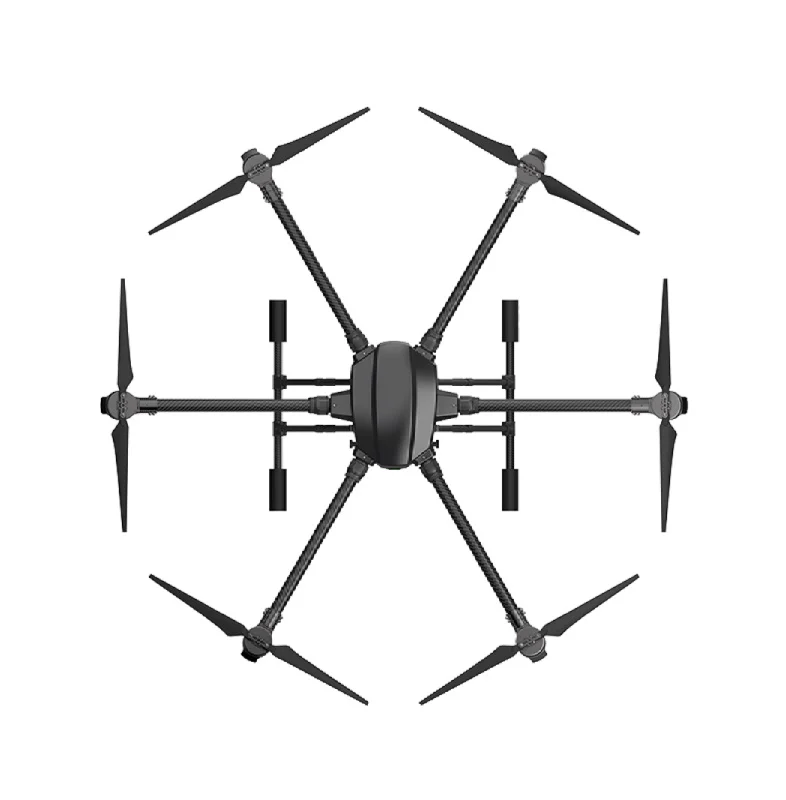
EFT 6120 Multifunction Surveillance Drone Frame
A professional-grade hexacopter frame designed for surveillance and mapping payloads. The EFT 6120’s rigid construction and vibration damping make it suitable for photogrammetry camera mounts.

3DR 100mW Radio Telemetry 915MHz for APM/PX4/Pixhawk
Essential for real-time telemetry and mission monitoring during mapping flights. Connect Mission Planner on your laptop to your ArduPilot drone for live status updates and mission execution.
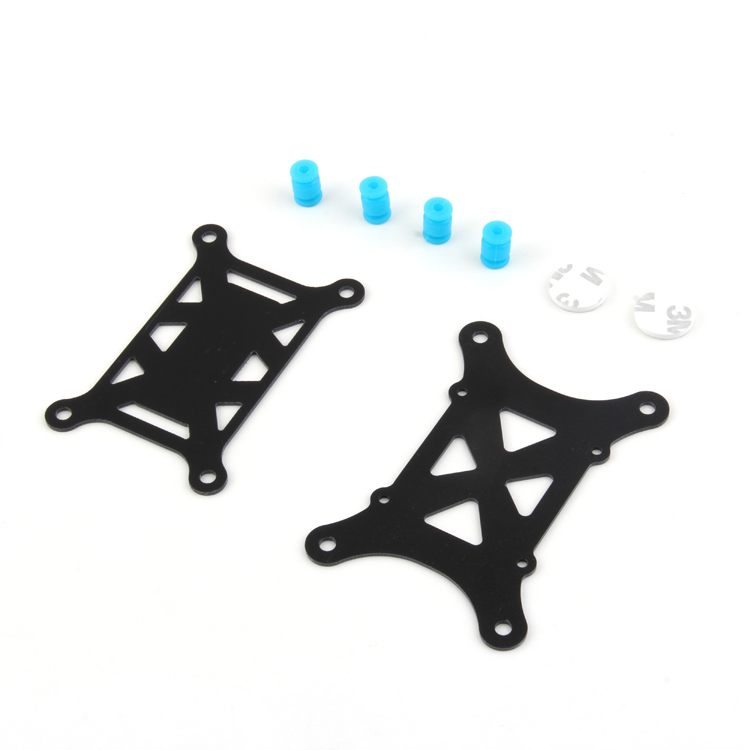
Anti-Vibration Shock Absorber for APM/KK/MWC/PixHawk
Vibration is the enemy of sharp photogrammetry images. This shock absorber isolates your flight controller from motor vibrations, improving GPS accuracy and reducing motion blur in captured images.
10. Frequently Asked Questions
What drone is best for photogrammetry in India?
For beginners and small projects, a DJI Mavic 3 or Phantom 4 Pro works well. For professional surveys requiring high accuracy, look at the DJI Matrice series with RTK or custom-built ArduPilot hexacopters with gimbal-stabilized cameras. Custom builds using frames like the EFT 6120 offer flexibility to swap sensors for different applications.
What is GSD and how low should I fly?
Ground Sampling Distance (GSD) is the real-world size of each pixel in your orthomosaic. Lower GSD means higher resolution. At 80m altitude with a standard 24MP camera, GSD is approximately 2–3cm per pixel. For most mapping applications, 3–5cm GSD is sufficient. Lower altitudes give better resolution but require more flight time and more overlap images.
Can I use WebODM for LiDAR point clouds?
WebODM itself is a photogrammetry tool (image-based). It does not process raw LiDAR data. For LiDAR point cloud processing, you need dedicated tools like CloudCompare (free, open-source), LAStools, or ROS-based processing pipelines. WebODM can display and analyse LiDAR-generated point clouds in the LAS/LAZ format, however.
Is drone photogrammetry data admissible for land dispute cases in India?
Drone-derived survey data is increasingly accepted in Indian courts and revenue tribunals, especially when conducted by a licensed surveyor with proper DGCA permissions, GCP-corrected accuracy, and chain-of-custody documentation. However, for official land records (mutations, pattadars), drone surveys must typically be submitted alongside or validated by state survey department personnel.
How much does a commercial drone mapping project cost in India?
Typical rates for drone survey services in India range from ₹500–2,000 per acre for agricultural surveys, ₹2,000–8,000 per acre for construction site volumetrics, and ₹10,000–50,000 per day for specialized engineering surveys. With your own drone and WebODM, the marginal cost per project approaches zero after the initial hardware investment.
11. Conclusion
Drone photogrammetry is one of the most exciting and commercially viable applications of drone technology in India. The combination of a quality mapping drone, proper flight planning, and either DroneDeploy or WebODM gives you the capability to produce professional-grade spatial data at a fraction of traditional survey costs.
Choose DroneDeploy if you need a polished, easy-to-use platform for client-facing work, your team includes non-technical operators, and the subscription cost is justified by your project volume.
Choose WebODM if you process a high volume of projects, need to keep data on Indian servers, have a technical team, or want the flexibility to run specialized processing pipelines. The upfront investment in hardware pays for itself quickly.
Build Your Mapping Drone with Zbotic
Get professional drone frames, flight controllers, telemetry modules, and components for your custom mapping platform. Trusted by drone professionals across India.







Add comment