
Water quality monitoring is one of the most impactful DIY electronics projects you can build. Whether you want to test your aquarium, monitor a borewell, check irrigation water quality, or even build a mini environmental sensor station, a DIY water quality monitor using pH and turbidity sensors is a practical and rewarding project. In this comprehensive guide, we walk you through every step — from understanding the sensors to writing the Arduino code and assembling the final circuit.
What Is Water Quality Monitoring?
Water quality monitoring involves measuring physical, chemical, and biological parameters of water to determine its suitability for a specific use — drinking, irrigation, aquaculture, or industrial processes. In India, where groundwater quality varies widely by region and contamination from agricultural runoff is common, a low-cost DIY sensor node can provide valuable real-time data.
The two most fundamental parameters for basic water quality assessment are:
- pH — indicates acidity or alkalinity of water (scale of 0–14)
- Turbidity — measures how clear or cloudy the water is (related to suspended particles)
Together, these two parameters give a quick picture of whether water has been contaminated, is safe for plants or fish, or needs treatment before use.
Sensors You Need
For this project, you will need the following sensor modules:
- Analog pH Sensor Module (typically the PH-4502C or similar) — outputs an analog voltage proportional to pH
- Turbidity Sensor Module — uses an LED and photodiode to detect light scattering by particles
- Arduino Uno or Nano — the microcontroller that reads both sensors and displays data
- 16×2 LCD or OLED display — to display readings locally
- DS18B20 Temperature Sensor — for temperature compensation on pH readings (recommended)
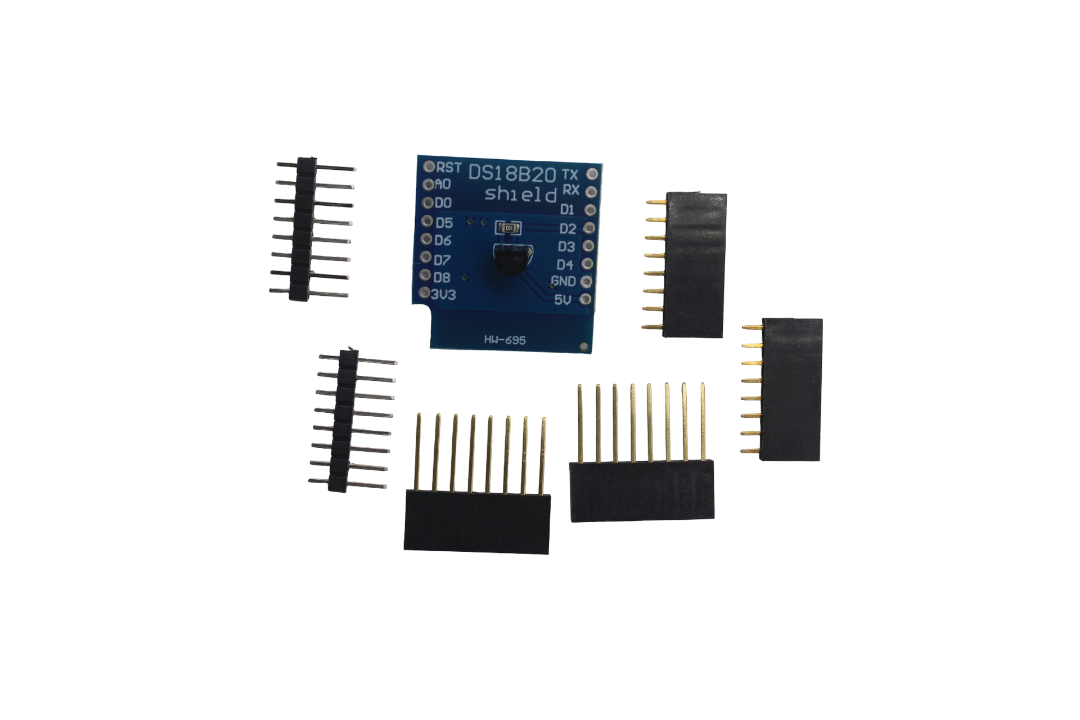
DS18B20 Temperature Sensor Module
Essential for accurate pH readings — temperature compensation corrects pH drift caused by water temperature changes.
How a pH Sensor Works
A pH sensor (also called a pH electrode or pH probe) works on the principle of electrochemical potential. The sensing element is a glass membrane that generates a voltage difference based on the hydrogen ion concentration (H⁺) in the solution. This voltage is amplified by a signal conditioning circuit (the BNC-connected module like PH-4502C) and output as an analog voltage, typically in the range of 0–3V or 0–5V.
For most Arduino-compatible pH modules:
- pH 7 (neutral) = approximately 2.5V output
- pH 4 (acidic) = approximately 3.0V
- pH 10 (alkaline) = approximately 2.0V
The exact voltage-to-pH relationship depends on the specific probe and must be calibrated using standard buffer solutions (pH 4.01, 6.86, and 9.18 are common standards). Temperature also affects the reading — which is why we add a DS18B20 sensor for temperature compensation in this project.
How a Turbidity Sensor Works
A turbidity sensor measures the optical density of a fluid by shining an infrared LED through the water and measuring how much light reaches a photodiode on the other side (or at 90°). When the water contains suspended particles (silt, algae, bacteria), more light is scattered and less reaches the detector — resulting in a higher turbidity reading (measured in NTU — Nephelometric Turbidity Units).
Most Arduino turbidity sensor modules output both a digital signal (above/below a threshold) and an analog signal (0–4.5V). For this project, we use the analog output to get actual turbidity values in NTU, which we convert using the manufacturer’s calibration curve.
Key turbidity thresholds to know:
- <1 NTU — drinking water standard
- 1–10 NTU — generally acceptable for agriculture
- >10 NTU — not suitable for most uses without treatment
- >100 NTU — highly turbid, visibly cloudy water
Full Components List
| Component | Quantity | Notes |
|---|---|---|
| Arduino Uno / Nano | 1 | Any 5V Arduino works |
| Analog pH Sensor Module (PH-4502C) | 1 | Includes BNC probe |
| Turbidity Sensor Module | 1 | Analog + digital output |
| DS18B20 Waterproof Temperature Sensor | 1 | Waterproof probe type |
| 16×2 LCD with I2C module | 1 | Easier wiring with I2C |
| 4.7kΩ Resistor | 1 | DS18B20 pull-up |
| Breadboard + Jumper Wires | 1 set | For prototyping |
| 5V Power Supply | 1 | Or power via USB |
| pH Buffer Solutions (4.01, 6.86, 9.18) | 1 set | For calibration only |
Circuit Diagram & Wiring
Here is how to wire everything together:
pH Sensor Module Connections
- VCC → Arduino 5V
- GND → Arduino GND
- PO (Analog Out) → Arduino A0
- Connect BNC probe to the BNC connector on the module
Turbidity Sensor Connections
- VCC → Arduino 5V
- GND → Arduino GND
- AO (Analog Out) → Arduino A1
- DO (Digital Out) → Arduino D2 (optional)
DS18B20 Temperature Sensor
- Red (VCC) → Arduino 5V
- Black (GND) → Arduino GND
- Yellow/White (Data) → Arduino D4 (with 4.7kΩ pull-up to 5V)
I2C LCD
- VCC → Arduino 5V
- GND → Arduino GND
- SDA → Arduino A4
- SCL → Arduino A5
Arduino Code
Install the following libraries in Arduino IDE before uploading:
OneWireby Jim StudtDallasTemperatureby Miles BurtonLiquidCrystal_I2Cby Frank de Brabander
#include <OneWire.h>
#include <DallasTemperature.h>
#include <LiquidCrystal_I2C.h>

#define PH_PIN     A0
#define TURB_PIN   A1
#define TEMP_PIN   4

OneWire oneWire(TEMP_PIN);
DallasTemperature tempSensor(&oneWire);
LiquidCrystal_I2C lcd(0x27, 16, 2);

// Calibration constants (adjust after calibration)
float ph_offset = 0.0;   // offset voltage correction
float ph_slope  = -5.70; // voltage per pH unit
float ph_neutral_v = 2.50; // voltage at pH 7

void setup() {
  Serial.begin(9600);
  lcd.init();
  lcd.backlight();
  tempSensor.begin();
  lcd.print("Water Monitor");
  delay(2000);
  lcd.clear();
}

float readPH(float temperature) {
  int raw = 0;
  for (int i = 0; i < 10; i++) {
    raw += analogRead(PH_PIN);
    delay(10);
  }
  float voltage = (raw / 10.0) * (5.0 / 1023.0);
  // Temperature compensation: Nernst equation correction
  float tempComp = 1.0 + 0.0198 * (temperature - 25.0);
  float ph = 7.0 + (ph_neutral_v - voltage) / (ph_slope / tempComp * (-1));
  return ph + ph_offset;
}

float readTurbidity() {
  int raw = 0;
  for (int i = 0; i < 10; i++) {
    raw += analogRead(TURB_PIN);
    delay(5);
  }
  float voltage = (raw / 10.0) * (5.0 / 1023.0);
  // Convert voltage to NTU (approximate formula for common modules)
  float ntu;
  if (voltage < 2.5) {
    ntu = 3000.0;
  } else {
    ntu = -1120.4 * voltage * voltage + 5742.3 * voltage - 4352.9;
  }
  return max(0.0, ntu);
}

void loop() {
  tempSensor.requestTemperatures();
  float temperature = tempSensor.getTempCByIndex(0);
  float ph = readPH(temperature);
  float ntu = readTurbidity();

  Serial.print("Temp: "); Serial.print(temperature); Serial.println(" C");
  Serial.print("pH: ");   Serial.println(ph);
  Serial.print("NTU: ");  Serial.println(ntu);

  // Display on LCD
  lcd.setCursor(0, 0);
  lcd.print("pH:");
  lcd.print(ph, 2);
  lcd.print(" T:");
  lcd.print(temperature, 1);

  lcd.setCursor(0, 1);
  lcd.print("Turb:");
  lcd.print(ntu, 0);
  lcd.print(" NTU");

  delay(2000);
}
Calibration Tips
Calibration is the most important step for accurate pH readings. Here is the proper procedure:
- Prepare buffer solutions: Get pH 4.01, 6.86, and 9.18 standard buffer sachets.
- Rinse the probe with distilled water between readings.
- Dip the probe in pH 6.86 buffer — note the ADC voltage output on Serial Monitor.
- Set
ph_neutral_vto this voltage value in the code. - Dip in pH 4.01 buffer, note voltage. Calculate slope:
slope = (6.86 - 4.01) / (V_686 - V_401). - Update
ph_slopewith the calculated slope (negative value, since pH decreases as voltage increases). - Verify with pH 9.18 buffer — result should be within ±0.1 pH.
Turbidity calibration is simpler — use clear tap water as your 0 NTU reference and adjust the formula constant if needed. For precise NTU values, use a calibration kit with known turbidity standards.
Important tips:
- Always store the pH probe in KCl storage solution (never dry or in distilled water)
- Allow the probe to soak for 30 minutes before first use
- Recalibrate every 2–4 weeks for best accuracy
DS18B20 Waterproof Temperature Sensor
Waterproof 1-Wire sensor perfect for water quality projects — submerge it directly in water for accurate temperature compensation.

BMP280 Barometric Pressure & Altitude Sensor
Add atmospheric pressure sensing to correlate outdoor environmental conditions with your water quality data.
Expanding Your Monitor
Once your basic pH and turbidity monitor is working, you can expand it with additional sensors to build a complete water quality station:
Dissolved Oxygen (DO) Sensor
Critical for aquaculture and fish farming. DO sensors work on electrochemical or optical principles and can be connected to an Arduino via analog output.
TDS / Conductivity Sensor
TDS (Total Dissolved Solids) sensors measure the conductivity of water, which is related to the concentration of dissolved salts and minerals. Great for monitoring drinking water and RO systems.
Nitrate / Nitrite Sensor
Important for agricultural runoff monitoring. Nitrate sensors are more advanced and often use colorimetry or ion-selective electrodes.
IoT Integration (ESP8266/ESP32)
Replace the Arduino with an ESP32 or ESP8266 to add Wi-Fi connectivity. Log your sensor data to:
- ThingSpeak — free IoT analytics platform
- Blynk — smartphone dashboard
- Google Sheets via Zapier or direct HTTP requests
- InfluxDB + Grafana — for a professional monitoring dashboard
Real-World Applications in India
The DIY water quality monitor has several practical applications in the Indian context:
- Borewell/Groundwater Monitoring: In areas with fluoride or iron contamination, track water quality changes over seasons.
- Aquaponics and Fish Farming: Maintain optimal pH (6.5–7.5) and turbidity for fish health.
- Agricultural Irrigation: Test irrigation water pH to optimize fertilizer uptake. Most crops prefer pH 6.0–7.0.
- School/College Projects: Excellent final year or science fair project demonstrating IoT and environmental monitoring.
- Smart Home Water Quality: Monitor tank or overhead water quality before consumption.
Frequently Asked Questions
With proper calibration, a typical analog pH module (PH-4502C) can achieve ±0.1 pH accuracy, which is sufficient for most DIY and educational applications. Industrial pH meters offer ±0.01 accuracy but cost significantly more.
This project can give indicative readings about water quality, but it should NOT be used as the sole basis for determining drinking water safety. For drinking water, get a proper certified test from a government-approved laboratory (e.g., PHC, NABL-accredited labs).
A quality glass pH electrode typically lasts 1–2 years with proper maintenance. Store it in KCl solution, not dry. The cheap plastic-body probes bundled with low-cost modules may last 6–12 months depending on usage.
NTU (Nephelometric Turbidity Units) and FTU (Formazin Turbidity Units) are essentially equivalent and often used interchangeably. NTU is measured at 90° scatter angle. FNU (Formazin Nephelometric Units) is similar but measured per ISO standards. For DIY purposes, they are interchangeable.
Yes, but Raspberry Pi lacks built-in ADC pins. You’ll need an ADS1115 or MCP3008 ADC module to read analog sensor outputs. The Raspberry Pi version is beneficial if you want to run a full web server for data logging and visualization.
Conclusion
Building a DIY water quality monitor using pH and turbidity sensors is a fantastic entry point into environmental electronics. The project combines analog sensing, signal conditioning, temperature compensation, and display — giving you hands-on experience with real-world sensor systems. Starting with just two sensors, you can progressively expand the system into a full IoT water quality station that logs data to the cloud.
For Indian makers, this project is particularly relevant — water quality issues affect agriculture, aquaculture, and daily life across the country. A low-cost sensor node built for under ₹1,500 can provide valuable real-time data that would otherwise require expensive lab testing.
Ready to start building? Grab the sensors and components from Zbotic and start monitoring your water quality today!
Get All Your Sensors at Zbotic
Find pH sensors, turbidity modules, temperature sensors, and all Arduino components at India’s favourite electronics store.





Add comment