
The BME688 is arguably the most versatile environmental sensor ever created for the maker and IoT community. In a single tiny package, it combines barometric pressure, humidity, temperature, and — uniquely — a metal oxide gas sensor with an onboard AI processing engine called BSEC (Bosch Software Environmental Cluster). Whether you are building an indoor air quality monitor, a smart HVAC controller, or an olfactory-sensing robot, the BME688 opens doors that previously required four separate sensors and complex data fusion algorithms.
What is the BME688?
Launched by Bosch Sensortec in 2021, the BME688 is a 4-in-1 environmental sensor integrating:
- Metal Oxide (MOX) Gas Sensor — detects a wide range of VOCs (Volatile Organic Compounds), CO, H2, and other gases through resistance change on a heated metal oxide surface
- Humidity Sensor — capacitive-type, 0–100% RH range
- Barometric Pressure Sensor — 300–1100 hPa, same technology as the BMP388
- Temperature Sensor — -40°C to +85°C, used for compensation of other measurements
What sets the BME688 apart from every other environmental sensor is its onboard heater control system and the BSEC software library, which applies machine learning algorithms to the raw gas resistance data to produce meaningful outputs like Indoor Air Quality (IAQ) index, CO2 equivalent, and VOC equivalent — all without an external processor doing heavy computation.
The BME688 is also unique in that Bosch provides BME AI Studio, a desktop tool that lets you train custom gas classification models on your BME688 hardware and deploy them directly to your application — essentially giving you a custom electronic nose.
Technical Specifications
| Parameter | Value |
|---|---|
| Pressure Range | 300 – 1100 hPa |
| Pressure Accuracy | ±0.6 hPa absolute, ±0.12 hPa relative |
| Humidity Range | 0 – 100% RH |
| Humidity Accuracy | ±3% RH (20–80% RH range) |
| Temperature Range | -40°C to +85°C |
| Temperature Accuracy | ±1°C (0–65°C) |
| Gas Sensor | MOX, heater temp 200–400°C, multiple scan profiles |
| IAQ Range (BSEC) | 0–500 (higher = worse air quality) |
| Supply Voltage | 1.71 V – 3.6 V |
| Current (gas enabled) | ~2.1 mA peak during heater pulse |
| Interface | I2C (up to 3.4 MHz), SPI (up to 10 MHz) |
| Package Size | 3.0 × 3.0 × 0.93 mm (LGA-14) |
Gas Sensing: How the MOX Sensor Works
The gas sensing element in the BME688 is a Metal Oxide (MOX) sensor — a thin layer of metal oxide (tin dioxide, SnO₂) deposited on a micro-hotplate. Here is how it works:
- Baseline state: In clean air, oxygen molecules adsorb onto the SnO₂ surface, creating a high baseline resistance.
- Reducing gas detection: When reducing gases (VOCs, alcohols, CO, H₂) are present, they react with the adsorbed oxygen on the surface, releasing electrons and reducing the sensor’s electrical resistance.
- Oxidizing gas detection: Oxidizing gases (NO₂, ozone) increase surface resistance by extracting electrons.
- Heater control: The BME688 cycles through up to 10 programmable heater profiles (temperature 200–400°C, duration per step). Different gases respond optimally at different temperatures, allowing multi-point scanning to distinguish between gas types.
The raw output is gas resistance in Ohms — higher resistance generally means cleaner air. The BSEC library converts this resistance (combined with temperature and humidity data for compensation) into the IAQ index and other derived outputs.
Important note: MOX sensors require a burn-in period of 48 hours in clean air at first use, and a daily stabilization period of 5 minutes. BSEC handles this automatically and reports its status via an accuracy flag (0=unreliable, 1=low, 2=medium, 3=high).
BSEC AI Library: Indoor Air Quality Index
BSEC (Bosch Software Environmental Cluster) is a closed-source but freely available pre-compiled library that runs on your microcontroller. It takes raw BME688 sensor data and outputs:
- IAQ (Indoor Air Quality): 0–500 scale. 0–50 = Excellent, 51–100 = Good, 101–150 = Lightly polluted, 151–200 = Moderately polluted, 201–250 = Heavily polluted, 251–350 = Severely polluted, 351–500 = Extremely polluted
- Static IAQ: IAQ for stationary applications (vs. worn/mobile devices)
- CO₂ equivalent: Estimated CO₂ concentration in ppm (derived from gas data, not a direct CO₂ measurement)
- VOC equivalent: Estimated breath VOC concentration in ppm
- Compensated temperature and humidity: With self-heating correction applied
BSEC also implements automatic background calibration — it continuously learns the clean-air baseline in your specific environment and adapts over time. This makes it far more reliable than static threshold-based gas detection used in simpler sensors like the MQ series.

MQ 135 Air Quality/Gas Detector Sensor Module For Arduino
Looking for a simpler gas detection solution? The MQ-135 detects ammonia, benzene, smoke, and CO₂ — a budget-friendly option for basic air quality projects.
BME688 vs BME280: Should You Upgrade?
Both sensors share the same pressure, temperature, and humidity measurement technology. The key differences:
| Feature | BME280 | BME688 |
|---|---|---|
| Gas Sensing | No | Yes (MOX) |
| IAQ Output | No | Yes (via BSEC) |
| AI / Custom Models | No | Yes (BME AI Studio) |
| Current Consumption | ~0.9 µA (sleep) | ~2.1 mA (heater active) |
| Price | Lower | Higher (~2-3x) |
| Pressure Accuracy | ±1.0 hPa | ±0.6 hPa |
Use BME280 when you only need temperature, humidity, and pressure and power consumption is critical. Use BME688 when air quality, VOC detection, or custom gas classification adds value to your application.
Wiring BME688 with Arduino
Most BME688 breakout boards (Adafruit, SparkFun, or generic) work at 3.3V logic with onboard regulation. I2C wiring:
| BME688 Pin | Arduino Uno/Nano |
|---|---|
| VCC | 3.3V |
| GND | GND |
| SDA | A4 |
| SCL | A5 |
| SDO/ADDR | GND (address 0x76) or 3.3V (0x77) |
Arduino Code with BSEC Library
Install the BSEC Software Library by Bosch Sensortec from the Arduino Library Manager. Also install Adafruit BME680 Library (the hardware layer is compatible) or use Bosch’s own BME68x-Sensor-API.
#include "bsec.h"

Bsec iaqSensor;

void checkIaqSensorStatus() {
  if (iaqSensor.status != BSEC_OK) {
    Serial.println("BSEC error: " + String(iaqSensor.status));
    while (1);
  }
  if (iaqSensor.bme68xStatus != BME68X_OK) {
    Serial.println("BME688 error: " + String(iaqSensor.bme68xStatus));
    while (1);
  }
}

void setup() {
  Serial.begin(115200);
  Wire.begin();

  iaqSensor.begin(BME68X_I2C_ADDR_LOW, Wire); // 0x76
  checkIaqSensorStatus();

  bsec_virtual_sensor_t sensorList[] = {
    BSEC_OUTPUT_IAQ,
    BSEC_OUTPUT_STATIC_IAQ,
    BSEC_OUTPUT_CO2_EQUIVALENT,
    BSEC_OUTPUT_BREATH_VOC_EQUIVALENT,
    BSEC_OUTPUT_RAW_TEMPERATURE,
    BSEC_OUTPUT_RAW_PRESSURE,
    BSEC_OUTPUT_RAW_HUMIDITY,
    BSEC_OUTPUT_RAW_GAS,
    BSEC_OUTPUT_SENSOR_HEAT_COMPENSATED_TEMPERATURE,
    BSEC_OUTPUT_SENSOR_HEAT_COMPENSATED_HUMIDITY,
  };

  iaqSensor.updateSubscription(
    sensorList, sizeof(sensorList) / sizeof(sensorList[0]),
    BSEC_SAMPLE_RATE_LP
  );
  checkIaqSensorStatus();
  Serial.println("BME688 + BSEC Ready!");
}

void loop() {
  if (iaqSensor.run()) {
    Serial.println("=== BME688 Readings ===");
    Serial.print("IAQ: "); Serial.print(iaqSensor.iaq);
    Serial.print(" (accuracy: "); Serial.print(iaqSensor.iaqAccuracy); Serial.println(")");
    Serial.print("Static IAQ: "); Serial.println(iaqSensor.staticIaq);
    Serial.print("CO2 equiv: "); Serial.print(iaqSensor.co2Equivalent); Serial.println(" ppm");
    Serial.print("VOC equiv: "); Serial.print(iaqSensor.breathVocEquivalent); Serial.println(" ppm");
    Serial.print("Temperature: "); Serial.print(iaqSensor.temperature); Serial.println(" °C");
    Serial.print("Humidity: "); Serial.print(iaqSensor.humidity); Serial.println(" %RH");
    Serial.print("Pressure: "); Serial.print(iaqSensor.pressure / 100.0); Serial.println(" hPa");
    Serial.print("Gas resistance: "); Serial.print(iaqSensor.gasResistance); Serial.println(" Ohms");
  } else {
    checkIaqSensorStatus();
  }
}
Important: BSEC_SAMPLE_RATE_LP means 3-second intervals. The BSEC library has a strict timing requirement — do not delay() or block in the loop. Use a proper millis()-based timing approach in production code.
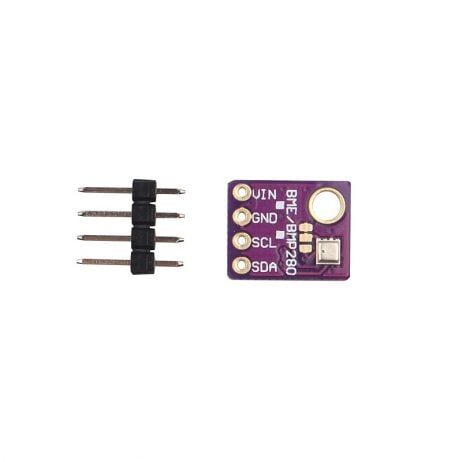
GY-BME280-5V Temperature and Humidity Sensor
Need pressure, humidity, and temperature without gas sensing? The BME280 5V module is the cost-effective alternative with the same excellent environmental sensing fundamentals.
Using BME688 with Raspberry Pi
The BME688 works seamlessly with Raspberry Pi via Python. Install the required packages:
pip3 install bme680 smbus2
# For full BSEC support:
pip3 install bsec2-python  # community wrapper
A basic Python script using the bme680 library (which works with BME688 for basic measurements):
import bme680
import time

sensor = bme680.BME680(bme680.I2C_ADDR_PRIMARY)  # 0x76
sensor.set_humidity_oversample(bme680.OS_2X)
sensor.set_pressure_oversample(bme680.OS_4X)
sensor.set_temperature_oversample(bme680.OS_8X)
sensor.set_filter(bme680.FILTER_SIZE_3)
sensor.set_gas_status(bme680.ENABLE_GAS_MEAS)
sensor.set_gas_heater_temperature(320)  # 320°C
sensor.set_gas_heater_duration(150)     # 150ms stabilization
sensor.select_gas_heater_profile(0)

while True:
    if sensor.get_sensor_data() and sensor.data.heat_stable:
        print(f"Temp: {sensor.data.temperature:.1f}°C")
        print(f"Humidity: {sensor.data.humidity:.1f}%")
        print(f"Pressure: {sensor.data.pressure:.1f} hPa")
        print(f"Gas resistance: {sensor.data.gas_resistance} Ohms")
    time.sleep(3)
BME AI Studio: Training a Custom Gas Classifier
One of the most exciting features of the BME688 ecosystem is Bosch BME AI Studio — a free Windows/Mac application that lets you train custom gas detection models:
- Data collection: Expose the BME688 to different target gases/smells and record labelled data using the BME AI Studio interface.
- Model training: The software uses neural network algorithms to learn gas signatures from your multi-point heater scan data.
- Export: Deploy the trained model as a BSEC configuration blob to your Arduino or ESP32.
- Inference: At runtime, BSEC classifies gas signatures in real time with confidence scores.
Example applications: detecting spoiled food in a smart fridge, identifying different types of cooking smoke, detecting specific solvent leaks in industrial settings, or building a pet odor detection system. The BME688 is the only sensor in its price class that enables this level of customization.
Real-World Project Ideas
Smart Indoor Air Quality Monitor
Combine BME688 with an ESP32, a small OLED or TFT display, and MQTT/Node-RED for a wall-mounted air quality dashboard. Display IAQ, CO₂ equivalent, temperature, and humidity. Trigger alerts via a buzzer or smart home notification when IAQ exceeds 150.
School Science Kit — Detect Cooking Gases
Use BME688 with an Arduino Nano 33 IoT to detect when a gas stove is on, when windows need to be opened, or when the room air quality deteriorates after cleaning with chemicals. Perfect for science fair projects exploring environmental chemistry.
Wearable Environmental Badge
Pair BME688 with a Nordic nRF52840 (BLE-enabled) on a small PCB. Log IAQ data to a smartphone app. Track how your commute environment, office, gym, and home compare in terms of air quality over time.
Greenhouse Monitoring System
Deploy multiple BME688 nodes across a greenhouse connected to a central Raspberry Pi via I2C or RS485. Monitor temperature gradients, humidity, and gas levels (CO₂, ethylene from ripening fruits) for optimal plant growth conditions.
Troubleshooting
- IAQ accuracy stuck at 0: Normal. The sensor needs ~20–30 minutes of continuous operation with BSEC running to reach accuracy level 1, and ~24–48 hours for full accuracy level 3 calibration.
- Gas resistance always the same: Ensure the heater is enabled in your configuration. In basic libraries, call
set_gas_status(ENABLE_GAS_MEAS)and set heater temperature and duration. - BSEC library compile error: The BSEC library is platform-specific. Download the version for your specific MCU from the Bosch GitHub repository. Different binaries exist for AVR, ESP32, ESP8266, STM32, etc.
- Temperature reads 5–10°C too high: Self-heating from the gas sensor heater element causes this. Use the BSEC heat-compensated temperature output rather than raw temperature.
- I2C device not found: Check that SDO/ADDR pin is correctly set (GND for 0x76, VCC for 0x77). Run I2C scanner. Confirm VCC is 3.3V stable.
Frequently Asked Questions
A: No. The CO₂ equivalent output from BSEC is an estimate derived from VOC gas resistance data correlated to typical human breath/activity patterns. For accurate direct CO₂ measurement, use a dedicated NDIR sensor like the SCD40 or MH-Z19.
A: Bosch rates the BME688 gas sensor for over 10 years of continuous operation. The MOX element degrades slowly over time, but BSEC’s background calibration compensates for most drift automatically.
A: Yes, two sensors per I2C bus (addresses 0x76 and 0x77). For more sensors, use a TCA9548A I2C multiplexer, SPI mode, or multiple I2C buses on your microcontroller.
A: The sensor itself can handle outdoor temperatures. However, MOX sensors are sensitive to humidity changes. Protect the sensor from direct moisture/rain with a Gore-Tex membrane vent cap, and ensure BSEC has time to recalibrate after large humidity swings.
A: The BME688 is the next generation of the BME680. Key improvements: 4 configurable heater scan profiles (vs 1 in BME680), multi-heater scanning for better gas discrimination, and official support for BME AI Studio for custom model training. The BME680 BSEC library does NOT work with BME688.
Build Your Environmental Monitoring Project Today
Browse Zbotic’s complete selection of environmental sensors, gas detectors, and temperature/humidity modules. Fast shipping across India for makers, students, and IoT developers.







Add comment