
Table of Contents
- What Is the APDS9960 Gesture Sensor?
- How Does Gesture Detection Work?
- Key Features and Specifications
- Wiring APDS9960 to Arduino
- Library Setup and Installation
- Arduino Code for Swipe Detection
- Troubleshooting Common Issues
- Creative Project Ideas
- Frequently Asked Questions
- Conclusion
Imagine controlling your Arduino project with just a wave of your hand — no buttons, no touchscreens, just pure gesture magic. The APDS9960 gesture sensor makes this a reality. Used in premium smartphones for years, this tiny sensor can detect hand swipes (up, down, left, right), measure ambient light, sense proximity, and even detect color — all over a simple I2C interface. In this guide, you will learn everything about APDS9960 swipe detection with Arduino: from hardware wiring to working code to real-world project ideas.
What Is the APDS9960 Gesture Sensor?
The APDS9960 is a digital proximity, ambient light, RGB color, and gesture sensor manufactured by Broadcom (formerly Avago Technologies). It was famously integrated into the Samsung Galaxy S5 to enable touchless gesture control. Today, breakout modules based on this chip are available at affordable prices, making them a favorite among hobbyists and embedded developers alike.
The sensor integrates four directional photodiodes and an IR LED into a single compact package. By analyzing the time-differential signals from these four photodiodes as your hand passes over the sensor, it can determine the direction of movement with high accuracy — even in varied ambient lighting conditions.
What makes the APDS9960 special is its versatility. It is not just a gesture sensor. In a single package, you get:
- Gesture recognition — detects swipes in four directions
- Proximity detection — senses objects from 0 to ~20 cm
- Ambient light sensing — measures lux level
- RGB color sensing — identifies red, green, blue channels
This combination makes it an incredibly useful sensor for interactive projects, UI control systems, smart home automation, and robotics.
How Does Gesture Detection Work?
The APDS9960 gesture engine works by emitting infrared light via its built-in IR LED and then measuring the reflected light using four directional photodiodes arranged around it — one each facing up, down, left, and right.
When a hand passes over the sensor, it sequentially reflects the IR beam to different photodiodes depending on the direction of movement. The sensor’s internal ASIC processes the differential intensities between these four photodiodes and stores up to 32 datasets of UDLR (Up, Down, Left, Right) values in a FIFO buffer.
The detection algorithm then processes this dataset to determine the gesture direction. For a left swipe, the Left photodiode sees peak intensity before the Right one. For an upward swipe, the Up photodiode fires before the Down one. The sensor outputs a simple gesture code over I2C, which your Arduino reads and acts upon.
The entire processing chain — IR emission, signal capture, FIFO buffering, and gesture classification — is handled on-chip. Your microcontroller only needs to read the result via I2C, keeping software overhead very low.
Key Features and Specifications
| Parameter | Value |
|---|---|
| Supply Voltage | 2.4V – 3.6V (I/O: 1.7V – 3.6V) |
| Interface | I2C (400 kHz fast mode) |
| I2C Address | 0x39 (fixed) |
| IR LED Drive Current | 12.5 mA – 100 mA (programmable) |
| Gesture Detection Range | Up to ~20 cm (hand) |
| Gesture FIFO Depth | 32 datasets |
| ALS / Color Resolution | 16-bit |
| Interrupt Output | Active low, open drain |
| Package | LCC 3.94 x 2.36 mm |
| Operating Temperature | -40°C to +85°C |
Important: The APDS9960 chip operates at 3.3V logic. Most breakout boards include an onboard voltage regulator and level shifter, allowing direct connection to a 5V Arduino. Always check your specific module’s datasheet before wiring.
Wiring APDS9960 to Arduino
Most APDS9960 breakout boards (SparkFun, Adafruit-compatible) expose the following pins: VCC, GND, SDA, SCL, and INT. Here is how to connect it to an Arduino Uno or Nano:
| APDS9960 Pin | Arduino Pin | Notes |
|---|---|---|
| VCC | 3.3V | Use 3.3V pin, not 5V |
| GND | GND | Common ground |
| SDA | A4 | I2C data line |
| SCL | A5 | I2C clock line |
| INT | D2 | Optional interrupt pin |
If you are using an Arduino Mega, SDA goes to pin 20 and SCL goes to pin 21. For Arduino Leonardo, SDA is on pin 2 and SCL is on pin 3.
Pro tip: If your breakout board does not have an onboard level shifter, use a bi-directional I2C level shifter between the Arduino’s 5V SDA/SCL lines and the sensor’s 3.3V I/O pins. Connecting 5V logic directly to the sensor can damage it.
Library Setup and Installation
The easiest library to use for the APDS9960 with Arduino is the SparkFun APDS9960 RGB and Gesture Sensor library. Here is how to install it:
- Open the Arduino IDE and go to Sketch → Include Library → Manage Libraries
- Search for “SparkFun APDS9960”
- Click Install on the SparkFun RGB and Gesture Sensor library by SparkFun Electronics
Alternatively, you can install it manually from GitHub: download the ZIP from github.com/sparkfun/SparkFun_APDS-9960_Sensor_Arduino_Library and use Sketch → Include Library → Add .ZIP Library.
The library provides a clean API with functions like apds.isGestureAvailable() and apds.readGesture() that abstract away all the low-level register manipulation.
Arduino Code for Swipe Detection
Below is a complete, working Arduino sketch for APDS9960 gesture (swipe) detection. It detects left, right, up, and down swipes and prints the result to the Serial Monitor:
#include <Wire.h>
#include <SparkFun_APDS9960.h>

#define APDS9960_INT 2  // Interrupt pin

SparkFun_APDS9960 apds = SparkFun_APDS9960();
int isr_flag = 0;

void interruptRoutine() {
  isr_flag = 1;
}

void setup() {
  Serial.begin(9600);
  Serial.println("APDS9960 Gesture Sensor Test");

  // Set interrupt pin as input
  pinMode(APDS9960_INT, INPUT);

  // Attach interrupt
  attachInterrupt(digitalPinToInterrupt(APDS9960_INT), interruptRoutine, FALLING);

  // Initialize APDS9960
  if (apds.init()) {
    Serial.println("APDS9960 initialized!");
  } else {
    Serial.println("ERROR: APDS9960 init failed!");
    while(1);
  }

  // Enable gesture mode
  if (apds.enableGestureSensor(true)) {
    Serial.println("Gesture sensor running.");
  } else {
    Serial.println("ERROR: Could not enable gesture sensor!");
  }
}

void loop() {
  if (isr_flag == 1) {
    detachInterrupt(digitalPinToInterrupt(APDS9960_INT));
    handleGesture();
    isr_flag = 0;
    attachInterrupt(digitalPinToInterrupt(APDS9960_INT), interruptRoutine, FALLING);
  }
}

void handleGesture() {
  if (apds.isGestureAvailable()) {
    switch (apds.readGesture()) {
      case DIR_UP:
        Serial.println("Gesture: UP");
        break;
      case DIR_DOWN:
        Serial.println("Gesture: DOWN");
        break;
      case DIR_LEFT:
        Serial.println("Gesture: LEFT (Swipe Left)");
        break;
      case DIR_RIGHT:
        Serial.println("Gesture: RIGHT (Swipe Right)");
        break;
      case DIR_NEAR:
        Serial.println("Gesture: NEAR (object approaching)");
        break;
      case DIR_FAR:
        Serial.println("Gesture: FAR (object moving away)");
        break;
      default:
        Serial.println("Gesture: NONE");
    }
  }
}
Upload this sketch, open the Serial Monitor at 9600 baud, and wave your hand over the sensor. You should see the gesture name printed with each swipe. Make sure to perform slow, deliberate swipes about 5–15 cm above the sensor for best results.
Using Gestures to Control Something
Once you can read gestures, you can use them to control actuators. For example, you can use a left/right swipe to increment or decrement a brightness value for an LED:
int brightness = 128;
const int LED_PIN = 9;

// Inside handleGesture():
case DIR_RIGHT:
  brightness = min(255, brightness + 25);
  analogWrite(LED_PIN, brightness);
  break;
case DIR_LEFT:
  brightness = max(0, brightness - 25);
  analogWrite(LED_PIN, brightness);
  break;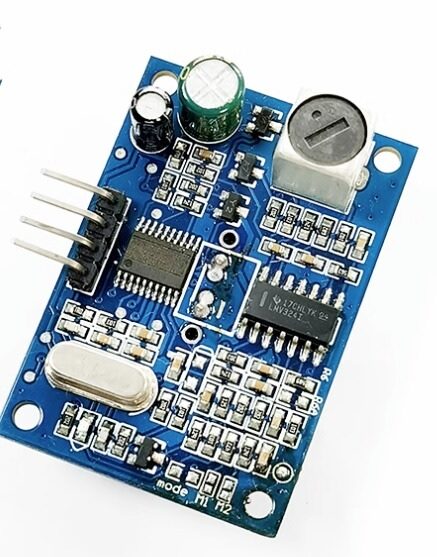
JSN-SR04T Waterproof Ultrasonic Rangefinder Module
Pair gesture control with proximity sensing — the JSN-SR04T adds waterproof distance measurement for outdoor touchless control projects.
Troubleshooting Common Issues
Sensor Not Detected on I2C
Run an I2C scanner sketch (available in Arduino IDE examples) to verify the sensor appears at address 0x39. If it does not show up, check your wiring, confirm that VCC is 3.3V (not 5V), and ensure SDA/SCL are connected to the correct Arduino pins.
No Gestures Detected
This is usually caused by one of three things: the hand is too close (less than 5 cm), the hand is too far (more than 20 cm), or the swipe is too fast. Try slow, deliberate movements at a distance of 8–12 cm. Also ensure the INT pin is connected — without the interrupt, the polling approach will miss gestures.
Incorrect Gesture Direction
The sensor’s orientation matters. If your module is rotated 90 degrees, left/right and up/down will be swapped. Check the silkscreen markings on your breakout board to determine which photodiode is facing which direction.
Library Compilation Errors
Ensure you are using the SparkFun library version compatible with your Arduino IDE version. In IDE 2.x, sometimes the Wire library must be explicitly included before the sensor library in your sketch.
Interference from Ambient Light
Direct sunlight or strong incandescent bulbs can saturate the sensor’s photodiodes and prevent gesture detection. The APDS9960 has some built-in ALS masking, but extreme light sources can still interfere. Shield the sensor from direct bright light for reliable operation.
Creative Project Ideas
1. Touchless Music Player Controller
Connect an APDS9960 to an Arduino with a Bluetooth module. Use swipe left/right to skip tracks on your phone, swipe up/down to control volume. Perfect for a hygiene-conscious smart speaker controller.
2. Gesture-Controlled Smart Lamp
Combine the sensor with a relay module and dimmable LED driver. Swipe right to increase brightness, left to decrease, up for full brightness, down to turn off. Mount the sensor flush in a wall plate for a futuristic interface.
3. Contactless Page Turner for Musicians
Mount an APDS9960 on a music stand with a Bluetooth HID keyboard emulator (ESP32 or Pro Micro). A right swipe sends a Page Down keypress to a tablet running sheet music software — no page-turning interruptions mid-performance.
4. Gesture-Controlled Robot Navigation
Use swipes to command a wheeled robot: left/right for turns, up/down for forward/reverse. The robot can also switch to autonomous mode using the proximity feature when an obstacle is detected within range.
5. Smart Retail Kiosk
Build a touchless information kiosk for retail or exhibitions. Visitors swipe to browse product images on a connected display without touching the screen — perfect for post-pandemic hygiene-conscious environments.

LM35 Temperature Sensor
Add temperature monitoring to your gesture-controlled smart home projects for complete environmental awareness.
Frequently Asked Questions
Can the APDS9960 detect complex gestures like circles?
No. The APDS9960 only detects four linear swipe directions (up, down, left, right) plus near/far. It does not support circular or complex multi-point gesture recognition. For complex gestures, you would need a camera-based solution like OpenCV or a dedicated gesture recognition chip.
Does the APDS9960 work through glass?
Yes, it works through thin clear glass (under 2 mm), making it suitable for embedding under a glass panel for hidden gesture interfaces. Tinted or UV-blocking glass may reduce sensitivity.
What is the maximum detection range?
Practical gesture detection range with a human hand is approximately 15–20 cm. The LED drive current can be increased via software to potentially extend this range, but reliability degrades beyond 20 cm.
Can I use multiple APDS9960 sensors on one Arduino?
Not easily — the I2C address is fixed at 0x39 and cannot be changed. You can use an I2C multiplexer (like the TCA9548A) to connect multiple sensors to a single Arduino.
Is the APDS9960 compatible with Raspberry Pi?
Yes. Raspberry Pi has native I2C support and 3.3V GPIO, making it an ideal host for the APDS9960. Python libraries like adafruit-circuitpython-apds9960 are available for easy integration.
Does it work with ESP32 or ESP8266?
Yes, and this is a popular combination. The ESP32’s native I2C support and 3.3V logic make it perfectly compatible with APDS9960. You can build Wi-Fi or Bluetooth-connected gesture interfaces with the ESP32 and the APDS9960 together.
Conclusion
The APDS9960 gesture sensor is one of the most rewarding modules to work with in the Arduino ecosystem. In a single $3–5 module, you get a complete touchless human-machine interface capable of swipe detection, proximity sensing, and color measurement. The I2C interface keeps wiring minimal, the SparkFun library makes coding straightforward, and the applications are limited only by your imagination.
Whether you are building a gesture-controlled lamp, a touchless kiosk, or a contactless robot controller, the APDS9960 brings a professional smartphone-grade interaction paradigm to your DIY projects. Start with the basic swipe detection sketch above, experiment with gesture thresholds, and then layer in the proximity and color features for truly sophisticated projects.
Ready to start building? Grab your sensors from Zbotic and bring your touchless interface to life today.
Zbotic stocks a wide range of sensors and modules for Arduino, ESP32, and Raspberry Pi projects — from gesture sensors to ultrasonic rangefinders. Browse all sensors →







Add comment