
Imagine controlling a robot, changing a music track, or adjusting a smart light — all without touching a single button. The APDS-9960 from Broadcom (formerly Avago) makes exactly this kind of touchless, gesture-based interaction possible with just one small I2C sensor module and a few lines of Arduino code.
The APDS-9960 packs four capabilities into one 3 × 4 mm chip: gesture detection, proximity sensing, ambient light measurement, and RGB colour sensing. This guide walks you through every feature, from hardware wiring to advanced gesture projects you can build today.
1. What Is the APDS-9960?
The APDS-9960 is an integrated optical sensor containing four directional IR photodiodes, a current-controlled IR LED, and on-chip ADCs, gesture engines, proximity engines, and colour/ALS (Ambient Light Sensor) circuitry. All communication happens over a standard I2C bus at up to 400 kHz.
The SparkFun APDS-9960 breakout board (and its many clones) brings this chip to 3.3 V and 5 V maker environments with level-shifting, decoupling, and an interrupt pin — making it the most popular platform to learn on.
The sensor was first popularised in Samsung’s Galaxy S5 smartphone, where it powered the touchless swipe gestures in the camera app. Today it is widely used in:
- Smart home control panels
- Contactless HMI (Human Machine Interface) in medical equipment
- Air-gesture keyboards and presenters
- Robotics and drone hand-control interfaces
- Automatic screen brightness adjustment
2. Key Specifications
| Parameter | Value |
|---|---|
| Operating voltage | 2.4 V – 3.6 V (chip); breakout: 3.3 V or 5 V |
| I2C address | 0x39 (fixed) |
| Gesture detection range | ~5 cm – 15 cm (hand gesture zone) |
| Proximity detection range | ~0 – 20 cm |
| Gesture directions | UP, DOWN, LEFT, RIGHT, NEAR, FAR |
| Colour channels | Clear, Red, Green, Blue (CRGB) |
| ALS range | 0 – 65,535 counts (16-bit) |
| IR LED drive current | 12.5 mA – 100 mA (configurable) |
| Package size | 3.94 × 2.36 × 1.35 mm |
| Operating temperature | -40°C to +85°C |
3. How the Sensor Works
Gesture Engine
The chip contains four directional IR photodiodes arranged in a cross pattern — North, South, East, and West. The on-chip IR LED illuminates a nearby object, and each diode measures the intensity of reflected IR light independently. As a hand moves across the sensor, the N/S/E/W photodiode signal ratios change in a characteristic pattern that the gesture engine’s finite state machine interprets as a directional swipe.
For example, a left-to-right swipe produces a signal sequence where the West diode peaks first, followed by a rising East diode signal. The engine matches this pattern and asserts the RIGHT gesture register.
Proximity Engine
All four photodiodes work together during proximity sensing, summing their signals to produce a single 8-bit value (0–255) proportional to how close an object is. Higher values indicate a closer object. The proximity threshold registers let you set hardware interrupt triggers without CPU polling.
Colour / ALS Engine
Each photodiode has a different optical filter: Clear (all wavelengths), Red (~615–700 nm), Green (~515–590 nm), and Blue (~430–500 nm). The 16-bit ADC behind each produces raw counts proportional to incident light intensity in each band. You can compute colour temperature, lux, or RGB ratios from these values.
4. Hardware Wiring to Arduino
The APDS-9960 breakout board operates at 3.3 V. SparkFun’s board has a built-in 3.3 V regulator and level shifters, allowing safe connection to a 5 V Arduino Uno. Chinese clone boards vary — check yours before connecting to 5 V directly.
| APDS-9960 Board Pin | Arduino Uno Pin |
|---|---|
| VCC (3.3V or 5V depending on board) | 3.3V or 5V |
| GND | GND |
| SDA | A4 |
| SCL | A5 |
| INT | D2 (interrupt pin — optional but recommended) |
Connect a 10 kΩ pull-up resistor from INT to 3.3 V if your board does not include one. The INT pin is active-low — it goes LOW when a gesture, proximity threshold, or ALS threshold event fires.
5. Library Setup
Two popular Arduino libraries exist for the APDS-9960:
- SparkFun APDS-9960 RGB and Gesture Sensor — the original, most stable. Install via Arduino Library Manager (search “SparkFun APDS-9960”).
- APDS9960_NonBlocking — uses interrupts and avoids delay() calls, better for RTOS and event-driven code.
This guide uses the SparkFun library. After installing, include it with #include <SparkFun_APDS9960.h>.
6. Gesture Detection Code
#include <Wire.h>
#include <SparkFun_APDS9960.h>

#define INT_PIN 2
SparkFun_APDS9960 apds;
bool isr_flag = false;

void interruptRoutine() { isr_flag = true; }

void setup() {
  Serial.begin(9600);
  pinMode(INT_PIN, INPUT);
  attachInterrupt(digitalPinToInterrupt(INT_PIN),
                  interruptRoutine, FALLING);
  Wire.begin();

  if (!apds.init()) {
    Serial.println("APDS-9960 init error");
    while(1);
  }
  apds.enableGestureSensor(true);
  Serial.println("Gesture sensor ready. Wave your hand!");
}

void loop() {
  if (isr_flag) {
    detachInterrupt(digitalPinToInterrupt(INT_PIN));
    handleGesture();
    isr_flag = false;
    attachInterrupt(digitalPinToInterrupt(INT_PIN),
                    interruptRoutine, FALLING);
  }
}

void handleGesture() {
  if (!apds.isGestureAvailable()) return;
  switch (apds.readGesture()) {
    case DIR_UP:    Serial.println("UP");    break;
    case DIR_DOWN:  Serial.println("DOWN");  break;
    case DIR_LEFT:  Serial.println("LEFT");  break;
    case DIR_RIGHT: Serial.println("RIGHT"); break;
    case DIR_NEAR:  Serial.println("NEAR");  break;
    case DIR_FAR:   Serial.println("FAR");   break;
    default:        Serial.println("NONE");  break;
  }
}
Open the Serial Monitor at 9600 baud and slowly swipe your hand 5–10 cm above the sensor. For best results, use a single smooth motion and avoid hovering (which can confuse the engine).
7. Proximity Sensing Code
#include <Wire.h>
#include <SparkFun_APDS9960.h>

SparkFun_APDS9960 apds;
uint8_t proximity_data = 0;

void setup() {
  Serial.begin(9600);
  Wire.begin();
  apds.init();
  apds.enableProximitySensor(false); // false = polling mode
}

void loop() {
  if (!apds.readProximity(proximity_data)) {
    Serial.println("Error reading proximity");
  } else {
    Serial.print("Proximity: ");
    Serial.println(proximity_data); // 0=far, 255=very close
  }
  delay(100);
}
The proximity value is inversely proportional to distance: 0 means nothing detected (or very far), 255 means extremely close. Use this in conditional logic: if (proximity_data > 200) { /* object very close */ }
8. RGB Colour Sensing Code
#include <Wire.h>
#include <SparkFun_APDS9960.h>

SparkFun_APDS9960 apds;
uint16_t r, g, b, a;

void setup() {
  Serial.begin(9600);
  Wire.begin();
  apds.init();
  apds.enableLightSensor(false);
}

void loop() {
  delay(150);
  if (apds.readRedLight(r) && apds.readGreenLight(g) &&
      apds.readBlueLight(b) && apds.readAmbientLight(a)) {
    Serial.print("R:"); Serial.print(r);
    Serial.print(" G:"); Serial.print(g);
    Serial.print(" B:"); Serial.print(b);
    Serial.print(" Clear:"); Serial.println(a);
  }
}
Hold a coloured object directly above the sensor (within 3–5 cm) for best readings. Normalise values by dividing each channel by the Clear (ambient) value to get approximate chromaticity coordinates independent of lighting intensity.
9. Common Problems and Fixes
Sensor Not Detected (init() returns false)
- Check SDA/SCL are not swapped
- Confirm voltage match — 3.3 V chip without level shifting on 5 V Arduino will need a voltage-level-shifter or a breakout with built-in level shifting
- Run an I2C scanner sketch and verify the device appears at 0x39
- Ensure the INT pin pull-up is present if you are using interrupt mode
Gestures Detected Randomly or Wrong Direction
- Move hand slower — the gesture engine needs approximately 200–400 ms for the full motion
- Maintain 5–15 cm distance from the sensor surface
- Avoid placing the sensor near bright IR sources (TV remotes, direct sunlight)
- Ensure the sensor face is not obstructed by plastic covers (IR-opaque plastics will block the signal)
No Gesture in Bright Ambient Light
Strong ambient IR light (sunlight, halogen lamps) can saturate the photodiodes. Reduce the GGAIN (gesture gain) and GLDRIVE (gesture LED drive) registers, or shelter the sensor from direct IR sources.
Proximity Always Reads 0
Ensure you call apds.enableProximitySensor() before reading. The chip’s internal state machine must be in proximity mode — you cannot simultaneously run gesture and proximity modes (they share the IR LED timing engine).
10. Project Ideas
Gesture-Controlled MP3 Player
Connect an APDS-9960 to an Arduino Uno and a DFPlayer Mini MP3 module. Swipe RIGHT to skip track, LEFT to go back, UP to increase volume, DOWN to decrease. Build it into a compact enclosure for desk or car use.
Touchless Hand Sanitiser with Proximity Trigger
Use the proximity engine to detect a hand placed beneath a nozzle. Trigger a 5 V relay driving a solenoid valve. Add a 3-second lockout timer to prevent continuous flow.
Smart Desk Lamp with Gesture Brightness Control
Swipe UP/DOWN to raise or lower PWM duty cycle on an LED driver. Swipe NEAR/FAR to toggle on/off. Add the colour sensor to automatically adjust colour temperature based on ambient light colour.
Colour-Sorting Robot
Mount the APDS-9960 above a conveyor belt. Read RGB values of each object passing under the sensor and steer a servo arm to route objects into labelled bins based on detected colour thresholds.
Automatic Screen Dimmer
Connect to a laptop or Raspberry Pi via serial. Read ambient lux from the Clear channel and send brightness adjustment commands to the OS display API — simulating a hardware ambient light sensor for devices that lack one.
11. Recommended Products from Zbotic
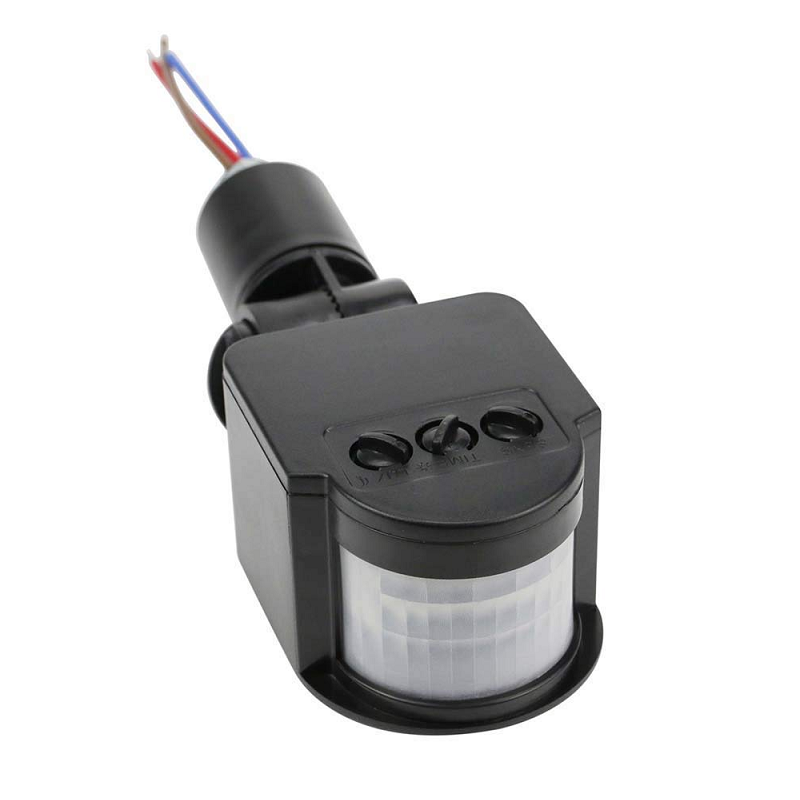
AC 220V Security PIR Human Body Motion Sensor Detector
When the APDS-9960 isn’t enough range, step up to this PIR sensor for whole-room presence detection in smart lighting and security systems.
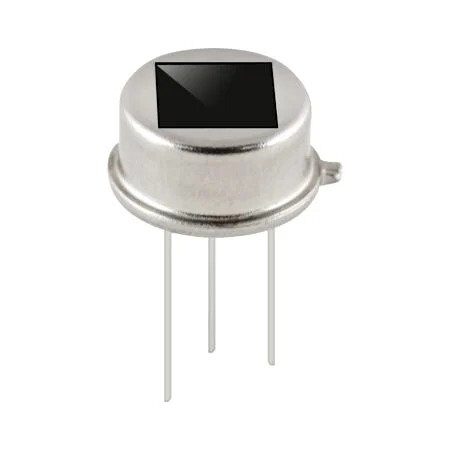
B2X2 4-Element Infrared Motion Analog PIR Sensor for Lighting
Multi-element PIR sensor ideal for high-sensitivity occupancy detection in smart home lighting projects complementing gesture-controlled interfaces.

BMP280 Barometric Pressure and Altitude Sensor I2C/SPI Module
Expand your I2C sensor network. The BMP280 pairs perfectly with the APDS-9960 on the same I2C bus for multi-sensor environment monitoring projects.
12. Frequently Asked Questions
Can the APDS-9960 detect finger gestures or only full hand swipes?
The gesture engine is optimised for hand-sized objects moved at 5–15 cm from the sensor. Finger-level gestures at close range (1–3 cm) may work but are less reliable. For precise finger gesture detection, capacitive touchscreens or the MGC3130 3D gesture controller are better suited.
Can I run gesture detection and proximity sensing at the same time?
No. The chip’s internal IR LED engine handles only one detection mode at a time. In the SparkFun library, calling enableGestureSensor() disables proximity and light sensing. You must explicitly switch modes between detections, adding a small settling delay (50–100 ms) between mode switches.
What is the maximum I2C bus length for APDS-9960?
Standard I2C at 100 kHz is reliable up to ~1 metre of wire. At 400 kHz (fast mode), keep wires under 30 cm and add appropriate pull-up resistors (2.2 kΩ for 400 kHz). For longer runs, use an I2C bus extender IC like the PCA9600.
Does the APDS-9960 work with 3.3 V microcontrollers like ESP32?
Yes, the chip is native 3.3 V and works perfectly with ESP32, STM32, and Raspberry Pi Pico. Use the standard Wire library and configure your SDA/SCL pins appropriately. No level shifter is needed for these 3.3 V systems.
How do I calibrate the colour sensor for accurate colour detection?
Perform a white balance calibration: place a white reference tile above the sensor in your standard lighting conditions and record R, G, B, C values. Use these as scaling factors when computing normalised RGB from subsequent readings. Also account for integration time — longer integration improves SNR but can saturate in bright light.
13. Conclusion
The APDS-9960 is one of the most versatile sensor ICs available for the Arduino ecosystem. Its combination of gesture recognition, proximity detection, ambient light measurement, and RGB colour sensing — all on a single I2C chip — makes it a powerful tool for creating intuitive, touchless interfaces.
Whether you are a student building your first gesture-controlled project or an engineer prototyping a next-generation HMI for an industrial product, the APDS-9960 delivers reliable performance at a very accessible price point. Start with the SparkFun library examples, understand how each engine mode works, and you will have a touchless controller up and running within an afternoon.
Build Your Touchless Interface Today
Find gesture sensors, proximity modules, and all the components you need — stocked and shipped fast across India.







Add comment