
The 4–20 mA current loop is the backbone of industrial process instrumentation. Developed in the 1950s and standardised internationally, it remains the most widely used signal standard for transmitting sensor data over long cable runs in factories, water treatment plants, oil refineries, and HVAC systems. If you’re building an IoT gateway, a low-cost SCADA replacement, or a remote monitoring system for industrial equipment, understanding how to interface 4-20 mA sensors with Arduino and ESP32 opens up access to thousands of industrial-grade sensors that Arduino-native sensors cannot match.
This comprehensive tutorial covers the physics of current loops, interface circuit design, code examples for both Arduino and ESP32, calibration methodology, and practical tips for deploying in real industrial environments.
Why 4-20mA? The Physics of Current Loops
Most hobbyist sensors output a voltage signal. A 0–5V pressure sensor outputs 0V at minimum pressure and 5V at maximum. The problem with voltage signals in industrial environments is resistance: even a small cable resistance (a 100m copper wire run can have 5–10 Ω) drops voltage proportionally. A signal that’s 5V at the sensor might be 4.5V at the receiving end — a 10% error with no way to distinguish cable loss from a real reading change.
Current loops solve this elegantly. In a series circuit, the current is identical at every point in the loop — regardless of cable resistance. If the sensor drives 12 mA into the loop, the receiving end sees exactly 12 mA even if the cable has 20 Ω of resistance (as long as the supply voltage is sufficient to push the current through). This allows reliable signal transmission over several kilometres of cable.
The 4–20 mA range has additional benefits:
- Live zero (4 mA): A reading of 0 mA means the sensor is unpowered, a wire is broken, or the transmitter has failed. A reading of exactly 4 mA confirms the sensor is powered and at its minimum range. This fault detection is built into the standard.
- Power over signal wires: 2-wire (loop-powered) transmitters draw their operating power from the same current loop that carries the signal — no separate power supply wiring needed.
- Noise immunity: Current signals are far less susceptible to electromagnetic interference than voltage signals. Industrial machinery, VFDs, and welding equipment generate enormous EMI that corrupts voltage signals — current loops are naturally immune.
2-Wire, 3-Wire, and 4-Wire Transmitters Explained
Industrial 4–20 mA transmitters come in three configurations that differ in how they’re powered:
2-Wire (Loop-Powered) Transmitters
The most common type in process industries. The transmitter is powered entirely by the 24V DC loop supply. It regulates the loop current between 4 mA (minimum, at 0% of range) and 20 mA (maximum, at 100% of range). Two wires handle both power and signal simultaneously.
Wiring: (+24V) → sensor (+) → sensor (−) → sense resistor → GND. The voltage drop across the 250Ω sense resistor converts the current to a 1–5V voltage signal readable by the microcontroller’s ADC.
3-Wire Transmitters
Separate power supply and signal return. One wire for power (+VDC), one wire for the 4–20 mA signal, one wire for common ground. The transmitter requires its own power connection. Common in sensors needing more than 4 mA to power their electronics.
4-Wire (Active) Transmitters
Completely separate power and signal circuits. Two wires for AC or DC power supply, two wires for the 4–20 mA signal output. Most signal conditioners, vibration transmitters, and smart transmitters with displays use this configuration.
Current-to-Voltage Conversion Circuit
Arduino and ESP32 ADC inputs accept voltage, not current. To interface a 4–20 mA signal, you need to convert it to a voltage. The simplest method is a shunt (burden) resistor.
Shunt Resistor Method (For 5V Arduino)
Connect a 250 Ω resistor between the signal wire and GND. The current flowing through the resistor creates a voltage drop (V = I × R):
- 4 mA × 250 Ω = 1.00V (sensor at 0% range)
- 12 mA × 250 Ω = 3.00V (sensor at 50% range)
- 20 mA × 250 Ω = 5.00V (sensor at 100% range)
This maps nicely to the Arduino’s 0–5V ADC range. The mapping formula in software is straightforward.
Shunt Resistor Method (For 3.3V ESP32)
Use a 165 Ω resistor instead (or combine 150 Ω + 15 Ω). This gives:
- 4 mA × 165 Ω = 0.66V
- 20 mA × 165 Ω = 3.30V
The ESP32’s ADC has known nonlinearity issues — the ADC is not accurate below ~0.1V and above ~3.1V. Keeping the voltage range within 0.66–3.3V means you’re in the linear region (mostly). Use the ESP32’s built-in ADC calibration or an external 16-bit ADS1115 ADC for better accuracy.
Complete Circuit with Protection
+24V ────┬──── Sensor (+)
         │
    [Fuse/PTC]          ← Overcurrent protection
         │
     Sensor (−) ─────── To ADC pin (via sense resistor)
                │
            [250Ω]      ← Shunt resistor (1% tolerance)
                │
              GND

Protection: Add a 5.1V Zener diode across the shunt resistor
to clamp any transients before they reach the ADC.
The Zener diode clamps transient overvoltages (from lightning, relay switching, or ground faults) that would otherwise destroy the ADC input. A 10 kΩ series resistor before the ADC pin adds further protection.
Ready-Made 4-20mA Receiver Modules
If you’d rather not design the interface circuit yourself, several plug-and-play modules handle the conversion:
- DFRobot Gravity 4-20mA to Voltage Module (SEN0262): Converts 4-20mA to 0-3.3V or 0-5V analog output. Includes protection and filtering. Directly plugs into Gravity-compatible analog inputs.
- Generic ADS1115 + 250Ω Breakout: Many makers simply add the shunt resistor externally and read the voltage with an ADS1115 16-bit ADC. This gives much better resolution than the Arduino’s 10-bit ADC (65,536 counts vs. 1,024).
- Industrial Signal Conditioner Modules (DIN rail): For real industrial deployment, DIN-rail-mount signal conditioners (e.g., from Phoenix Contact, Wago) provide galvanic isolation, which protects both the MCU and the industrial sensor from ground loops.
Wiring to Arduino
For a 2-wire loop-powered sensor with Arduino Uno:
| Component | Connection |
|---|---|
| 24V Supply (+) | Sensor (+) terminal |
| Sensor (−) terminal | One end of 250Ω resistor |
| Other end of 250Ω resistor | 24V Supply GND |
| Junction of sensor(−) and resistor | Arduino A0 |
| 24V Supply GND | Arduino GND |
Important: Share the GND between the 24V supply and the Arduino. Without a common ground reference, the ADC reading will be meaningless or erratic.
Wiring to ESP32
For ESP32, use a 165 Ω shunt and read on GPIO 34 (input-only ADC, no accidental output mode). ESP32 ADC pins: 32–39 are recommended (GPIO 34, 35, 36, 39 are input-only — safest for external signals).
| Component | Connection |
|---|---|
| 24V Supply GND | ESP32 GND |
| 165Ω junction point | ESP32 GPIO34 (via 10kΩ series resistor) |
| 5.1V Zener across shunt | Cathode to signal, Anode to GND |
Arduino Code: Read and Convert 4-20mA
The key is mapping the ADC reading to the physical engineering unit. This involves two steps: ADC-to-current, then current-to-physical-unit.
// 4-20mA Sensor Reader for Arduino Uno
// Shunt resistor: 250 Ohm, ADC reference: 5V
// Example sensor: 4-20mA pressure transmitter, 0-100 bar

const int analogPin = A0;
const float Vref = 5.0;         // Arduino ADC reference voltage
const float Rshunt = 250.0;     // Shunt resistor in Ohms
const float I_min = 0.004;      // 4mA minimum
const float I_max = 0.020;      // 20mA maximum
const float RANGE_MIN = 0.0;    // Physical minimum (0 bar)
const float RANGE_MAX = 100.0;  // Physical maximum (100 bar)

void setup() {
  Serial.begin(9600);
  analogReference(DEFAULT); // 5V reference
}

void loop() {
  // Step 1: Read ADC, average 10 samples for stability
  long sum = 0;
  for (int i = 0; i < 10; i++) {
    sum += analogRead(analogPin);
    delay(5);
  }
  float adcAvg = sum / 10.0;

  // Step 2: Convert ADC to voltage
  float voltage = (adcAvg / 1023.0) * Vref;

  // Step 3: Convert voltage to current
  float current_mA = (voltage / Rshunt) * 1000.0;

  // Step 4: Check sensor health (< 3.8 mA = fault)
  if (current_mA < 3.8) {
    Serial.println("FAULT: Sensor disconnected or broken wire!");
    delay(1000);
    return;
  }

  // Step 5: Map current to engineering unit
  float physicalValue = RANGE_MIN +
    ((current_mA - 4.0) / (20.0 - 4.0)) * (RANGE_MAX - RANGE_MIN);

  Serial.print("Current: "); Serial.print(current_mA, 2); Serial.print(" mA | ");
  Serial.print("Pressure: "); Serial.print(physicalValue, 1); Serial.println(" bar");

  delay(1000);
}
Expected output:
Current: 12.04 mA | Pressure: 50.3 bar
Current: 12.07 mA | Pressure: 50.4 bar
ESP32 Code: Send to MQTT / Cloud
#include <WiFi.h>
#include <PubSubClient.h>

const char* ssid = "YourSSID";
const char* password = "YourPass";
const char* mqtt_server = "192.168.1.100";
const char* mqtt_topic = "plant/pressure";

const int adcPin = 34;
const float Vref = 3.3;
const float Rshunt = 165.0;
const float RANGE_MIN = 0.0;
const float RANGE_MAX = 100.0;

WiFiClient espClient;
PubSubClient client(espClient);

float readSensor() {
  long sum = 0;
  for (int i = 0; i < 50; i++) { // More samples for ESP32 ADC noise
    sum += analogRead(adcPin);
    delay(2);
  }
  float adcVal = sum / 50.0;
  float voltage = (adcVal / 4095.0) * Vref; // ESP32 has 12-bit ADC
  float current_mA = (voltage / Rshunt) * 1000.0;

  if (current_mA < 3.8) return -1.0; // Fault indicator

  return RANGE_MIN + ((current_mA - 4.0) / 16.0) * (RANGE_MAX - RANGE_MIN);
}

void setup() {
  Serial.begin(115200);
  WiFi.begin(ssid, password);
  while (WiFi.status() != WL_CONNECTED) delay(500);
  client.setServer(mqtt_server, 1883);
}

void loop() {
  if (!client.connected()) client.connect("ESP32_4to20mA");
  client.loop();

  float value = readSensor();
  char payload[32];
  if (value < 0) {
    client.publish(mqtt_topic, "{"status":"fault"}");
  } else {
    snprintf(payload, sizeof(payload), "{"pressure":%.1f}", value);
    client.publish(mqtt_topic, payload);
  }
  delay(5000);
}
Calibration and Error Correction
To achieve better than 1% accuracy, follow a two-point calibration procedure:
- Apply exactly 4 mA (use a calibrated current calibrator or a precision current source) and record the ADC reading — this is your
ADC_4mAvalue. - Apply exactly 20 mA and record the ADC reading — this is
ADC_20mA. - In code, replace the hard-coded mapping with:
current = 4.0 + ((adcVal - ADC_4mA) / (ADC_20mA - ADC_4mA)) * 16.0;
This eliminates errors from resistor tolerance, ADC reference voltage variation, and component aging. Store the calibration constants in Arduino EEPROM or ESP32 NVS (Non-Volatile Storage) so they survive power cycles.
For maximum accuracy (±0.1%), use an external 16-bit ADS1115 ADC module instead of the built-in ADC. The ADS1115 has a programmable gain amplifier and a precision 2.048V reference, giving you far better resolution and linearity than the ESP32’s or Arduino’s onboard ADC.
Reading Multiple 4-20mA Sensors
To read multiple current loop sensors simultaneously:
Option 1: Multiple Analog Inputs
Connect each sensor’s shunt resistor to a separate ADC pin. Arduino Uno has 6 analog inputs (A0–A5), allowing up to 6 separate 4–20 mA channels. Ensure each channel has its own shunt resistor and protection circuit — do NOT share a single shunt resistor between channels.
Option 2: External Multiplexed ADC (ADS1115)
The ADS1115 is a 4-channel 16-bit I2C ADC. One ADS1115 handles four 4–20 mA channels over a single I2C connection. Multiple ADS1115 modules can share the same I2C bus (using ADDR pin to set different addresses: 0x48, 0x49, 0x4A, 0x4B), giving up to 16 channels from four chips.
Option 3: Dedicated Industrial Module
For 8 or more channels, consider a dedicated 4–20 mA acquisition module with Modbus RTU/RS485 output. Connect the module’s RS485 to the ESP32’s UART, and poll all channels via Modbus commands. This offloads ADC and signal conditioning to dedicated hardware.
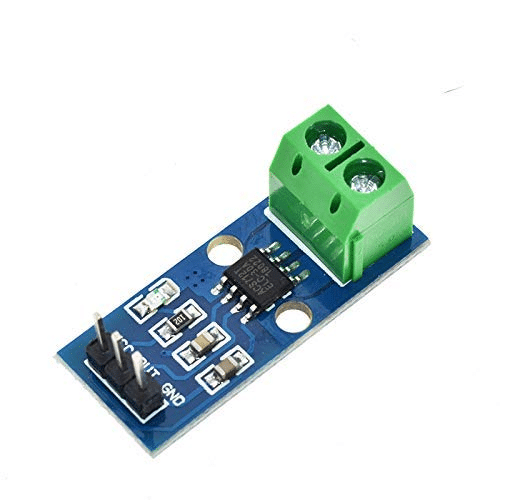
30A Range Current Sensor Module ACS712
For monitoring current in DC circuits alongside your 4-20mA system — the ACS712 Hall-effect sensor reads up to 30A with simple analog output.

INA219 I2C Bi-Directional Current/Power Monitor
A precision I2C current monitoring chip ideal for measuring the loop current in your 4-20mA interface with high accuracy and no ADC noise concerns.
Noise Immunity and Grounding in Industrial Settings
In real industrial environments, noise management is the difference between a system that works on the bench and one that works reliably in the field. Key practices:
Use Shielded Cable
Industrial 4–20 mA wiring should use twisted-pair shielded cable (TPSC). The twist reduces magnetic field pickup, and the shield diverts capacitively-coupled noise to ground. Connect the shield to ground at ONE end only (typically the controller end) to prevent ground loop currents flowing through the shield.
Galvanic Isolation
If the sensor’s GND is connected to machine chassis (common in process instrumentation) and your Arduino/ESP32 GND is connected to the PC via USB, you have a ground loop. Use an isolated DC-DC converter to power the sensor loop from a floating supply, or use an optocoupler-based signal isolator.
Filter Capacitors
Add a 100 nF ceramic capacitor and a 10 μF electrolytic in parallel across the shunt resistor. This acts as a low-pass filter for high-frequency noise while not affecting the slow-changing DC current loop signal.
Avoid Parallel Routing with Power Cables
Never run 4–20 mA signal cables parallel to AC power cables or motor leads for more than 30 cm. Route them in separate cable trays or conduit. If crossing is unavoidable, cross at 90 degrees to minimise inductive coupling.
Frequently Asked Questions
Can I power a loop-powered (2-wire) sensor from the Arduino’s 5V pin?
Technically possible if the sensor’s minimum supply voltage is below 5V and the maximum current draw doesn’t exceed what the Arduino’s 5V regulator can provide. However, most industrial 2-wire transmitters require 10.5–35V DC supply. You’ll need a separate 12V or 24V DC supply — do not use the Arduino’s 5V output for standard industrial transmitters.
My 4-20mA sensor reads correctly in the lab but drifts in the field. Why?
Common causes: ground loops between sensor chassis and controller GND (add galvanic isolation), temperature effects on the shunt resistor (use 0.1% metal film resistors, not carbon film), cable shield improperly grounded at both ends (ground only at controller end), or VFD/motor noise coupling into the signal cable (increase separation or add ferrite cores).
What does a current below 4mA mean?
Below 3.8 mA typically indicates a fault condition: broken signal wire, loss of loop power supply, or transmitter failure. This “live zero” fault detection is one of the key advantages of 4–20 mA over 0–20 mA or 0–10V signals. Always implement a fault check in your code as shown in the examples above.
How do I generate a 4-20mA output from Arduino to drive an industrial actuator?
To generate rather than receive 4–20 mA, you need a DAC (Digital-to-Analog Converter) and a voltage-to-current converter circuit (using an op-amp and transistor). Alternatively, the XTR115 and XTR116 ICs from Texas Instruments are designed specifically for this purpose. The ESP32’s DAC output (GPIO 25, 26) can be the voltage source for such a circuit.
Is the INA219 a good way to measure 4-20mA loop current?
Yes, the INA219 is an excellent alternative to the shunt-resistor-ADC approach. Use it as a current shunt monitor (it has a built-in precision shunt resistor or configure your own). The INA219 communicates over I2C, has 12-bit current resolution, and is not affected by ADC nonlinearity. Configure the gain appropriately for the 4–20 mA range.
Conclusion
Interfacing industrial 4–20 mA sensors with Arduino and ESP32 bridges the gap between the maker world and the vast ecosystem of professional industrial instrumentation. With a simple shunt resistor circuit, proper grounding practices, and the code examples in this tutorial, you can read pressure transmitters, level sensors, flow meters, temperature transmitters, and hundreds of other industrial sensors on your microcontroller.
The 4–20 mA standard’s inherent noise immunity, fault detection capability, and support for long cable runs makes it ideal for remote IoT monitoring in factories, water treatment plants, agricultural settings, and HVAC systems. ESP32’s Wi-Fi and MQTT capabilities turn a simple sensor reading into a cloud-connected industrial IoT node at a fraction of the cost of commercial SCADA hardware.
Master this interface, and you’ll have access to thousands of industrial sensors that no hobbyist-grade sensor can match in durability, accuracy, or reliability.
Find Industrial Sensor Components at Zbotic
Browse current sensors, ADC modules, and industrial interface components for your next IoT or automation project — fast delivery across India.






Add comment