
How to Fix Drone Oscillations: Complete PID Tuning Troubleshooting Guide
Nothing is more frustrating than watching your drone wobble, oscillate, or twitch when you just want it to fly smooth and stable. Whether you are flying a 5-inch freestyle quad, a 10-inch long-range cruiser, or a 600mm surveying multirotor, oscillations during flight almost always come down to one thing: incorrect PID tuning. This in-depth guide will help you systematically identify the type of oscillation you are experiencing and provide step-by-step fixes for both ArduPilot and Betaflight flight controllers — the two most common systems used in India’s drone community.
1. Understanding PID Control: What Each Term Does
PID stands for Proportional, Integral, Derivative. These are three mathematical terms that work together to control how the drone responds to disturbances and stick inputs. Think of it as a self-correcting system that is constantly asking: “Where am I? Where should I be? How fast am I getting there?”
P (Proportional) Term
The P term determines how aggressively the drone reacts to an error (the difference between desired angle and actual angle). A high P value makes the drone snap to position quickly but causes oscillations if too high. A low P value makes the drone feel mushy and slow to respond. High P = fast oscillations that look like buzzing or motor vibrations. Low P = sluggish, slow-to-respond flight.
I (Integral) Term
The I term accumulates error over time and corrects for persistent drift. Without I, your drone would slowly drift even in calm air because it cannot compensate for motor imbalances, prop differences, or a slightly off-centre CoG (centre of gravity). High I = slow, oscillating wobbles that take a long time to damp out. Low I = drift, inability to hold position in wind.
D (Derivative) Term
The D term acts as a brake, predicting where the P term is headed and damping overshoot. It is often described as the “damping” term. Without D, the drone would overshoot its target angle and oscillate around it. High D = high-frequency motor noise (the motors sound “buzzy” or “grinding”). Low D = bounce-back oscillations after stick inputs.
2. Diagnosing Types of Drone Oscillations
Before touching any PID value, you need to correctly identify what kind of oscillation you are dealing with. Different oscillations have different causes and different fixes.
High-Frequency Oscillations (Fast Buzz)
These look like the drone is vibrating rapidly, almost like it is shaking. You can often hear it in the motor sound — they sound rough or grinding. This is almost always caused by P gain too high or D gain too high. Mechanical causes include propeller damage, loose motor screws, or frame flex.
Low-Frequency Oscillations (Slow Wobble)
The drone rocks back and forth slowly, like a pendulum. This looks like it cannot decide where to point. Usually caused by P gain too low, I gain too low, or mechanical imbalance. On ArduPilot copters in Loiter mode, slow oscillations can also indicate GPS accuracy issues.
Post-Stick Oscillations (Bounce-Back)
The drone bounces or oscillates after you release the stick to centre. This is caused by D gain too low — the P term is overcorrecting without sufficient braking. In Betaflight, this manifests as a spring-like rebound when you let go of the stick.
Toilet Bowl Effect
The drone slowly circles around a point instead of holding position. This is a compass calibration issue or magnetic interference problem, not a PID issue. Re-calibrate your compass away from electronics and metal objects.
Yaw Oscillations
The drone yaws (rotates horizontally) back and forth without stick input. This is almost always yaw P too high. On large multirotors, it can also indicate motor timing issues or asymmetric prop pitch.
3. Hardware Causes of Oscillations (Always Check First)
Before blaming PIDs, eliminate hardware issues. A perfectly tuned PID cannot overcome physical problems with the drone.
Propeller Issues
This is the most common hardware cause of oscillations in India, where rough roads during transport can damage props. Check for:
- Nicks, chips, or bends in any propeller blade
- Loose prop nuts — hand-tight is not enough, use a wrench
- Mixed prop types — never mix carbon fibre with plastic props on the same quad
- Unbalanced props — use a prop balancer before installing
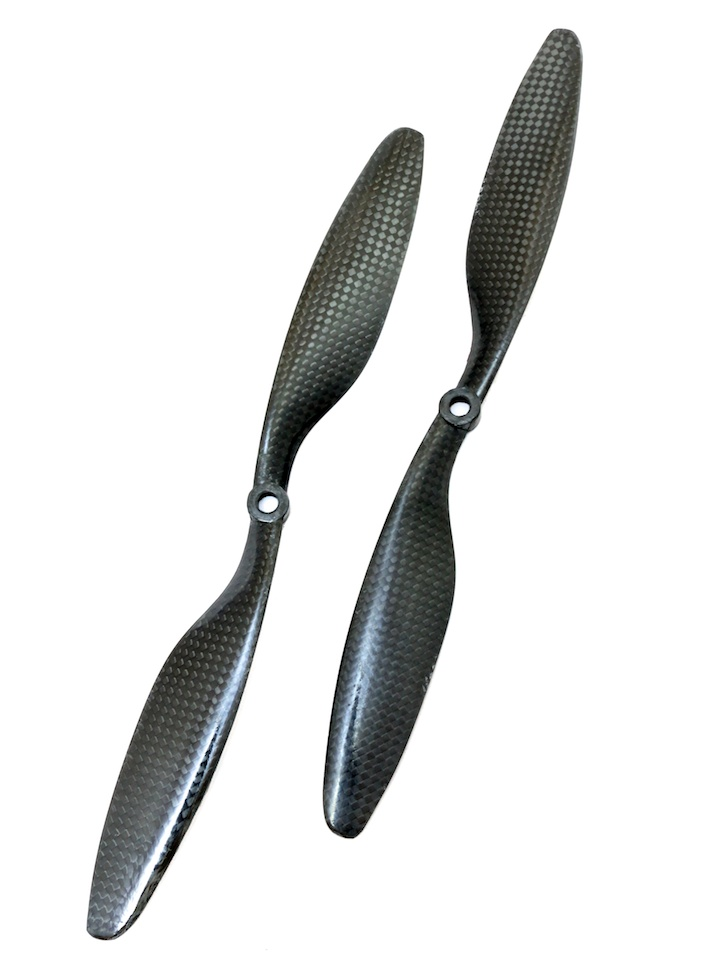
1045 Carbon Fiber Propeller CW&CCW For DJI
Balanced carbon fibre propellers that introduce far less vibration than plastic alternatives. If oscillations started after a crash or prop change, replacing with these precision-balanced CF props should be the first hardware fix you try.
View on ZboticFlight Controller Mounting
If your flight controller is hard-mounted directly to the frame, motor vibrations travel directly into the IMU. This overwhelms the D-term filters and appears as high-frequency oscillations that no amount of PID tuning will fix. Always use soft-mount standoffs.
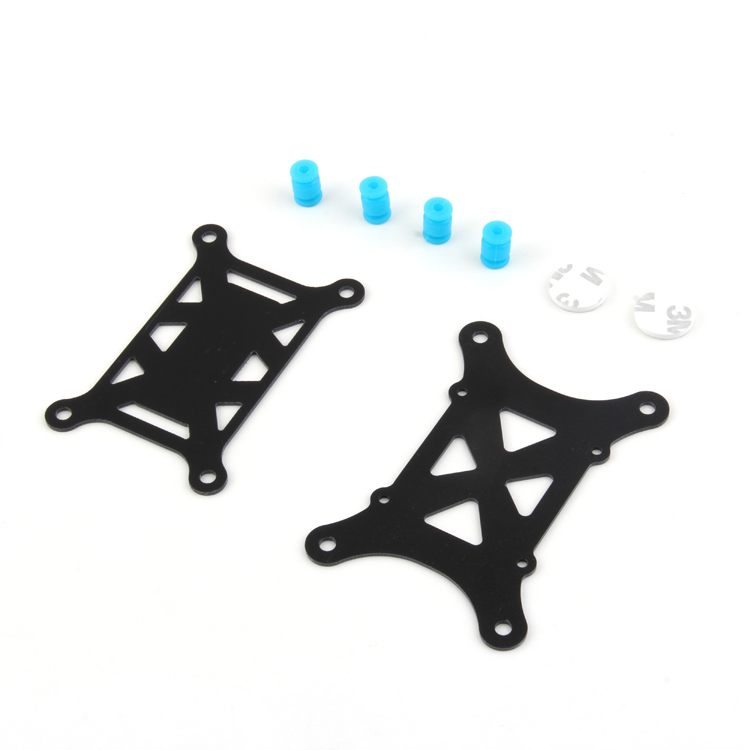
Anti-Vibration Shock Absorber for APM/KK/MWC/PixHawk
Gel-pad vibration isolator that decouples the flight controller from frame vibrations. Essential for any ArduPilot build — eliminates a major source of IMU noise that can cause persistent oscillations despite correct PIDs.
View on ZboticESC Issues
Faulty or mismatched ESCs can cause one motor to respond differently to the others. On 4-in-1 ESC boards, a damaged FET on one channel can cause asymmetric thrust and oscillations. Also check that all ESC protocols match (all DSHOT600, or all PWM — never mix).

35A V2.1 2-5S 4-in-1 Brushless ESC for FPV Racing
A matched 4-in-1 ESC ensures all four channels respond identically to throttle commands. Eliminates ESC mismatch as a cause of oscillations. Supports DSHOT600 for clean digital motor communication.
View on Zbotic4. PID Tuning for FPV Drones in Betaflight
Betaflight is used in most FPV racing and freestyle builds. It comes with a default PID set that works reasonably well on 5-inch 2306 motor builds, but needs adjustment for 3-inch toothpicks, 7-inch long-range, or heavier camera drones.
Betaflight PID Tuning Methodology
The standard approach: tune P first, then D, then I. Always change one axis at a time (start with Roll, then Pitch, then Yaw).
Step 1: Increase Roll P until oscillation, then back off 20%
- Fly in a clear open space (a cricket ground or open field in India works well)
- Increase Roll P by 5 units at a time
- Do rapid roll inputs and look for high-frequency buzz on release
- Once you see/hear buzzing, reduce P by 20% from that point
Step 2: Set D to remove bounce-back
- With P set, do quick roll inputs and look for bounce-back when releasing the stick
- Increase D by 3 units at a time until the bounce-back disappears
- If motors get warm/hot after 3-minute hover, D is too high — reduce by 5 units
Step 3: Adjust I for drift
- Fly forwards at medium speed and release roll stick
- If the quad rolls to one side slowly, increase I
- If the quad oscillates slowly left-right during straight flight, decrease I
Betaflight PID Starting Points by Build Size
| Build | P (R/P) | I (R/P) | D (R/P) |
|---|---|---|---|
| 3″ Toothpick | 38/40 | 50/50 | 20/22 |
| 5″ Standard | 46/48 | 65/65 | 30/32 |
| 7″ Long Range | 32/34 | 40/40 | 18/20 |
5. PID Tuning for ArduPilot Multirotors
ArduPilot uses a different PID architecture than Betaflight. The tuning parameters are in the MissionPlanner Parameter List and named differently.
Key ArduPilot PID Parameters
ATC_RAT_RLL_P— Roll rate P gainATC_RAT_RLL_I— Roll rate I gainATC_RAT_RLL_D— Roll rate D gainATC_ANG_RLL_P— Roll angle P gain (outer loop)- Same pattern for PIT (Pitch) and YAW axes
ArduPilot Manual Tuning Procedure
For ArduPilot, start in Stabilize mode (not Loiter or AltHold) for initial PID tuning. Stabilize mode uses only the attitude PIDs without GPS/baro involvement.
- Start with default PID values from Mission Planner’s default for your vehicle size
- Hover and give small sharp roll inputs — observe recovery
- If oscillating rapidly: reduce
ATC_RAT_RLL_Pby 15% - If slow to respond: increase
ATC_RAT_RLL_Pby 10% - If bounce-back after stick release: increase
ATC_RAT_RLL_Dby 10% - Repeat for pitch, then yaw
6. Using ArduPilot AutoTune Feature
ArduPilot’s AutoTune is one of the best features for beginners. It automatically finds optimal PID values by performing controlled oscillations and measuring the response. You must have a well-mechanically-sound drone for AutoTune to work effectively.
AutoTune Prerequisites
- Calm wind conditions — ideally below 3 m/s (very early morning in India)
- Open area with at least 40m x 40m clear space
- Good GPS lock (HDOP < 1.5) for position hold during the tune
- Battery at least 80% — AutoTune can take 10–15 minutes
- Pre-AutoTune: verify drone can hover without crashing (rough stability is OK)
AutoTune Steps
- Enable AutoTune mode in Mission Planner: add it to a flight mode switch
- Arm and take off in AltHold mode, hover at 3–5m altitude
- Switch to AutoTune mode
- The drone will begin twitching — this is normal and expected
- Maintain gentle stick inputs to keep the drone centred over the launch point
- When the twitching stops and the drone hovers calmly, AutoTune is complete
- Land and disarm WITHOUT power-cycling — new PIDs are saved to EEPROM on land
Important for Indian operators: Do not run AutoTune during summer afternoons in northern India — thermal turbulence above 35°C can invalidate the tune and cause erratic results. The ideal AutoTune window is 6–9am.
7. RPM Filtering and Notch Filters
Modern flight controller firmware (Betaflight 4.x and ArduPilot 4.x) supports dynamic notch filters that target specific vibration frequencies coming from motor RPM harmonics. This is a game-changer for oscillation control.
Why Filters Matter
Every motor creates vibration at a frequency proportional to its RPM. At 20,000 RPM, a motor vibrates the frame at ~333Hz. These vibrations are picked up by the IMU gyroscope and interpreted as false “errors” by the PID controller, causing it to react to vibrations that are not real flight movements — causing oscillations.
Enabling Dynamic Notch Filters in Betaflight
- Go to Configuration tab, enable RPM Filter (requires DSHOT and Bidirectional DSHOT enabled)
- Set Notch Filter Width to 1 (narrow) for racing, 2 for freestyle
- After enabling RPM filter, you can often reduce D gain by 30–40% — this reduces motor heat significantly
Dynamic Notch in ArduPilot
Enable INS_HNTCH_ENABLE = 1 and set INS_HNTCH_MODE = 3 (ESC telemetry-based RPM tracking) or INS_HNTCH_MODE = 1 (throttle-based, simpler). This single change often eliminates high-frequency oscillations on ArduPilot builds without any PID change.
8. Advanced Oscillation Fixes
Prop Wash Oscillations
Propwash occurs when the quad descends through its own turbulent downwash — most noticeable in FPV when you do a dive-and-pull-out maneuver. The props temporarily lose bite in the turbulent air, causing a brief loss of control. Fixes:
- Increase D term by 3–5 units
- Enable TPA (Throttle PID Attenuation) in Betaflight — this reduces P and D at high throttle where it is not needed
- Enable Motor Idle Governor in Betaflight 4.3+ to keep motors spinning during fast descents
Altitude Oscillations on ArduPilot
If your drone bobs up and down in AltHold mode, the issue is with the altitude control PID, separate from the attitude PID:
- Barometer cover: make sure the baro is covered with foam to prevent wind affecting altitude reading
- Reduce
PSC_ACCZ_Pby 20% if the drone hunts up and down rapidly - Check for EKF variance issues in the Mission Planner HUD — baro vs GPS altitude disagreement
9. Using Blackbox Logs to Diagnose Problems
Blackbox logging records gyro data, PID outputs, and motor commands at 2000Hz+ during flight. Analysing these logs with Betaflight Blackbox Explorer or ArduPilot’s Log Analyzer is the most precise way to diagnose oscillations.
What to Look for in Blackbox Logs
- Gyro trace follows setpoint closely with minimal lag: Good tune
- Gyro trace oscillates after stick input: D too low
- High-frequency noise on gyro with no stick input: Physical vibrations passing through — increase filtering or fix mechanical issues
- P term trace is noisy: Gyro noise — lower P or increase LPF cutoff
- Motor outputs clipping at max (1000 in Betaflight terms): Tune is too aggressive for the motor/prop combination
ArduPilot Log Analysis
Download .bin logs from the flight controller via Mission Planner (DataFlash Logs section). Open with Mission Planner’s Review a Log feature. Key charts to examine:
- ATT (Attitude) log: DesRoll vs Roll — should overlap closely
- IMU log: AccX/AccY/AccZ — should be smooth, not spiky. Spikes indicate vibration
- RCOU (RC Output): Motor outputs — should be smooth during hover, not pulsing
10. Frequently Asked Questions
A: This is likely a frame flex issue or an I term windup problem. At speed, aerodynamic forces flex the frame, changing the arm angles slightly. Carbon fibre frames reduce this. On the software side, enable I-term relax in Betaflight or reduce ATC_RAT_RLL_IMAX in ArduPilot to prevent I windup at high speeds.
A: Firmware updates frequently change default filter settings and PID scaling. In Betaflight, the PIDs from older versions do not translate directly to newer versions due to changes in the master multiplier and filter defaults. Always start with new firmware defaults and retune, or use the PID Tuning Slider tab in Betaflight 4.3+ which normalises values across versions.
A: Spin each motor individually with props off and listen for bearing noise, grinding, or uneven sound. Use the Betaflight Motor tab to spin each motor at 30% throttle individually. A healthy motor sounds smooth; a failing motor sounds rough or stutters. Also check for play in the motor shaft — any wobble means the motor needs replacement.
A: Yes, with minor adjustments. Cold air (December–January in north India) is denser, so props generate more thrust at the same throttle. Your drone will feel slightly more responsive. If you tuned in summer, reduce P by 5–10% for winter flying. Battery performance also changes significantly in cold weather — keep packs warm before flying in temperatures below 10°C.
A: AutoTune only tunes the attitude rate and angle PIDs. Loiter mode oscillations usually involve the position and velocity PIDs (PSC_POSXY_P, PSC_VELXY_P/I/D). These are separate and not touched by AutoTune. Reduce PSC_VELXY_P by 20% to fix lateral oscillations in Loiter mode.
Get Your Drone Flying Smooth
Shop quality ESCs, flight controller mounts, and balanced propellers at Zbotic — everything you need to eliminate oscillations and get perfect flight performance.
Shop Drone Components






Add comment