
Biometric fingerprint sensors have become affordable and accessible enough for hobbyists in India to integrate into door locks, attendance systems, safes, and personal project security. The two most widely available optical fingerprint sensor modules for Arduino and similar microcontrollers are the R307 (also labelled GT-521Fx or R305 in some variants) and the AS608 (used inside the popular Adafruit Fingerprint Sensor and many generic modules). Both modules communicate over UART, both store fingerprint templates onboard, and both are priced similarly in the Indian market — but there are meaningful differences in image quality, template capacity, library support, and real-world reliability. This buyer guide breaks it all down.
R307 Fingerprint Sensor Overview
The R307 is an optical fingerprint sensor manufactured by Hangzhou Grow Technology (the same company behind the popular R305 and the newer R503 capacitive sensor). It uses an LED-illuminated optical scanning method to capture fingerprint images at a resolution of 500 DPI with a 256×288 pixel sensor. The module incorporates all processing onboard — fingerprint image acquisition, feature extraction, template storage, and matching — so the host microcontroller only needs to send UART commands and interpret the response packets.
The R307 is typically enclosed in a silver metallic housing with a blue backlit scanning window. Key specifications: 3.3V or 5V operating voltage (check your specific module — most Indian breakout boards accept 3.3–6V), UART at 57,600 baud (configurable), onboard flash memory for up to 1,000 fingerprint templates in a two-page format (feature page 1 + page 2 per template), and an onboard DSP processor for sub-second matching.
The R307 (and its sibling R305) became popular because ZhiHai (now widely documented online) published their UART communication protocol, enabling the Arduino community to write libraries. The GT-521F32 variant from ADH-Tech stores up to 3,000 templates.
AS608 Fingerprint Sensor Overview
The AS608 is a fingerprint sensor module based on the AS608 chip manufactured by Synochip. It is physically very similar to the R307/R305 in form factor and communication protocol — in fact, many AS608 modules are pin-compatible and protocol-compatible with R307 modules. This is because both modules implement the same or a very similar UART packet protocol, and both are supported by the Adafruit Fingerprint Sensor Library.
The AS608 features a 500 DPI optical sensor, UART communication, 3.3–5V operation, and stores up to 1,000 fingerprint templates in internal flash. It is often sold under the label “fingerprint sensor module” without a clear AS608 designation — you may need to check the chip marking or module documentation. The Adafruit Fingerprint Sensor product (their ID #751) uses an AS608 sensor and is one of the best-documented implementations available.
More recently, a new variant called R503 has appeared which uses capacitive sensing rather than optical — but for this comparison we are focusing on the optical AS608 vs R307 which are the most commonly stocked in Indian markets.
Detailed Specification Comparison
| Specification | R307 | AS608 |
|---|---|---|
| Sensing Technology | Optical | Optical |
| Image Resolution | 500 DPI | 500 DPI |
| Image Area | 14×18 mm | 14×18 mm (approx) |
| Fingerprint Capacity | 162 (R305) / 1000 (R307) | Up to 1000 |
| Matching Time (1:1) | <0.3 s | <0.3 s |
| Matching Time (1:N, N=1000) | <1 s | <1 s |
| False Acceptance Rate | <0.001% (security level 3) | <0.001% (security level 3) |
| False Rejection Rate | <1% | <1% |
| UART Baud Rate | 9600–115200 (configurable) | 9600–115200 (configurable) |
| Operating Voltage | 3.3V / 5V (TTL) | 3.3V / 5V (TTL) |
| Operating Current | ~60–80 mA peak | ~50–80 mA peak |
| Arduino Library | Adafruit FP + Grow Library | Adafruit Fingerprint Sensor |
| Price in India | ₹450–₹700 | ₹400–₹650 |
| Best Source in India | Zbotic, Robu, Evelta | Zbotic, Robocraze, Amazon |
Optical Sensor and Image Quality
Both the R307 and AS608 use the same fundamental optical design: an LED (usually red or green) illuminates the fingertip placed against a glass platen, and a CMOS sensor captures the reflected image at 500 DPI. The DSP on the module processes the image to extract minutiae points (ridge endings, bifurcations) which are stored as compact templates rather than raw images.
In practice, the image quality between a genuine Grow R307 and a genuine Synochip AS608 module is very similar at standard light levels. Differences emerge in challenging conditions:
- Dry fingers: Optical sensors struggle with very dry fingertips because the ridge-valley contrast is low. Both sensors perform similarly — marginally worse than capacitive sensors in this regard.
- Wet fingers: Slightly wet fingers can cause smearing of the optical image. Both modules fail roughly equally here.
- Cut or worn fingers: Same limitation for both — optical sensors need a minimum ridge pattern to extract features.
- Counterfeit modules: The biggest real-world quality issue in India is clone/counterfeit modules. Both R307 and AS608 are extensively cloned. Clone modules often have lower-quality optics, weaker LED illumination, and inconsistent DSP performance. Buy from reputable Indian electronics suppliers to avoid this.
Template Storage and Memory
The R307 module sold in India typically supports 1,000 fingerprint templates. Earlier R305 variants only supported 162 templates. The onboard flash memory organises templates in a circular buffer; you can store, delete, and load specific template IDs from your Arduino code.
The AS608 also supports up to 1,000 templates in most Indian market versions. For large-scale attendance systems needing thousands of users, neither module is sufficient at the module level — you would need to use partial matching strategies or offload template management to a server, using the modules only for image capture and feature extraction.
Both modules support two “character buffers” (CharBuffer1, CharBuffer2) in RAM for real-time comparison operations, plus the full flash-based template library for 1:N search. This architecture lets you do a fast 1:1 verification (compare live scan against a specific stored template) or a slower 1:N search (find the best match across all stored templates).
Security Level, FAR and FRR
Both modules allow you to set a security level from 1 (most permissive, lowest FRR) to 5 (most secure, lowest FAR). At level 3 (the recommended default), both modules specify FAR < 0.001% and FRR < 1%.
- FAR (False Acceptance Rate): Probability that an unauthorised person’s fingerprint is accepted. At security level 5, this approaches 0.0001% — extremely secure.
- FRR (False Rejection Rate): Probability that an authorised fingerprint is rejected. At level 5, FRR increases — authorised users may need to try 2–3 times in difficult conditions.
For a door lock application, level 3 is the sweet spot. For a high-security enclosure or weapons safe, use level 4–5 and enroll each finger multiple times (at slightly different angles) to reduce FRR.

CJMCU-219 INA219 I2C Bi-directional Current Monitor
Monitor the power consumption of your fingerprint sensor module in real time — essential for battery-powered access control designs.
Arduino Wiring and Communication
Both R307 and AS608 communicate via 3.3V TTL UART. When connecting to a 5V Arduino Uno or Nano, you need a voltage divider or logic level shifter on the Arduino TX → Sensor RX line (Arduino outputs 5V logic; sensor RX may only tolerate 3.3V). The sensor TX → Arduino RX line is fine without level shifting since 3.3V is read as HIGH by Arduino 5V inputs.
Wiring for Arduino Uno (Software Serial):
- Sensor VCC → Arduino 5V (or external 5V regulator — sensor draws up to 80 mA)
- Sensor GND → Arduino GND
- Sensor TX (White/Green wire) → Arduino pin D2
- Sensor RX (Yellow/Blue wire) → Arduino pin D3 via voltage divider (1kΩ + 2kΩ)
#include <Adafruit_Fingerprint.h>
#include <SoftwareSerial.h>

SoftwareSerial mySerial(2, 3); // RX, TX (D2=sensor TX, D3=sensor RX)
Adafruit_Fingerprint finger = Adafruit_Fingerprint(&mySerial);

void setup() {
  Serial.begin(9600);
  finger.begin(57600);

  if (finger.verifyPassword()) {
    Serial.println("Fingerprint sensor found!");
  } else {
    Serial.println("Sensor not found - check wiring");
    while(1);
  }
  finger.getParameters();
  Serial.print("Capacity: "); Serial.println(finger.capacity);
  Serial.print("Security level: "); Serial.println(finger.security_level);
}

void loop() {
  Serial.println("Place finger...");
  int result = finger.getImage();
  if (result == FINGERPRINT_OK) {
    result = finger.image2Tz();
    if (result == FINGERPRINT_OK) {
      result = finger.fingerSearch();
      if (result == FINGERPRINT_OK) {
        Serial.print("Match found! ID: ");
        Serial.println(finger.fingerID);
      } else {
        Serial.println("No match found");
      }
    }
  }
  delay(50);
}
Library Support and Software
The Adafruit Fingerprint Sensor Library (available in the Arduino Library Manager) works with both R307 and AS608 modules because they share the same UART packet protocol (originally from GROW/ZhiHai). This is the most well-documented and supported library, with examples for enrollment, search, delete, and count operations.
Key library functions you will use:
finger.getImage()— Capture fingerprint image from sensorfinger.image2Tz(1)— Convert image to character template in buffer 1finger.image2Tz(2)— Convert second image to buffer 2 (during enrollment)finger.createModel()— Combine buffers 1+2 into a templatefinger.storeModel(id)— Save template to flash at given IDfinger.fingerSearch()— Search all stored templates for a matchfinger.deleteModel(id)— Delete template at given IDfinger.emptyDatabase()— Erase all stored templates
Enrollment Sample Code
// Enroll fingerprint at ID slot 'id'
bool enrollFingerprint(int id) {
  Serial.print("Enrolling ID "); Serial.println(id);

  // Take first image
  while (finger.getImage() != FINGERPRINT_OK);
  if (finger.image2Tz(1) != FINGERPRINT_OK) return false;
  Serial.println("Remove finger");
  delay(2000);

  // Take second image
  while (finger.getImage() != FINGERPRINT_NOFINGER);
  Serial.println("Place same finger again");
  while (finger.getImage() != FINGERPRINT_OK);
  if (finger.image2Tz(2) != FINGERPRINT_OK) return false;

  // Create and store model
  if (finger.createModel() != FINGERPRINT_OK) return false;
  if (finger.storeModel(id) != FINGERPRINT_OK) return false;

  Serial.println("Fingerprint enrolled!");
  return true;
}
Project Ideas and Applications
- Fingerprint door lock: Arduino Nano + fingerprint sensor + relay module + solenoid lock. Enroll 5–10 family members, only authorised prints unlock the door.
- Attendance system: Fingerprint sensor + RTC module + SD card logger. Records timestamp + employee ID on match.
- Fingerprint-protected safe: Arduino + fingerprint sensor + servo motor to turn the lock mechanism. Add a buzzer for rejected fingerprint alerts.
- IoT access control: ESP8266 or ESP32 + fingerprint sensor + MQTT. Log access events to a server or mobile app in real time.
- Child safety device lock: Lock a medicine cabinet or tool drawer — only adults (whose prints are enrolled) can open it.
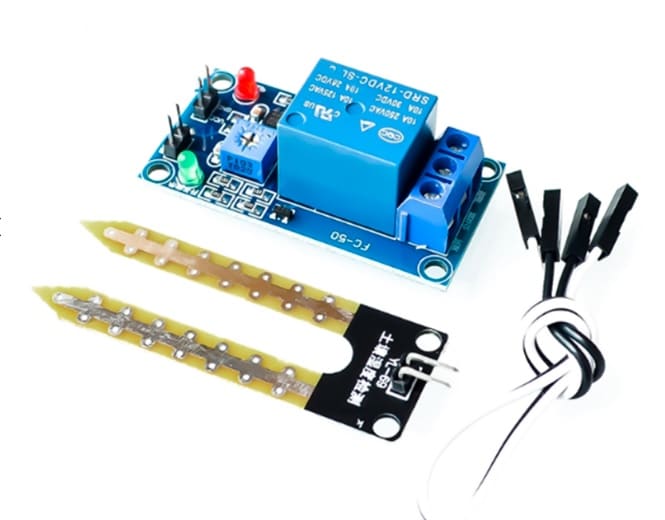
5V/12V Relay Control Module
Control a solenoid lock or electric bolt using this relay module — the essential hardware link between your fingerprint sensor and the physical lock mechanism.
Buying Advice for India
R307 vs AS608 — which should you buy in India? For most hobbyist and maker projects, either module will serve you well. The Adafruit Fingerprint Sensor Library supports both. Here are buying considerations specific to the Indian market:
- Protocol compatibility: Both use the ZhiHai/GROW UART protocol. Any library that works for one will likely work for the other with minimal or no modification.
- Beware counterfeits: The biggest risk in India is buying a clone with substandard optics. Stick to known sellers. Avoid rock-bottom pricing — a genuine module should cost ₹400–₹700, not ₹150.
- Cable quality: Some modules ship without a connector cable. Confirm the cable is included, or buy JST-SH or Dupont connector cables separately.
- Warranty: Zbotic and similar reputable Indian electronics stores offer basic return/replacement which is important for a component at this price point.
- R503 (capacitive) consideration: If you are building a product for repeated daily use (commercial attendance system), consider stepping up to the R503 capacitive sensor — it handles dry/wet fingers better and has a much longer mechanical lifespan since there is no glass platen to scratch.
Frequently Asked Questions
Can I use the R307 or AS608 with ESP32 or ESP8266?
Yes. Both ESP32 and ESP8266 have hardware UART at 3.3V, which matches the sensor’s TTL level perfectly — no level shifting needed. Use the UART2 (Serial2) on ESP32 or SoftwareSerial on ESP8266. The Adafruit library works on both platforms.
How many times should I enroll each finger?
For best results, enroll each finger twice (the default protocol requires two scans to create one template). For high-reliability applications, enroll the same finger at slots 1 and 2 with slightly different placement angles — use the lower-numbered match during search. This significantly reduces FRR.
Will the fingerprint sensor work on dark-skinned fingers?
Yes. Both modules use infrared illumination internally for image capture, so melanin concentration (skin color) does not affect recognition. The sensor responds to ridge-valley topography, not skin color.
What is the maximum baud rate for these sensors?
Both modules support up to 115,200 baud. The default is typically 57,600. Higher baud rates reduce response time when downloading templates (useful for IoT backup applications) but are not necessary for normal operation.
Can I retrieve stored fingerprint images from the sensor?
The sensors store compressed feature templates, not raw images. You can download the raw image (256×288 pixel, 4-bit per pixel) during an active scan using the GetImg command, but stored templates are feature vectors only and cannot be reverse-engineered back to fingerprint images — this is intentional for privacy.
What happens to stored fingerprints if power is cut?
Templates are stored in non-volatile flash memory on the module. Cutting power does not erase stored fingerprints. The module retains all enrolled data indefinitely until you explicitly delete templates using software commands.
Find fingerprint sensors, relay modules, Arduino boards, and all the components you need for access control and security projects. Shop the Sensors & Measurement range at Zbotic.in — fast delivery across India.







Add comment