
The ESP32 WROOM vs WROVER PSRAM debate is one of the most common questions beginners ask when they first dive into the ESP32 ecosystem. Both modules look almost identical on the outside — same metal-shielded package, same footprint, same ESP32 chip inside. But there is one crucial difference: the WROVER has PSRAM, and the WROOM does not. This single difference determines which module is right for your project.
In this article, we go deep into the technical differences between WROOM and WROVER, explain when PSRAM matters (and when it doesn’t), compare flash memory configurations, and help you decide which module to pick for your specific application.
Module Overview: What’s Inside WROOM and WROVER
Both the ESP32-WROOM-32 and ESP32-WROVER-IE (or WROVER-B) are self-contained RF modules manufactured by Espressif Systems. They’re designed for integration into commercial products — you can solder them directly onto a PCB without worrying about antenna design, RF matching networks, or FCC/CE certification.
ESP32-WROOM-32 Inside the Can:
- ESP32-D0WDQ6 chip (or D0WD-V3 in newer revisions)
- SPI Flash chip (4MB standard, 8MB and 16MB variants available)
- 40MHz crystal oscillator
- PCB antenna (or IPEX connector on -32U variants)
- Decoupling capacitors, ferrite beads
- No PSRAM
ESP32-WROVER-IE Inside the Can:
- ESP32-D0WD chip
- SPI Flash chip (4MB, 8MB, or 16MB)
- PSRAM chip: 4MB or 8MB (typically Espressif PSRAM or IS25WP)
- 40MHz crystal oscillator
- PCB antenna + IPEX connector (WROVER-IE has both)
- Decoupling capacitors
The physical dimensions are almost identical: WROOM is 18×25.5×3.1mm and WROVER is 18×31.4×3.3mm — slightly longer and slightly taller. The pinout is the same for shared signals, making WROVER a drop-in upgrade for most WROOM designs if you need PSRAM.
Flash Memory: Sizes, Chips, and Partitioning
Both WROOM and WROVER use an external SPI flash chip. The ESP32 chip itself has no internal flash — it boots from external SPI NOR flash, and all your firmware, file system, and OTA partitions live there.
Standard Flash Configurations:
- 4MB Flash (most common): Sufficient for most projects. A typical partition scheme gives 1.8MB for OTA app + 1.8MB for OTA app copy + 16KB NVS + 288KB SPIFFS.
- 8MB Flash: Allows larger SPIFFS partitions for serving web files, storing logs, or keeping more data on-device. Also allows larger app sizes for complex firmware.
- 16MB Flash: For applications with large static assets like HTML dashboards, audio files, or font files stored in LittleFS.
Flash is connected via a quad-SPI (QSPI) bus at 80MHz (or 40MHz). Read speeds can reach ~40MB/s in dual-I/O mode. This is fast enough for streaming web content or reading audio files, but not for real-time frame buffer operations — that’s where PSRAM becomes essential.
Important note for Indian buyers: When purchasing ESP32 modules locally in India, verify the flash size. Some grey-market boards sold as “4MB” actually contain 2MB flash chips, causing cryptic partition errors. Buy from reputable stores like Zbotic to ensure you get genuine, correctly-specced modules.
PSRAM Explained: What It Is and How ESP32 Uses It
PSRAM stands for Pseudo-Static RAM (also called SPI SRAM or pSRAM). It’s an external RAM chip connected to the ESP32 via a dedicated SPI bus. The ESP32 maps the PSRAM into its address space using the MMU, making it (mostly) transparent to your code — heap allocations can spill into PSRAM automatically.
Key PSRAM Facts:
- Capacity: 4MB (32Mbit) in WROVER-B, 8MB (64Mbit) in some WROVER-IE variants
- Speed: PSRAM bus runs at 40MHz (80MHz on ESP32-S3 with Octal PSRAM), significantly slower than internal SRAM
- Latency: Much higher latency than internal SRAM — accessing PSRAM takes ~10-20 cycles vs 1-2 cycles for internal SRAM
- Usage: Best for large, infrequently-accessed buffers (image frames, audio buffers, large JSON, HTML strings)
- Not suitable for: Time-critical ISRs, DMA descriptors, Bluetooth stack (must remain in internal SRAM)
How to Use PSRAM in Arduino/ESP-IDF:
Enable PSRAM in Arduino IDE under Tools → PSRAM → Enabled. Then allocate PSRAM explicitly:
// Allocate in PSRAM explicitly:
uint8_t* frameBuffer = (uint8_t*)ps_malloc(320 * 240 * 2); // 150KB in PSRAM

// Check if PSRAM is available:
if (psramFound()) {
  Serial.printf("PSRAM size: %d bytesn", ESP.getPsramSize());
  Serial.printf("Free PSRAM: %d bytesn", ESP.getFreePsram());
}

// When PSRAM is enabled, large heap allocations (>~8KB) automatically go to PSRAM
// Small allocations stay in internal SRAM for speed
byte* bigBuffer = (byte*)malloc(100000); // Goes to PSRAM if available
The ESP32 Arduino core automatically allocates large `malloc()` calls to PSRAM when it’s available and enabled. For the camera library, PSRAM is required — the OV2640 frame buffer at VGA resolution (640×480) needs 300KB minimum, which exceeds internal SRAM’s available heap.
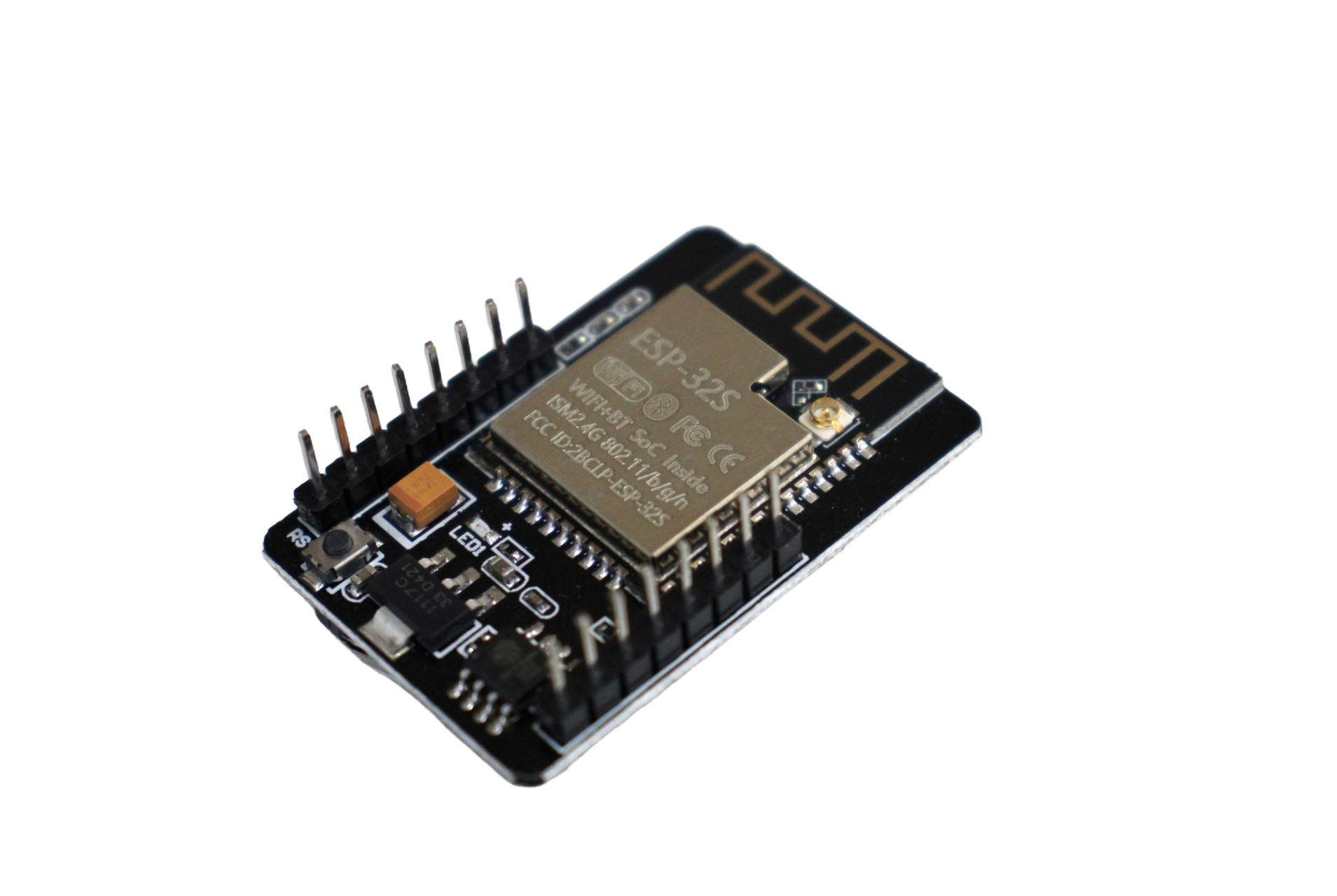
ESP32-CAM WiFi Module with OV2640 Camera 2MP for Face Recognition
The ESP32-CAM uses WROVER-compatible PSRAM to buffer OV2640 camera frames — the most affordable way to add camera vision to your IoT project.
Real-World Performance Impact of PSRAM
PSRAM does not make your ESP32 universally faster — it provides more RAM, which prevents out-of-memory crashes and allows larger data structures. Here’s how it impacts real-world performance:
Where PSRAM Helps Enormously:
- Camera streaming: Without PSRAM, you’re limited to 96×96 or 160×120 resolution. With PSRAM, you can buffer 1600×1200 UXGA frames.
- Web server with large pages: Serving HTML pages over 50KB from SPIFFS requires PSRAM to buffer the response before sending.
- LVGL graphics library: LVGL’s screen buffers for 320×240 displays are ~150KB — only possible with PSRAM.
- Audio processing: 1-2 second audio buffers for playback or recording comfortably fit in PSRAM.
- Large JSON parsing: ArduinoJson documents over 50KB need PSRAM allocation.
Where PSRAM Makes Little or No Difference:
- Simple MQTT/HTTP clients
- Sensor data collection and publishing
- BLE advertising/scanning
- GPIO-based control (relay, motor, LED)
- OTA firmware updates
Because PSRAM accesses are ~10x slower than internal SRAM, putting frequently-accessed data structures in PSRAM can actually slow down your code. Always profile with and without PSRAM for performance-critical code paths.
When to Choose WROOM vs WROVER
Use this simple decision framework:
Choose WROOM if:
- Your project is a Wi-Fi/BLE IoT node (sensor monitoring, MQTT client, home automation)
- You’re budget-conscious and don’t need large RAM
- Your firmware fits comfortably within internal heap (~280KB available)
- You’re doing industrial IoT, Modbus gateways, or protocol converters
- Learning/education projects
Choose WROVER if:
- You’re using an OV2640 or OV5640 camera module
- Your project uses a large TFT display (320×240 or larger) with LVGL
- You need to parse large JSON payloads (>50KB)
- You’re serving HTML/JavaScript files from a web server embedded in ESP32
- Audio recording or playback is involved
- You’re building a product and want headroom for future firmware growth
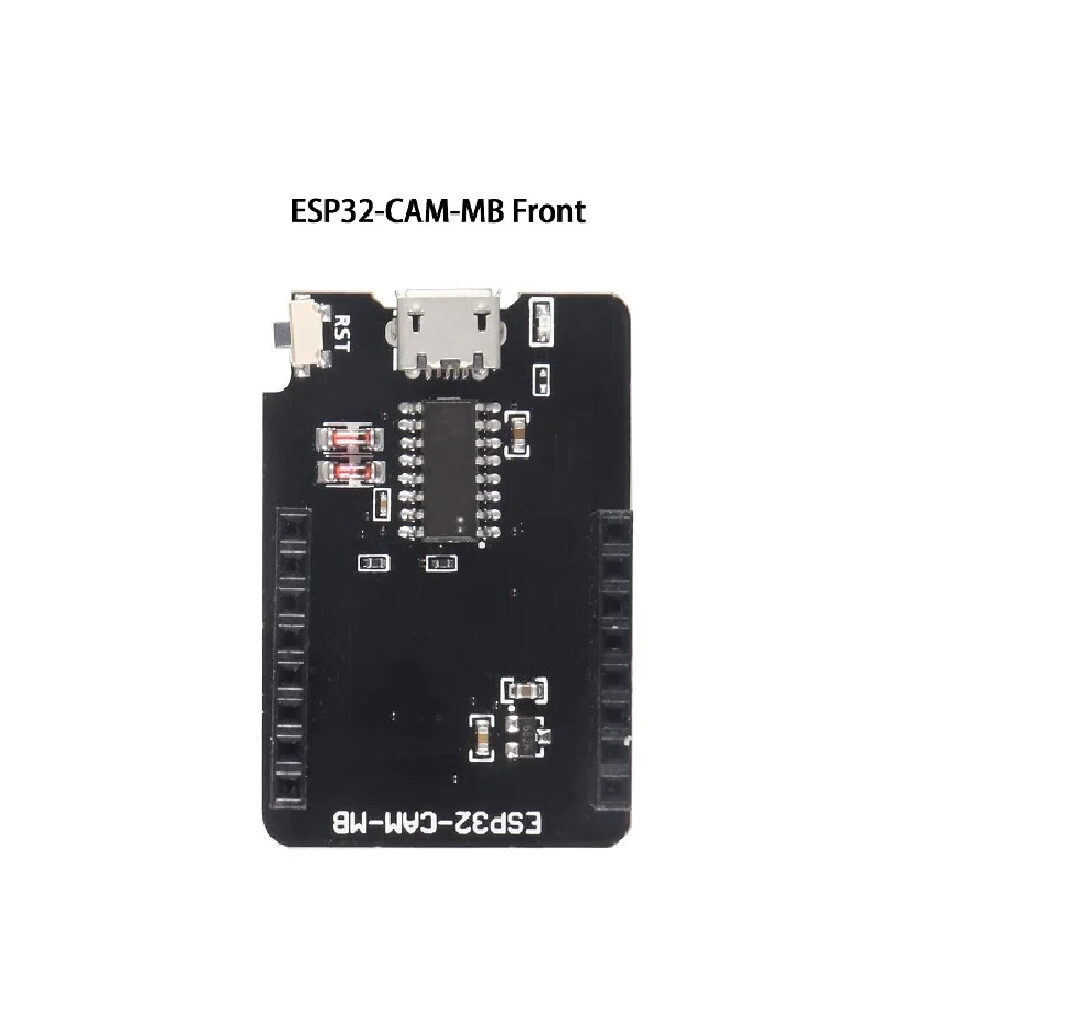
ESP32-CAM-MB Micro USB Download Module for ESP32 CAM
Makes programming the ESP32-CAM (WROVER-based) much easier — no jumper wires needed, just plug in USB and upload. Essential accessory for any ESP32-CAM project.
ESP32-CAM: A Practical WROVER Application
The ESP32-CAM is the most popular real-world example of WROVER’s PSRAM in action. Developed by Ai-Thinker, it packs:
- ESP32-S chip (single-core, lower cost version of ESP32)
- 4MB Flash + 4MB PSRAM (WROVER-inspired design)
- OV2640 camera interface (2MP, up to 1600×1200)
- MicroSD card slot
- On-board LED flash
Without PSRAM, the ESP32-CAM could only capture tiny 96×96 thumbnails. With 4MB PSRAM, it can stream MJPEG video at 640×480 15fps over Wi-Fi or capture 2MP JPEG stills. The PSRAM holds the entire frame buffer — typically 300KB to 1.5MB depending on resolution and JPEG quality.
For Indian makers building security cameras, attendance systems, or wildlife monitoring stations, the ESP32-CAM at under ₹400 is an extraordinary value. Pair it with the ESP32-CAM-MB programmer board to make firmware uploads painless.

Ai Thinker ESP32-CAM Development Board with AF2569 Camera Module
The definitive WROVER-based camera board — includes autofocus-capable AF2569 camera for sharper image capture compared to fixed-focus OV2640 modules.
Frequently Asked Questions
Can I add PSRAM to an existing WROOM board externally?
No, not practically. PSRAM connects to dedicated SPI pins on the ESP32 chip that are shared with the flash chip. Adding external PSRAM requires hardware modifications inside the module’s shielding — not feasible outside a PCB redesign. If you need PSRAM, buy a WROVER module or an ESP32-S3 board with built-in Octal PSRAM.
Does enabling PSRAM affect Wi-Fi or Bluetooth performance?
Minimally. PSRAM uses a dedicated SPI bus separate from the flash bus. However, at 80MHz PSRAM mode, there can be minor RF interference. Espressif’s modules are tested to comply with regulatory limits even with PSRAM enabled. In practice, Wi-Fi range is not noticeably affected.
How much of the 4MB PSRAM is actually available to my sketch?
All 4MB (4,194,304 bytes) is technically available, but some is reserved for OS/stack overhead. Typically you’ll see ~3.9MB free after boot. Use ESP.getFreePsram() to check at runtime. The internal SRAM (~300KB free) is unaffected — you now have two heaps.
Is WROVER supported in Arduino IDE or only ESP-IDF?
WROVER is fully supported in Arduino IDE. In Arduino IDE 2.x, select your WROVER board variant from the ESP32 board package. Enable PSRAM via Tools → PSRAM → Enabled. The ps_malloc() and ps_calloc() functions become available automatically.
What is the WROVER-IE variant vs WROVER-B?
WROVER-B uses a 4MB PSRAM chip and has only a PCB antenna. WROVER-IE (Improved Edition) uses an 8MB PSRAM chip and features both a PCB antenna and an IPEX/U.FL connector for an external antenna — making it better for enclosures. The -IE is the current production variant and is recommended for new designs.
Get Your ESP32 Module from Zbotic
Whether you need a WROOM DevKit for learning or an ESP32-CAM (WROVER-based) for camera projects, Zbotic.in stocks genuine modules at competitive prices with fast delivery across India.





Add comment