
The ESP32 BLE GATT server tutorial you’ve been searching for is here — a deep, hands-on guide that goes beyond blinking an LED over Bluetooth and teaches you the architectural concepts behind Bluetooth Low Energy. The ESP32’s built-in BLE stack (based on NimBLE or Bluedroid) makes it one of the most capable and affordable platforms for building BLE-enabled IoT devices — smart sensors, wearables, home automation bridges, and industrial monitoring nodes. This guide covers the complete GATT protocol stack, building a working BLE server with custom services and characteristics, implementing notifications, and connecting from an Android or iOS app.
BLE Fundamentals: GAP, GATT, Services and Characteristics
Before writing a single line of code, understanding the BLE protocol architecture is essential. BLE is not the same as classic Bluetooth (BR/EDR) — it’s a completely different protocol optimised for low power, short data bursts, and simple one-to-one or one-to-many device communication. BLE operates on 40 RF channels in the 2.4 GHz band and uses FHSS (Frequency Hopping Spread Spectrum) to avoid interference with WiFi on the same ESP32.
GAP: Generic Access Profile
GAP controls how BLE devices advertise themselves and how connections are established. Two key roles:
- Peripheral (Server): Broadcasts advertising packets at defined intervals (typically 100–500 ms). Your ESP32 GATT server runs in this role — it advertises its presence and accepts connections from central devices.
- Central (Client): Scans for advertising packets and initiates connections. Your smartphone app runs in this role.
Advertising packets contain the device name, UUID of advertised services, and optionally manufacturer-specific data — all within 31 bytes (extended advertising in BLE 5.0 allows up to 255 bytes).
GATT: Generic Attribute Profile
Once a BLE connection is established, communication happens via GATT. GATT organises data into a hierarchical structure:
- Profile: A collection of services (e.g., Heart Rate Profile, Environmental Sensing Profile).
- Service: Groups related characteristics. Identified by a 16-bit UUID (standardised by Bluetooth SIG) or 128-bit UUID (custom). Example: Battery Service = 0x180F.
- Characteristic: The actual data container. Each characteristic has a UUID, a value (up to 512 bytes), and properties that define allowed operations (Read, Write, Notify, Indicate).
- Descriptor: Metadata attached to a characteristic. The most important is CCCD (Client Characteristic Configuration Descriptor, UUID 0x2902), which the client writes to enable/disable notifications.
UUID Reference Table
| Service/Characteristic | 16-bit UUID | Properties |
|---|---|---|
| Generic Access Service | 0x1800 | – |
| Battery Service | 0x180F | – |
| Battery Level | 0x2A19 | Read, Notify |
| Environmental Sensing | 0x181A | – |
| Temperature | 0x2A6E | Read, Notify |
| Humidity | 0x2A6F | Read, Notify |
| Device Information | 0x180A | – |
ESP32 BLE Stack: NimBLE vs Bluedroid
ESP32 supports two Bluetooth stacks:
Bluedroid (Classic + BLE)
Bluedroid is Espressif’s port of the Android Bluetooth stack. It supports both Classic Bluetooth (for A2DP audio, SPP serial profile) and BLE. However, it consumes about 100 KB more RAM than NimBLE and is slower to initialise. Bluedroid is the default in the Arduino ESP32 core’s BLEDevice.h library.
NimBLE (BLE Only)
NimBLE is Apache’s open-source BLE-only stack ported to ESP-IDF. It uses approximately 50 KB less RAM than Bluedroid, initialises in ~100 ms instead of ~500 ms, and achieves better throughput. The Arduino NimBLE-Arduino library provides a nearly API-compatible replacement for Bluedroid’s BLEDevice.h. For new projects that don’t need Classic Bluetooth, always choose NimBLE.
In PlatformIO, add to your platformio.ini:
lib_deps = h2zero/NimBLE-Arduino@^1.4.1
Ai Thinker ESP32-C3-01M Wi-Fi + BLE Module
The ESP32-C3 natively supports Bluetooth 5.0 LE with improved range — perfect for BLE GATT server projects where the module will be mounted inside an enclosure away from the phone.
Building a BLE GATT Server with Arduino Framework
Here is a complete, working BLE GATT server for ESP32 using the NimBLE-Arduino library. This server exposes a custom service with two characteristics: one readable and one notifiable.
#include <NimBLEDevice.h>

// Custom 128-bit service and characteristic UUIDs
#define SERVICE_UUID        "4fafc201-1fb5-459e-8fcc-c5c9c331914b"
#define CHAR_READ_UUID      "beb5483e-36e1-4688-b7f5-ea07361b26a8"
#define CHAR_NOTIFY_UUID    "1c95d5e3-d8f7-413a-bf3d-7a2e5d7be87e"

NimBLEServer* pServer = nullptr;
NimBLECharacteristic* pReadChar = nullptr;
NimBLECharacteristic* pNotifyChar = nullptr;
bool deviceConnected = false;
uint32_t counter = 0;

class ServerCallbacks : public NimBLEServerCallbacks {
    void onConnect(NimBLEServer* pSrv, NimBLEConnInfo& connInfo) {
        deviceConnected = true;
        Serial.printf("Client connected: %sn", connInfo.getAddress().toString().c_str());
    }
    void onDisconnect(NimBLEServer* pSrv, NimBLEConnInfo& connInfo, int reason) {
        deviceConnected = false;
        NimBLEDevice::startAdvertising();
        Serial.println("Client disconnected, restarting advertising");
    }
};

void setup() {
    Serial.begin(115200);
    NimBLEDevice::init("ESP32-Zbotic-Sensor");
    NimBLEDevice::setPower(ESP_PWR_LVL_P9);  // Max TX power

    pServer = NimBLEDevice::createServer();
    pServer->setCallbacks(new ServerCallbacks());

    NimBLEService* pService = pServer->createService(SERVICE_UUID);

    // Read characteristic: client can poll this
    pReadChar = pService->createCharacteristic(
        CHAR_READ_UUID,
        NIMBLE_PROPERTY::READ
    );
    pReadChar->setValue("Hello from ESP32!");

    // Notify characteristic: ESP32 pushes updates
    pNotifyChar = pService->createCharacteristic(
        CHAR_NOTIFY_UUID,
        NIMBLE_PROPERTY::NOTIFY
    );

    pService->start();

    NimBLEAdvertising* pAdv = NimBLEDevice::getAdvertising();
    pAdv->addServiceUUID(SERVICE_UUID);
    pAdv->setScanResponse(true);
    pAdv->start();
    Serial.println("BLE GATT Server advertising...");
}

void loop() {
    if (deviceConnected) {
        // Send counter value as notification every second
        counter++;
        pNotifyChar->setValue(counter);
        pNotifyChar->notify();
        Serial.printf("Notified: %un", counter);
    }
    delay(1000);
}
Understanding Characteristic Properties: Read, Write, Notify
Each characteristic can have one or more properties that define what operations the GATT client (smartphone) can perform on it:
READ
The client can request the current value at any time. The server responds synchronously. Use for: device firmware version, configuration settings, last sensor reading. The server must update the characteristic’s value before the client reads it (or set it in a READ callback).
WRITE and WRITE_NR
The client sends data to the server. WRITE requires an acknowledgment (confirmed write); WRITE_NR (No Response) is fire-and-forget. Use for: sending commands, updating LED colour, changing sensor polling rate. Implement a NimBLECharacteristicCallbacks::onWrite() callback to process incoming data.
NOTIFY
The server pushes data to the client without the client needing to poll. Notifications are unconfirmed — they may be lost in a congested RF environment. Use for: sensor readings, counter values, status updates. The client must first write 0x0001 to the CCCD descriptor to enable notifications — this is handled automatically by most BLE apps.
INDICATE
Same as Notify but confirmed — the client must acknowledge each indication. This guarantees delivery but at the cost of throughput. Use for: critical alerts, commands that must not be missed (e.g., lock/unlock commands in a smart lock product).
Real Project: BLE Temperature Sensor with Notifications
Let’s build a practical BLE temperature sensor using the DHT11 sensor and ESP32. The ESP32 reads temperature and humidity every 2 seconds and sends them via BLE notifications to a connected smartphone.

DHT11 Temperature and Humidity Sensor Module with LED
The DHT11 with built-in LED indicator is the ideal beginner sensor for an ESP32 BLE GATT server project — connect to GPIO and broadcast temperature/humidity via Bluetooth to any smartphone app.
The DHT11 connects to GPIO 4. Add the DHT sensor library and NimBLE-Arduino to your project. In the firmware, use the BLE Environmental Sensing Service (0x181A) with standard Temperature Characteristic (0x2A6E) and Humidity Characteristic (0x2A6F) UUIDs — this makes the sensor compatible with any standard BLE health/environment app on Android or iOS without a custom app.
// Temperature value format: int16_t, unit 0.01 °C
// 25.00°C → 2500 (0x09C4)
int16_t temp_val = (int16_t)(temperature * 100);
pTempChar->setValue((uint8_t*)&temp_val, 2);
pTempChar->notify();

// Humidity value format: uint16_t, unit 0.01 %
uint16_t hum_val = (uint16_t)(humidity * 100);
pHumChar->setValue((uint8_t*)&hum_val, 2);
pHumChar->notify();
Open the nRF Connect app on your phone (Android or iOS), scan for “ESP32-Zbotic-Sensor”, connect, navigate to the Environmental Sensing service, and enable notifications on both characteristics. You’ll see live temperature and humidity updates on your phone without any custom app development.
BLE Security: Pairing and Bonding on ESP32
For IoT products deployed in real environments — smart locks, industrial sensors, medical devices — BLE security is non-negotiable. ESP32 NimBLE supports all BLE security modes:
Pairing Methods
- Just Works: No user confirmation — easiest but vulnerable to man-in-the-middle attacks. Acceptable for low-security applications like a BLE LED controller.
- Passkey Entry: A 6-digit PIN displayed on the peripheral (ESP32 serial output or display) is entered on the phone. Protects against passive eavesdropping.
- Numeric Comparison (BLE 4.2+): A 6-digit number shown on both devices. User confirms they match. Protects against MITM attacks.
- OOB (Out-of-Band): Uses NFC or QR code to exchange keys — highest security, requires additional hardware.
// Enable BLE security with passkey
NimBLEDevice::setSecurityAuth(BLE_SM_PAIR_AUTHREQ_SC | BLE_SM_PAIR_AUTHREQ_BOND);
NimBLEDevice::setSecurityPasskey(123456);
NimBLEDevice::setSecurityIOCap(BLE_SM_IO_CAP_OUT_ONLY); // Display passkey
Bonding stores the long-term key (LTK) in ESP32 NVS flash, so subsequent connections are instant without re-pairing — critical for user experience in consumer IoT products.
NimBLE with ESP-IDF for Production Firmware
For production ESP-IDF projects, NimBLE is included in the IDF component registry. The architecture uses an event-driven callback model with a NimBLE host task running on a dedicated FreeRTOS task. Key advantages over the Arduino wrapper:
- Full access to NimBLE’s L2CAP (Layer 2 Connection Oriented Channels) for custom protocols with 500+ byte MTU.
- BLE 5.0 extended advertising with 255-byte payload (more device info, manufacturer data).
- 2 Mbps PHY (BLE 5.0) support on ESP32-S3 for 2× the throughput at the same power level.
- BLE mesh networking for multi-device smart home automation.
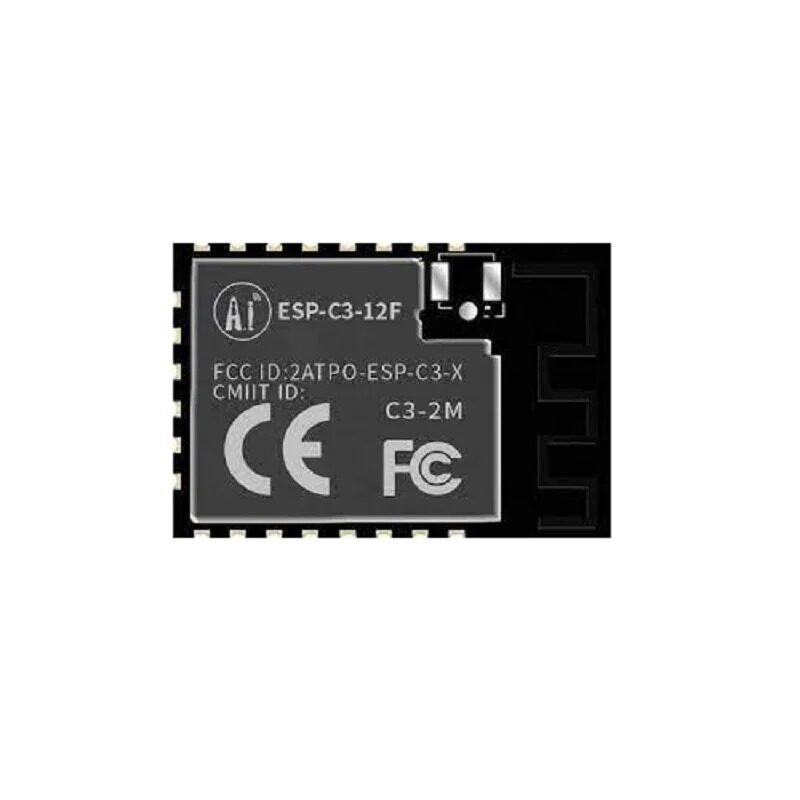
Ai-Thinker ESP32-C3-12F Wi-Fi + BLE Module
The ESP32-C3-12F with 4MB flash and PCB antenna is an excellent production module for BLE GATT server products — RISC-V architecture, Bluetooth 5.0 LE, and a compact form factor for product integration.
Frequently Asked Questions
What is the maximum BLE range I can expect from an ESP32?
In open air with maximum TX power, ESP32 BLE reaches 50–100 metres. In an indoor home or office environment with walls and interference, expect 10–30 metres. The ESP32-C3 and ESP32-S3 have improved RF front-ends and can achieve better range than original ESP32 modules. For extended range, use an IPEX antenna connector with an external PCB antenna.
Can ESP32 be a BLE central (scanner) and peripheral (server) simultaneously?
Yes — ESP32 supports simultaneous BLE advertising (peripheral role) and scanning/connection (central role). This is called a BLE Multi-Role configuration. One practical use case: an ESP32 BLE gateway that scans for BLE sensor beacons (central role) and simultaneously advertises its own GATT service to a phone app (peripheral role). Enable multi-role in NimBLE by configuring both NimBLEScan and NimBLEServer.
Why do BLE notifications stop after a few seconds on Android?
Android aggressively manages BLE connections to save battery. If the ESP32’s connection interval is too short (< 15 ms) or the supervision timeout is too low, Android may terminate the connection. Set the preferred connection parameters in your ESP32 firmware: minimum interval 15 ms, maximum interval 30 ms, supervision timeout 500 ms. In NimBLE: pServer->updateConnParams(connInfo.getConnHandle(), 12, 24, 0, 500).
How do I send data larger than the MTU size over BLE?
Standard BLE MTU is 23 bytes (20 bytes payload). After connection, the GATT client and server negotiate a larger MTU (up to 512 bytes in BLE 4.2, up to 2048 bytes in BLE 5.0). NimBLE negotiates MTU automatically. For payloads larger than the negotiated MTU, implement a fragmentation protocol in your application layer: split data into chunks, add sequence numbers, reassemble on the client side. Alternatively, use BLE 5.0’s larger PDU size or switch to a different transport (BLE L2CAP CoC channels allow 64 KB+ throughput).
Is ESP32 BLE compatible with iPhone/iOS?
Yes, all standard Bluetooth SIG-defined GATT services work with iOS Core Bluetooth without any special approval. Custom 128-bit UUID services also work. The key iOS restriction is that background BLE scanning is rate-limited — apps that need continuous background updates must use the Core Bluetooth state restoration API. For the device side (ESP32 firmware), no special configuration is needed for iOS compatibility beyond standard BLE spec compliance.
Build Your BLE IoT Project with Components from Zbotic
Zbotic.in has everything you need for ESP32 BLE projects: ESP32 development boards, ESP32-C3 modules, DHT11/DHT20 sensors, BME280, and battery shields — all available with fast shipping across India.







Add comment