
Reading your own brainwaves with an Arduino — what once seemed like science fiction is now a weekend project thanks to the NeuroSky MindWave EEG brain sensor. The MindWave headset uses a single dry electrode on the forehead to pick up microvolt-level electrical signals from the brain, processes them with NeuroSky’s proprietary ThinkGear ASIC, and outputs quantified mental state data (attention, meditation, raw EEG) over Bluetooth or UART. This guide covers everything from the neuroscience basics to full Arduino integration — including reading raw EEG data, plotting brainwave bands, and building real brain-computer interface (BCI) projects.
What Is EEG and What Does MindWave Measure?
Electroencephalography (EEG) is the measurement of electrical activity in the brain through electrodes placed on the scalp. Neurons in the brain communicate via electrical signals — when millions of neurons fire synchronously, they create detectable voltage fluctuations (in the range of 1–100 microvolts) that propagate through the skull and scalp to the surface.
Clinical EEG systems use 19–256 electrodes to map brain activity across regions. The NeuroSky MindWave takes a radically simpler approach: a single dry electrode on FP1 (forehead, above the left eye) and a reference clip on the ear. This is enough to capture the dominant mental state of the prefrontal cortex — which governs attention, focus, working memory, and executive function.
The MindWave outputs:
- eSense Attention: 0–100 scale indicating focused mental concentration
- eSense Meditation: 0–100 scale indicating relaxed, calm mental state
- Raw EEG: 512 samples/second, 16-bit signed integer
- Brainwave power bands: delta, theta, low-alpha, high-alpha, low-beta, high-beta, low-gamma, mid-gamma (8 bands, each as a 32-bit unsigned integer representing relative power)
- Signal quality: 0 = best, 200 = no signal
MindWave Hardware: ThinkGear Architecture
The heart of the MindWave is the ThinkGear Application-Specific Integrated Circuit (ASIC). This chip handles the entire EEG signal chain:
- Preamplification: The microvolt-level EEG signal is amplified 10,000× by a low-noise instrumentation amplifier
- Analog filtering: A bandpass filter passes 0.5–50 Hz (the physiological EEG band), rejecting power line noise and high-frequency artefacts
- Notch filtering: 50 Hz notch (or 60 Hz in US/Japan variants) removes mains frequency interference
- ADC: 12-bit ADC samples at 512 Hz
- DSP: On-chip FFT computes the 8 power bands in real-time; eSense algorithms output attention and meditation values
- Output: UART (ThinkGear serial protocol) at 57600 baud, also available over Bluetooth (MindWave Mobile version)
The MindWave (non-mobile) version has a 3.5 mm audio jack that outputs the raw ThinkGear serial data. With a TRRS-to-UART adapter, this connects directly to any microcontroller’s serial port. The MindWave Mobile uses Bluetooth and connects to smartphones or PC via a USB dongle.
Understanding Brainwave Bands
| Band | Frequency | Associated Mental State |
|---|---|---|
| Delta | 0.5–4 Hz | Deep sleep, unconsciousness |
| Theta | 4–8 Hz | Drowsiness, light sleep, creativity, REM |
| Low Alpha | 8–10 Hz | Relaxed alertness, visual processing |
| High Alpha | 10–12 Hz | Relaxed focus, meditation |
| Low Beta | 12–20 Hz | Active thinking, concentration |
| High Beta | 20–30 Hz | Anxiety, stress, active problem-solving |
| Low Gamma | 30–40 Hz | Cognitive integration, sensory binding |
| Mid Gamma | 40–50 Hz | Higher cognitive function, consciousness |
For most Arduino BCI projects, you will primarily work with the eSense attention and meditation values (which the ThinkGear chip already computes for you) and the delta/theta/alpha/beta band powers for more nuanced mental state detection.
Connecting MindWave to Arduino via UART
The MindWave (original wired version) exposes its ThinkGear serial output via the 3.5 mm audio jack:
- Tip: Serial TX (data from MindWave to Arduino)
- Ring: Ground
- Sleeve: VCC (3.3 V output, up to 50 mA)
Wire it to Arduino using a 3.5 mm TRRS breakout or a custom cable:
| 3.5mm Jack | Arduino Uno Pin |
|---|---|
| Tip (TX) | D2 (SoftwareSerial RX) |
| Ring (GND) | GND |
| Sleeve (3.3V) | Do NOT connect — use Arduino 3.3V for SD card etc. |
Use SoftwareSerial on D2 so you keep the hardware serial (D0/D1) free for debugging. The ThinkGear operates at 57600 baud, 8N1.
ThinkGear Serial Protocol Explained
The ThinkGear protocol uses a packet structure with synchronisation bytes and a checksum:
SYNC  SYNC  PLENGTH  [PAYLOAD]  CHECKSUM
0xAA  0xAA  N        N bytes    1 byte
Inside the payload, each data value is identified by a Code byte:
0x02— Poor signal quality (1 byte)0x04— Attention eSense (1 byte, 0–100)0x05— Meditation eSense (1 byte, 0–100)0x80— Raw EEG value (2 bytes, big-endian signed int16)0x83— ASIC EEG band powers (24 bytes: 8 bands × 3 bytes each)
The checksum is computed by summing all payload bytes, inverting the result, and masking to 8 bits: checksum = (~sum) & 0xFF.
Arduino Code: Reading Attention and EEG Data
Here is a complete Arduino sketch that parses the ThinkGear protocol and outputs attention, meditation, and signal quality to the Serial Monitor:
#include <SoftwareSerial.h>

SoftwareSerial mindWave(2, 3); // RX=D2, TX=D3 (TX not used)

// Packet parser state
byte payloadBuffer[256];
byte payloadLen = 0;
byte checksum = 0;
bool inPacket = false;

void processPayload(byte *data, byte len) {
  for (int i = 0; i < len; ) {
    byte code = data[i++];
    if (code == 0x02) {
      Serial.print("Signal Quality (0=best): ");
      Serial.println(data[i++]);
    } else if (code == 0x04) {
      Serial.print("Attention: ");
      Serial.println(data[i++]);
    } else if (code == 0x05) {
      Serial.print("Meditation: ");
      Serial.println(data[i++]);
    } else if (code == 0x80) {
      // Raw EEG: 2 bytes big-endian
      int16_t raw = (int16_t)((data[i] << 8) | data[i+1]);
      i += 2;
      // Print raw EEG for plotting
      Serial.print("Raw EEG: ");
      Serial.println(raw);
    } else if (code == 0x83) {
      // Skip extended code row
      i++; // length byte
      // 8 bands x 3 bytes each
      unsigned long delta = ((unsigned long)data[i]<<16)|((unsigned long)data[i+1]<<8)|data[i+2]; i+=3;
      unsigned long theta = ((unsigned long)data[i]<<16)|((unsigned long)data[i+1]<<8)|data[i+2]; i+=3;
      i += 18; // skip remaining 6 bands for brevity
      Serial.print("Delta: "); Serial.print(delta);
      Serial.print(" Theta: "); Serial.println(theta);
    } else {
      break; // Unknown code, abort parsing
    }
  }
}

void setup() {
  Serial.begin(115200);
  mindWave.begin(57600);
  Serial.println("MindWave Ready — put headset on and wait for signal");
}

void loop() {
  static byte syncCount = 0;
  static byte byteIndex = 0;
  static byte pLen = 0;
  static byte sum = 0;

  if (!mindWave.available()) return;
  byte b = mindWave.read();

  if (!inPacket) {
    if (b == 0xAA) { syncCount++; } else { syncCount = 0; }
    if (syncCount >= 2) { inPacket = true; syncCount = 0; byteIndex = 0; }
    return;
  }

  if (byteIndex == 0) { // PLENGTH
    pLen = b;
    if (pLen > 169) { inPacket = false; return; } // Invalid
    payloadLen = 0; sum = 0;
    byteIndex++;
  } else if (byteIndex <= pLen) { // Payload bytes
    payloadBuffer[payloadLen++] = b;
    sum += b;
    byteIndex++;
  } else { // Checksum byte
    byte expected = (~sum) & 0xFF;
    if (b == expected) processPayload(payloadBuffer, payloadLen);
    inPacket = false;
  }
}
For a working output, you must have good electrode contact — press the headset firmly against the forehead and ensure the ear clip makes metal contact with the earlobe. Signal quality 0 means perfect; 200 means no signal at all. eSense values of 0 mean the algorithm hasn’t computed a reliable value yet (usually takes 5–10 seconds after good contact).
BCI Project Ideas for Students and Hackers
- Mind-controlled LED brightness: Map the attention value (0–100) to PWM duty cycle on an LED — concentrate harder to make it glow brighter.
- Meditation game: Connect to an LCD and display a "calm-o-meter" — meditation value above 70 triggers a relaxing animation.
- Study focus tracker: Log attention values to an SD card over a 45-minute study session and plot focus vs time to find peak concentration periods.
- Drowsiness alarm: High delta and theta power with low attention triggers a buzzer alarm — useful for preventing sleep while studying or driving (prototype only).
- Mind-controlled servo: Think hard (high attention) to rotate a servo clockwise; relax to rotate counterclockwise — basic brain-robot interface.
- Neurofeedback trainer: Play a tone whose frequency corresponds to alpha wave power — helps users learn to voluntarily increase alpha (associated with relaxed focus).
Improving Signal Quality and Reducing Noise
- Skin preparation: Clean the forehead with an alcohol swab before use. Oil and dead skin cells increase electrode-skin impedance, degrading signal quality.
- Pressure and fit: The forehead sensor must make firm, consistent contact. Adjust the headband so there is no movement during measurement.
- Electrical environment: Avoid sitting near running motors, fluorescent lights, or phone chargers — all generate electromagnetic noise that bleeds into EEG frequencies.
- Muscle artefacts: Jaw clenching, eye blinking, and forehead movements generate EMG signals (100–1000 µV) that are 10–100× larger than EEG. Keep facial muscles relaxed.
- Power supply noise: If powering via USB from a laptop, the laptop’s power adapter can introduce 50/60 Hz noise. Use a battery pack instead for cleanest signals.
- Serial cable length: Keep the TRRS cable shorter than 30 cm to minimise induced noise. Use shielded cable for best results.
Recommended Products from Zbotic
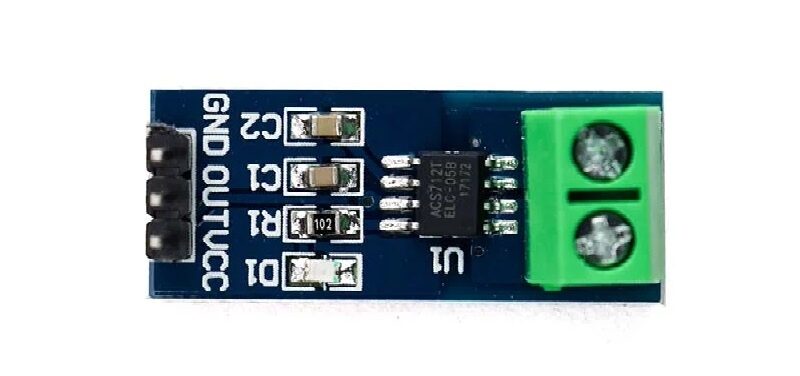
5A Range Current Sensor Module ACS712
Monitor the current drawn by your MindWave-Arduino system. The ACS712 helps verify stable, clean power delivery — critical for EEG signal quality, where power supply noise appears as artefacts.

MQ-135 Air Quality/Gas Detector Sensor Module For Arduino
Combine with the MindWave for a fascinating multimodal experiment: measure CO2 levels in a study room alongside EEG attention metrics to see how air quality affects focus.

DHT11 Temperature And Humidity Sensor Module with LED
Room temperature and humidity significantly affect cognitive performance. Combine DHT11 environmental readings with MindWave EEG data to correlate environment with mental states.
Frequently Asked Questions
Q1: Is the NeuroSky MindWave safe to use?
Yes. The MindWave is a passive measurement device — it only reads existing electrical signals from your scalp and applies no electrical current to your body. It operates at battery voltages (1.5 V AA) and has been certified by CE, FCC, and ROHS. It is used in schools, research institutions, and consumer products worldwide.
Q2: What is the difference between MindWave and MindWave Mobile?
The original MindWave outputs data via a 3.5 mm audio jack (ThinkGear serial at 57600 baud) — ideal for direct Arduino connection. The MindWave Mobile uses Bluetooth and includes a USB dongle for PC/Mac connection. For Arduino projects without Bluetooth, the original wired MindWave is simpler and cheaper.
Q3: How reliable are the attention and meditation values?
The eSense values are correlation-based metrics derived from multiple brainwave band ratios — they are not absolute or medically certified measurements. They are consistent within a session for the same person but vary significantly between individuals. Treat them as relative indicators useful for biofeedback and interactive projects, not as clinical measurements.
Q4: Can I run the MindWave on Arduino Nano instead of Uno?
Yes. The Arduino Nano uses the same ATmega328P as the Uno and supports SoftwareSerial on D2. Nano is ideal for portable battery-powered BCI projects due to its small size. Ensure the Nano is powered at 5 V and the MindWave jack output (3.3 V logic) is compatible with the SoftwareSerial RX pin (it is for most Nano boards).
Q5: Why do I get constant signal quality 200 (no signal)?
Common causes: ear clip not making metal contact with skin, forehead sensor not pressed firmly enough, hair between sensor and skin, or software not parsing the protocol correctly. First confirm the hardware by checking signal quality in the official NeuroSky app (PC/Mac) before debugging the Arduino code.
Q6: Can I use this for a B.Tech or M.Tech project?
Absolutely. EEG-based BCI systems are well-documented in academic literature. MindWave-Arduino projects have been published in IEEE conference proceedings. Interesting research topics include driver drowsiness detection, student focus monitoring, stress level quantification, and neurofeedback training systems.
Browse our complete selection of biosensors, environmental sensors, and Arduino modules at Zbotic. Everything you need for your BCI, robotics, or IoT project — with fast delivery across India.






Add comment