
Choosing the right Raspberry Pi microSD card is one of the most important decisions you’ll make for your project. The microSD card is your Raspberry Pi’s primary storage — it holds the OS, your data, and all your applications. A slow or unreliable card can turn a powerful Raspberry Pi 5 into a sluggish, crash-prone machine. In this comprehensive guide, we’ll explain everything you need to know about selecting the best microSD card for your Raspberry Pi in India.
Why Your MicroSD Card Choice Matters
The Raspberry Pi — unlike a traditional computer — uses a microSD card instead of a hard drive or SSD as its primary boot and storage medium. This means all OS reads and writes happen through the microSD interface, which is significantly slower and less durable than an SSD. A poor microSD card choice results in:
- Slow boot times — cheap cards can take 60+ seconds to boot Raspberry Pi OS
- Sluggish application performance — high read/write latency causes lag in applications
- SD card corruption — cheap or old cards fail unpredictably, especially during power loss
- Shortened lifespan — consumer cards are not designed for the continuous random write workload a Raspberry Pi generates
The Raspberry Pi OS performs many small, random read/write operations — log files, databases, temp files — which are much harder on flash storage than sequential writes like recording a video. This is why endurance-rated cards designed for continuous writing (like dashcam cards or high-endurance cards) outperform standard photography cards in Raspberry Pi applications.
Understanding SD Card Speed Classes
SD card specifications use several different rating systems, which can be confusing. Here’s a clear breakdown:
Speed Class (C2, C4, C6, C10)
The classic Speed Class rating guarantees a minimum sequential write speed. Class 10 (C10) guarantees 10 MB/s minimum sequential write. This is the bare minimum you should accept for Raspberry Pi use.
UHS Speed Class (U1, U3)
UHS (Ultra High Speed) ratings are more relevant for modern cards. U1 guarantees 10 MB/s minimum, U3 guarantees 30 MB/s minimum sequential write speed. For Raspberry Pi OS, U1 is adequate, but U3 is better for projects involving video recording or databases.
Application Performance Class (A1, A2)
This is the most important rating for Raspberry Pi use. The A1 and A2 ratings define minimum random read/write IOPS (Input/Output Operations Per Second):
| Rating | Random Read IOPS | Random Write IOPS | Sequential Write |
|---|---|---|---|
| A1 | 1,500 IOPS | 500 IOPS | 10 MB/s |
| A2 | 4,000 IOPS | 2,000 IOPS | 10 MB/s |
For Raspberry Pi use, always look for A1 or A2 rated cards. The random IOPS matter far more than sequential speed for OS workloads. An A2 card will feel noticeably more responsive than a standard C10 card even if both have the same sequential speed on paper.
Bus Interface: UHS-I vs UHS-II
UHS-II cards have a second row of contacts and can achieve much higher speeds (up to 312 MB/s), but the Raspberry Pi’s SD card interface only supports UHS-I (up to ~104 MB/s). Buying a UHS-II card for a Raspberry Pi is wasteful — it will fall back to UHS-I speeds. Save your money and buy a quality UHS-I card instead.

Raspberry Pi 5 Model 4GB RAM
Pair a fast A2-rated microSD card with the Raspberry Pi 5 4GB for noticeably better performance — the Pi 5’s faster SD interface takes full advantage of high-IOPS cards.
How Much Storage Do You Need?
The capacity you need depends on your project. Here’s a practical guide:
- 8GB: Minimum for Raspberry Pi OS Lite (no desktop). Only suitable for headless servers with minimal software.
- 16GB: Comfortable for Raspberry Pi OS with desktop for most projects. Good for retro gaming with limited ROMs.
- 32GB: Recommended sweet spot — plenty of room for OS + applications + data. Good price-to-capacity ratio in India.
- 64GB: Required for media servers, large ROM collections, or surveillance camera local storage.
- 128GB+: For NAS applications, large databases, or high-bitrate video recording. Consider using external USB storage instead at this size.
Note: The Raspberry Pi OS image itself takes about 4-6GB, leaving you with the rest for applications and data. Always buy at least 32GB for a comfortable experience.
Top MicroSD Cards for Raspberry Pi in India
Here are the most recommended microSD cards available in the Indian market, tested and trusted by the maker community:
1. Samsung EVO Plus (32GB/64GB/128GB)
The Samsung EVO Plus is the most popular choice among Raspberry Pi users globally and in India. It has an A1 rating, 100 MB/s read speed, and excellent reliability. Samsung’s proven flash memory technology makes it very resistant to corruption. Price in India: approximately ₹500-₹800 for 32GB.
2. SanDisk Extreme (32GB/64GB)
The SanDisk Extreme offers A2 rating and 160 MB/s read speed, making it one of the fastest UHS-I cards available. It’s officially recommended by the Raspberry Pi Foundation and works exceptionally well with Pi 4 and Pi 5. The V30 rating also makes it suitable for 4K video recording projects. Price: approximately ₹700-₹1,200 for 32GB.
3. Kingston Endurance (32GB/64GB/128GB)
The Kingston High Endurance card is specifically designed for continuous write workloads — dashcams and surveillance systems. It’s rated for 20,000 hours of continuous recording. For Raspberry Pi use as a server or always-on device, this card’s endurance rating is very attractive. Price: approximately ₹600-₹900 for 32GB.
4. Transcend High Endurance (32GB/64GB)
Transcend is a popular brand in India and their High Endurance microSD cards offer excellent value. They’re rated for 2,000 hours of Full HD video recording and perform reliably in embedded system applications. A good budget option for makers in India.
5. Samsung PRO Endurance (32GB/64GB/128GB)
For mission-critical applications — a Raspberry Pi running a home automation system, a security camera, or a production server — the Samsung PRO Endurance is the top choice. It’s rated for 100 years of video recording and is engineered for maximum flash endurance. It costs more but provides maximum peace of mind.

Raspberry Pi 5 Model 16GB RAM
The top-of-the-line Raspberry Pi 5 with 16GB RAM — pair it with an NVMe SSD via the PCIe slot for maximum storage performance, going beyond microSD limitations.
Tips to Extend MicroSD Card Lifespan
Even with the best microSD card, improper use will shorten its life. Follow these best practices to protect your card and data:
Enable Log2Ram
Log2Ram moves system log files from the SD card to RAM, dramatically reducing write cycles. Install it on any Raspberry Pi used as a long-term server:
echo "deb [signed-by=/usr/share/keyrings/azlux-archive-keyring.gpg] http://packages.azlux.fr/debian/ bookworm main" | sudo tee /etc/apt/sources.list.d/azlux.list
sudo apt install log2ram
Move /tmp to RAM (tmpfs)
Add the following lines to /etc/fstab to mount temporary directories in RAM:
tmpfs /tmp tmpfs defaults,noatime,nosuid,size=100m 0 0
tmpfs /var/tmp tmpfs defaults,noatime,nosuid,size=30m 0 0
Always Shut Down Properly
Never unplug your Raspberry Pi without running sudo shutdown -h now first. Sudden power loss during a write operation is the most common cause of SD card corruption and data loss.
Use a UPS or Battery HAT
For always-on projects, a UPS or battery HAT protects against unexpected power cuts — common in many parts of India. Configure the Pi to run a safe shutdown script when the battery reaches a critical level.
Backup Regularly with dd or rpi-clone
Back up your SD card image regularly to an external drive or cloud storage. Use rpi-clone for live incremental backups or dd for full image snapshots.
Alternatives to MicroSD: USB Boot and NVMe
For the best possible performance and reliability, consider moving beyond microSD entirely:
USB Boot (Pi 4 and Pi 5)
The Raspberry Pi 4 and Pi 5 can boot from a USB drive. A quality USB 3.0 SSD or flash drive will significantly outperform even the best microSD card. USB 3.0 SSDs can deliver 400+ MB/s read speeds versus ~100 MB/s for the best microSD cards.
NVMe via PCIe (Pi 5 only)
The Raspberry Pi 5 includes a PCIe FFC connector that, via an NVMe HAT, supports M.2 NVMe SSDs. This is the fastest storage option for the Pi — delivering 900+ MB/s read speeds, comparable to a laptop. For serious applications (database servers, media servers, AI workloads), NVMe is transformative. The Raspberry Pi 5 is the first Pi to make this practical.
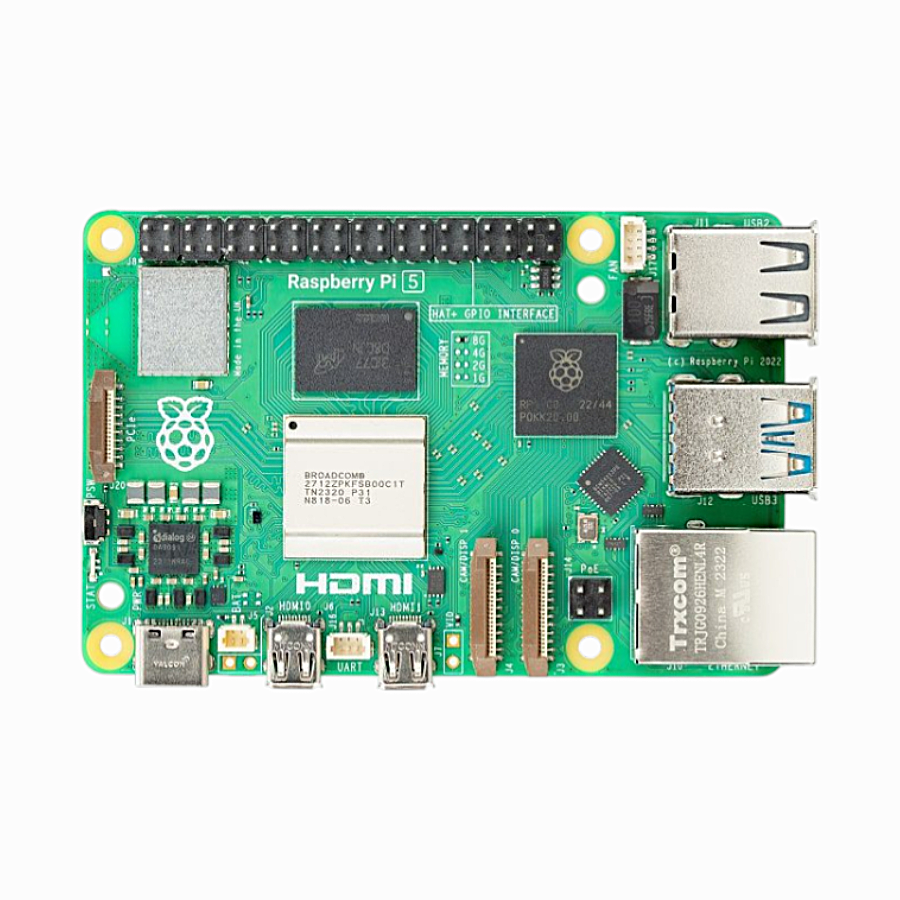
Raspberry Pi 5 Model 2GB RAM
Even the 2GB Raspberry Pi 5 benefits from fast microSD or NVMe storage — the Pi 5’s improved SD controller makes A2 card performance more noticeable than on previous Pi models.
Frequently Asked Questions
What is the minimum microSD card speed for Raspberry Pi OS?
The minimum recommended speed class is Class 10 (C10) or UHS Speed Class 1 (U1). However, for a smooth experience, always choose an A1 or A2 rated card, as random IOPS performance is more important than sequential speed for OS workloads.
Can I use a fake or cheap microSD card with my Raspberry Pi?
You can, but you will likely regret it. Fake or very cheap microSD cards sold on local markets often fail within weeks of heavy use, and many are counterfeit cards with false capacity ratings (e.g., a card sold as 64GB but actually only stores 8GB reliably). Always buy from reputable sources and verified brands.
How often should I replace my Raspberry Pi’s microSD card?
For casual use (a few hours per week), a good microSD card can last 5+ years. For always-on server applications, consider replacing the card every 2-3 years as a precaution, or switch to USB SSD or NVMe boot for better durability.
Is a 32GB microSD enough for Raspberry Pi with a desktop?
Yes, 32GB is comfortable for Raspberry Pi OS with the full desktop environment for most users. You’ll have approximately 22-26GB of usable space after the OS installation, which is sufficient for the majority of projects.
Can I use the same microSD card in different Raspberry Pi models?
Yes, the same microSD card works across different Raspberry Pi models, as they all use the same microSD slot and the same Raspberry Pi OS. You can even clone your card from a Pi 4 and boot it on a Pi 5, though some configuration adjustments may be needed.
Get Your Raspberry Pi Setup Ready
Browse Zbotic’s full Raspberry Pi product range — boards, accessories, sensors, and cameras — all available with fast shipping across India. We’re the trusted source for genuine electronics components for makers, students, and professionals.






Add comment