
CNC (Computer Numerical Control) routers have become increasingly accessible in India, with desktop models starting under ₹15,000 and capable hobbyist machines available in the ₹25,000–₹80,000 range. Whether you want to carve wooden signs, cut acrylic panels, engrave metal, or prototype PCBs, there is a CNC router that fits your needs and budget. This CNC router India buying guide for beginners covers everything you need to know to make the right first purchase in 2026.
1. Types of CNC Routers
Not all CNC routers are the same. Understanding the main categories helps you buy the right machine for your intended use:
Desktop GRBL CNC Routers (Candle / gSender)
These are the most popular entry-level machines in India. They use GRBL firmware on an Arduino-based controller (usually a CNC Shield V3 or GRBL-compatible board) and are controlled via USB from a laptop. Work area: typically 300×300mm to 3018 (300×180mm). Best for: wood engraving, soft PCB isolation, acrylic cutting, leather etching.
Popular Indian examples: Generic 3018 Pro, 3040 CNC, Woodpecker 3018 Pro.
Laser Engravers (diode laser + CNC frame)
Machines like the xTool D1 Pro, Sculpfun S30, and Atomstack A20 are CNC-motion-based laser engravers. They cannot cut hard materials like metal but excel at wood engraving, leather burning, and thin acrylic cutting. Laser engravers are generally faster and cleaner for 2D engraving than router-based machines.
Mid-Range CNC Mills
Machines in the ₹50,000–₹2,00,000 range with ball screws, aluminium extrusion or cast iron frames, and spindles of 500W–2.2kW. These can cut aluminium, brass, and hard wood reliably. Examples: CNC 6040, Workbee CNC, Shapeoko 3.
Industrial CNC Routers
₹3,00,000+ machines used in furniture, signage, and manufacturing. Outside the scope of this beginner guide, but worth knowing they exist for when your business scales up.
2. Key Specifications Explained
Work Area (X × Y × Z)
This is the maximum size material the machine can process. A 3018 machine has 300mm × 180mm work area. For Indian hobbyists working on sign making or furniture inlays, 600×400mm or larger is recommended. Always measure your most common workpiece size before buying.
Spindle Power and Speed
- 24V DC spindles (100–200W): Found on budget 3018/3040 machines. Only suitable for soft materials — MDF, balsa, foam, soft plastics, PCB.
- 300–500W spindles: Can cut hardwood and some aluminium at conservative feeds. Found on mid-range desktop routers.
- 800W–2.2kW spindles: Professional grade. Cut aluminium, brass, and hard woods at production speeds. Require proper VFD (Variable Frequency Drive) controllers.
- RPM range: Most hobby spindles run 8,000–24,000 RPM. Higher RPM with smaller bit diameter = better surface finish.
Frame Rigidity
Frame rigidity directly determines machining accuracy, especially in Z-axis. Budget 3018 machines use extruded aluminium frames that flex during cutting, limiting depth of cut. Mid-range machines use thicker profiles or steel frames. Industrial routers use cast iron. For cutting anything harder than MDF, prioritise frame rigidity over work area.
Lead Screw vs Belt Drive
- Lead screw (ACME or ball screw): More accurate, higher cutting forces, slower rapids. Ball screws are significantly more accurate than ACME screws. Use for CNC milling.
- Belt drive: Faster rapids, less accurate under cutting load, prone to belt stretch. Better for laser engravers and plasma cutters where no lateral cutting force is applied.
Controller and Firmware
- GRBL (open source): Arduino Uno/Nano based, USB connected, gSender / Candle / UGS as host software. Free, widely supported, huge community.
- Mach3/Mach4: Windows-only, parallel port (Mach3) or USB breakout, used on larger mid-range machines. ₹3,000–₹8,000 license cost.
- Offline controllers: Some CNC machines include standalone controllers with LCD displays that read G-code from SD cards without needing a laptop. Useful for workshop use.
3. Budget Guide for India 2026
| Budget Range | What You Get | Best For |
|---|---|---|
| ₹10,000–₹20,000 | 3018/3040 GRBL router, 24V DC spindle, ~200W, belt or lead screw drive | PCB isolation, soft wood/foam engraving, learning CNC concepts |
| ₹20,000–₹50,000 | 3040–6040 footprint, 300–500W spindle, better frame rigidity, offline controller option | Hardwood, acrylic, PCB prototyping, sign carving |
| ₹50,000–₹1,50,000 | 800W–1.5kW water/air cooled spindle, ball screws, aluminium or steel frame | Aluminium, brass, hardwood production runs, semi-professional use |
| ₹1,50,000+ | 2.2kW+ spindle, rack-and-pinion drive, large work area (600×900mm+) | Professional sign making, furniture, small-batch manufacturing |
4. What Materials Can CNC Routers Cut?
Budget Machines (200W DC spindle)
- Balsa, basswood, soft pine — limited depth of cut (1–2mm per pass)
- MDF up to 6mm — multiple shallow passes required
- Foam (EVA, XPS)
- PCB (FR4 isolation routing)
- Soft plastics (HDPE, LDPE)
- Acrylic up to 3mm — very slow feed rate required
Mid-Range Machines (500W–800W spindle)
- All above materials faster and cleaner
- Hardwood (teak, rosewood, oak) up to 20mm
- Acrylic up to 10mm
- Aluminium (with lubrication, conservative settings)
- Carbon fibre (requires carbide bits, dust extraction)
What CNC Routers Cannot Do (in budget range)
- Stainless steel or mild steel — requires rigid machine and coolant system
- Titanium — industrial only
- Glass cutting — specialised diamond tooling and ultrasonics needed
5. Software Ecosystem: CAD, CAM, and Controller
Free/Low-Cost CAD for India
- Fusion 360 (free for hobbyists/startups <₹8 lakh revenue): Industry-standard CAD + CAM in one tool. Excellent for complex 3D parts and PCB integration. The free tier is sufficient for most hobbyists.
- FreeCAD: Fully free, open-source, good for parametric 3D modelling. Path workbench handles basic CAM.
- Inkscape: Free vector drawing tool — perfect for 2D engravings, sign layouts, and SVG import into CAM software.
Free CAM Software
- Easel (Inventables): Browser-based, beginner-friendly, free tier. Excellent for first cuts.
- CAMotics: Free G-code simulator — visualise toolpaths before cutting. Essential for beginners.
- EstlCAM: Low-cost (₹2,500 one-time) and very user-friendly for 2D/2.5D work.
GRBL Controller Software
- gSender (Sienci Labs): Best modern GRBL host for beginners. Free, well-documented, runs on Windows/Mac/Linux.
- Candle: Lightweight GRBL sender, popular in India, simple interface. Free.
- Universal G-Code Sender (UGS): Java-based, highly reliable, good for production use. Free.
6. Popular CNC Routers Available in India
Entry Level: 3018 Pro CNC Router (₹10,000–₹18,000)
The 3018 Pro is the most widely sold CNC router in India for beginners. It has a 300×180×45mm work area, uses GRBL firmware, and comes with a 24V DC spindle. Assembly takes 2–4 hours. Limitations include flex in the Z-axis and a weak spindle, but it is an excellent learning machine.
Mid-Range: 3040 / CNC 6040 (₹35,000–₹90,000)
Larger work area, stronger spindle, and generally better build quality. The CNC 6040 with a 800W spindle and offline controller is a popular choice among Indian woodworkers and sign makers doing small-batch production.
Premium Hobbyist: Shapoko 3 / Millright Mega V (₹80,000–₹1,50,000 imported)
Belt-drive routers with rigid welded steel or thick aluminium frames. The Shapeoko 3 is popular among engineering students and startup hardware teams in India. Import duty and shipping add significantly to the price — factor in 30–40% over base USD price.
7. Buying Tips and What to Avoid
Buy From
- Amazon India and Flipkart for budget 3018 machines — easy returns if DOA
- Robu.in, Thinkrobotics, Zbotic.in for components and upgrades
- AliExpress for mid-range machines (longer wait, but better selection)
- IndiaMART for local suppliers on 4×8 feet production routers
Red Flags to Avoid
- No spindle speed specification: “High speed” without RPM numbers usually means a weak DC motor
- No controller board information: Generic Arduino CNC shield clones have poor stepper driver quality
- Claims of cutting aluminium on 3018: Technically possible but impractical — avoid sellers making it sound routine
- No community/forum: Machines without active communities leave you stuck when things go wrong
Must-Have Accessories
- End mills: V-bits (60°/90°) for engraving, flat 2-flute end mills for profiling, ball nose for 3D carving
- Collets: 1/8″ (3.175mm) and 1/4″ (6.35mm) are the two most common sizes in India
- Workholding: T-slot table or clamps — the machine is useless without secure workholding
- Dust collection: Even a shop vac connected with a hose massively improves visibility and cleans up hazardous MDF dust
- Sacrificial board: A waste board (MDF or HDPE) protects your machine bed and allows through-cuts
8. Setting Up Your First CNC Router
- Assemble carefully. Take your time with the mechanical assembly. Check squareness before final tightening — a non-square gantry produces angled cuts.
- Install GRBL. Flash the latest GRBL release to your Arduino. Most 3018 machines ship with an older version.
- Configure steps/mm. Use GRBL settings $100 (X), $101 (Y), $102 (Z) to set accurate steps per mm. For 3018 lead screw machines, 800 steps/mm is typical for Z. Verify by jogging 100mm and measuring with a ruler.
- Set work coordinate origin (zero). Use gSender to manually jog to your intended corner, then zero all axes. This sets your WCS (Work Coordinate System) — every G-code move is relative to this point.
- Run an air cut first. Run your G-code with the spindle off and the Z raised 20mm. Verify the toolpath traces the correct shape before cutting real material.
9. Safety Considerations
CNC routing is significantly more hazardous than 3D printing — spinning cutters, dust, and flying chips are all real risks:
- Eye protection: Safety glasses are mandatory. Acrylic chips are sharp and fly unpredictably.
- Dust mask: MDF dust contains formaldehyde and ultra-fine particles. Use an N95 or better at minimum. A proper dust collector is strongly recommended.
- Fire risk: Fast, shallow cuts on wood can cause smouldering. Never leave a CNC router unattended.
- Emergency stop: Wire a physical E-stop button in series with the spindle power. Many GRBL controllers have an E-stop input.
- Workholding: Never rely on hand pressure or tape alone for hard materials. A workpiece launching off the table at 20,000 RPM spindle contact is a serious injury risk.
10. Profitable CNC Applications in India
Indian makers and small businesses are finding commercial success with CNC routers in these niches:
- Personalised wooden nameplates and signage: High demand at exhibitions, gifting occasions, and residential building projects.
- Custom jewellery and trophy engraving: Brass and acrylic trophies with personalised engraving.
- PCB prototyping: Electronics startups and students use small CNC routers for rapid PCB prototyping before ordering manufactured boards.
- Architectural models: Architecture colleges and design firms use MDF CNC cuts for scale models.
- Custom guitar parts: The Indian custom guitar/instrument market is a growing niche for precision wood CNC work.
- Drone frame cutting: Carbon fibre and G10 fibre-glass frame cutting for FPV drones (requires carbide tooling and dust extraction).
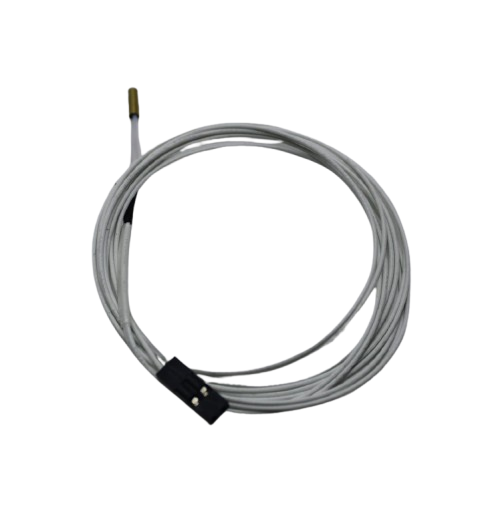
100k NTC Thermistor with Copper Tip for MK8 Extruder
If you are building or upgrading a CNC router with a heated bed or temperature monitoring, a reliable NTC thermistor ensures accurate temperature readings for your controller.
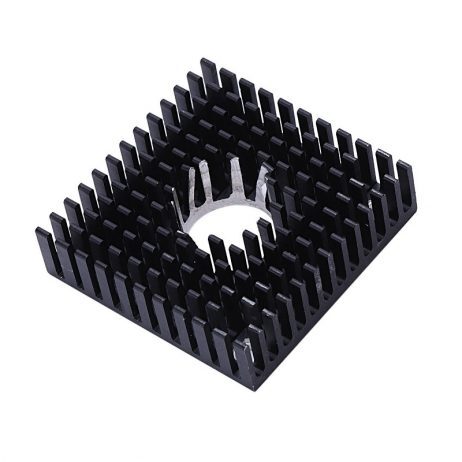
B-Type Aluminium Heat Sink for MK7/MK8 Extruder
CNC controller boards and stepper drivers generate significant heat during long jobs. Proper heat sinking on your stepper drivers prevents thermal throttling and missed steps during multi-hour cuts.
Frequently Asked Questions
What is the best CNC router for beginners in India under ₹20,000?
The 3018 Pro GRBL CNC router is the best entry-level option in India under ₹20,000. It has a 300×180mm work area, uses widely supported GRBL firmware, and has an enormous online community with tutorials and resources. It cuts soft wood, foam, PCBs, and acrylic well. Its limitations (small work area, weak spindle) are acceptable for learning CNC fundamentals before investing in a larger machine.
Can a budget CNC router cut aluminium?
A 300–500W spindle CNC router can cut aluminium, but it requires very conservative settings: 0.1–0.2mm depth of cut per pass, slow feed rate (200–400mm/min), WD-40 or cutting oil as lubricant, and a sharp 2-flute carbide end mill. Budget 3018 machines with 24V DC spindles can barely scratch aluminium and are not suitable for aluminium cutting. A rigid frame and proper spindle power (800W minimum) are necessary for reliable aluminium work.
Do I need a laptop to run a CNC router?
Most GRBL-based CNC routers require a USB connection to a laptop running gSender, Candle, or similar software during the cut. However, some machines include offline controllers with SD card slots — you upload G-code to a card, insert it, and run the job without a laptop. Offline controllers are convenient for workshop environments. Klipper-based machines can be operated via a Raspberry Pi web interface.
What software do I need to design and cut with a CNC router?
You need three types of software: CAD (design), CAM (generate toolpaths), and a GRBL sender (run the machine). For beginners, Fusion 360 handles both CAD and CAM for free. For simpler 2D work, Inkscape (design) + Easel (CAM + sender) is the easiest combination. Run CAMotics to simulate toolpaths before your first real cut to avoid mistakes on expensive material.
Is a CNC router a good investment in India for a home business?
Yes, especially for personalised products (nameplates, gifts, trophies), PCB prototyping, and architectural model making. A ₹30,000–₹50,000 CNC router can generate ₹5,000–₹15,000 per month in personalised product sales through platforms like Etsy India, Amazon Handmade, or local corporate gifting contracts. The key is finding a niche with consistent demand rather than trying to compete on commodity items.
Get Started with CNC and 3D Printing
Zbotic stocks CNC and 3D printing components, stepper drivers, hotend accessories, and maker supplies for hobbyists and professionals across India. Browse our full catalogue.







Add comment