
When choosing a display for a robotics project, most makers focus on size and resolution — but display refresh rate and response time for robotics are equally critical parameters that directly affect how smoothly your robot’s feedback interface works. A slow-refreshing display on a fast-moving robot arm shows stale position data. A high-response-time screen on an FPV drone camera feed looks blurry and disorienting. This guide explains what refresh rate and response time actually mean, how they differ across display technologies (LCD, TFT, OLED, ePaper), and how to choose the right display for each type of robotic application.
Refresh Rate vs Response Time: Key Definitions
These two terms are often confused but measure completely different things:
Refresh Rate
Refresh rate (measured in Hz or FPS) is how many times per second the display controller updates the screen content. A display refreshing at 60 Hz updates 60 times per second. In robotics, this determines how frequently you can push new data to the screen — joint angles, motor RPM, battery voltage, sensor readings.
For most embedded displays connected via SPI (like OLED and TFT modules), the actual achievable refresh rate is limited by the SPI clock speed and the number of bytes that need to be transferred, not by the display controller’s internal refresh rate.
Response Time
Response time (measured in milliseconds) is how quickly a pixel changes from one state to another — typically measured as the time for a pixel to go from black to white and back (BWB), or grey-to-grey (GTG). A 5ms response time means each pixel needs 5ms to fully switch. At low response times, fast-moving content appears sharp; at high response times, it appears blurred with ghosting trails.
Response time is critical for displays showing fast-moving video or rapidly changing graphics (robot arm telemetry with live camera feed). For mostly static dashboards that update every few seconds, response time matters very little.
Why Both Matter Together
A display with a 60Hz refresh rate but 20ms response time will still show motion blur, because each frame changes before pixels finish transitioning. Conversely, a display with 1ms response time but a 10Hz refresh rate updates too slowly to show smooth motion. For robotics, you need both numbers to be appropriate for your use case.
Display Technologies Compared for Robotics
TFT LCD (ILI9341, ILI9488, ST7789)
The most common display type in maker robotics projects. TFT LCDs use liquid crystal cells backlit by LEDs. Response time is typically 8–25ms (grey-to-grey), refresh rate via SPI is limited to 20–60 FPS depending on resolution and clock speed.
Best for: Status dashboards, telemetry displays, colour UI panels, parameter tuning menus on industrial robots.
Weaknesses: Limited viewing angle (IPS panels are better than TN), backlight consumes power continuously, not readable in very bright outdoor sunlight without backlight boost.
OLED (SSD1306, SH1106, SSD1351)
OLED displays have the fastest response times of any display technology used in maker electronics — typically under 1ms. Each pixel emits its own light, so pixels turn on and off almost instantly. This makes OLED excellent for high-frequency numerical displays (PID tuning, encoder counts, motor current).
Monochrome OLEDs (0.96-inch SSD1306) have limited resolution (128×64) but are fast and power-efficient. Colour OLEDs (SSD1351, 128×128) offer vivid colour with sub-millisecond response but are more expensive and have limited size options in the Indian market.
Best for: Fast-updating numerical displays, oscilloscope-style waveform displays on Arduino, status indicators on robot enclosures.
Weaknesses: Burn-in if a static image is shown for hours. Moderate brightness (difficult to read in direct sunlight). Small available sizes for SPI variants.
ePaper / E-Ink
ePaper has the slowest refresh rate of any display type — a full refresh takes 1–4 seconds. However, it consumes zero power when static and is readable in any lighting condition including direct Indian summer sunlight.
Best for: Status boards that change infrequently (battery level, connected status, configuration parameters), outdoor robots, warehouse robots showing order IDs.
Weaknesses: Completely unsuitable for any application requiring more than 1 update per 3 seconds. Ghosting visible between full refreshes. Colour variants (three-colour) are even slower.
SPI vs Parallel Interface
Most hobbyist displays use SPI (Serial Peripheral Interface) which transfers one bit at a time on a single data line. Parallel interfaces (8-bit or 16-bit) transfer 8 or 16 bits simultaneously — up to 16x faster. Parallel displays are used on shields like the Arduino Mega TFT shield and can achieve 60+ FPS at 320×240. For high-performance robotics displays, parallel interface is preferred if the microcontroller has enough GPIO pins.

BMP280 Barometric Pressure and Altitude Sensor I2C/SPI Module
Monitor atmospheric pressure for altitude-aware robotics. The BMP280’s 26Hz output rate matches well with displays refreshing at 10–30 FPS.
SPI Bandwidth: The Real Bottleneck
When working with SPI-connected TFT or OLED displays on ESP32 or Arduino, the display controller’s rated refresh rate is rarely the limiting factor. Instead, SPI transfer time determines your maximum FPS. Here is the math:
| Display | Resolution | Bytes/Frame | SPI @ 40MHz → FPS |
|---|---|---|---|
| SSD1306 OLED | 128×64 mono | 1,024 | ~4,000 FPS (limited by I2C) |
| ILI9341 TFT | 320×240 16-bit | 153,600 | ~26 FPS |
| ILI9488 TFT | 320×480 16-bit | 307,200 | ~13 FPS |
| SSD1351 OLED | 128×128 16-bit | 32,768 | ~122 FPS |
Note: ESP32 SPI with DMA can reach 80MHz; Arduino Uno is limited to 4MHz (8x slower than these estimates). Use TFT_eSPI with DMA enabled on ESP32 for maximum throughput.
The key insight: for a 320×480 TFT showing full-frame updates at 13 FPS, you might think that is sufficient. But if you need to update 10 times per second and your display takes 77ms per full frame, your robot loop is blocked for 77ms per update — a significant delay in a real-time control system. The solution is partial updates.
Which Display for Which Robot?
Matching display characteristics to application requirements:
Line-Following Robot / Obstacle Avoidance Robot
Needed: Low power, basic status (speed, direction, sensor state). Refresh rate needed: 2–5 FPS.
Recommendation: 0.96-inch SSD1306 OLED (I2C). Tiny, low power, fast enough, shares I2C with other sensors.
Robotic Arm with PID Control
Needed: Real-time joint angle feedback, PID parameters display, live adjustment. Refresh rate needed: 20+ FPS.
Recommendation: 1.3-inch or 1.5-inch SPI OLED (SSD1351) or small TFT with partial updates. OLED’s sub-millisecond response eliminates readout blur during fast movements.
ROS Robot (Raspberry Pi based)
Needed: Multi-widget dashboard, map thumbnail, camera feed, topic values. Refresh rate needed: 15–30 FPS.
Recommendation: 3.5-inch ILI9486 TFT via SPI, driven by fbcp-ili9341 mirroring the Pi’s framebuffer. Use LVGL or pygame for the UI.
Autonomous Outdoor Robot
Needed: Status board readable in sunlight, low power during standby. Refresh rate needed: 0.1 FPS (update every 10+ seconds).
Recommendation: 2.9-inch or 4.2-inch ePaper display. Zero power when static, perfect sunlight readability.
Drone FPV / Telemetry OSD
Needed: Extremely fast update, overlay text on video. Refresh rate needed: 60+ FPS.
Recommendation: Dedicated OSD chips (MAX7456 for analog video) or digital VTX with built-in OSD. Standard TFT/OLED displays are not suitable for OSD applications.

DHT20 SIP Packaged Temperature and Humidity Sensor
Fast I2C sensor ideal for robotics display projects. 2-second measurement interval matches well with a display refresh rate of 0.5 FPS for environmental monitoring robots.
Partial Update Strategies for Better Performance
The single most effective technique for improving perceived display performance in robotics is partial updates — only redrawing screen regions that have changed. This reduces SPI data volume dramatically:
- Updating a 60×20 pixel battery percentage bar: 2,400 bytes (vs 307,200 for full frame on 320×480) = 128x less data
- Updating a 100×30 pixel RPM counter: 6,000 bytes = 51x less data
Implementation with TFT_eSPI on ESP32:
// Set viewport to only update the RPM counter area
tft.setViewport(10, 50, 120, 40);
tft.fillScreen(TFT_BLACK); // clears only the viewport
tft.setCursor(0, 10);       // coordinates are now relative to viewport
tft.printf("RPM: %d", currentRPM);
tft.resetViewport();         // restore full-screen mode
On OLED displays with SSD1306, you can define a display window (display.startscrollright() or manually set column/page addresses) for similar partial updates. The U8g2 library for Arduino provides excellent partial update support with its tile-based rendering engine.
For very fast robotics applications, use double-buffering: draw the next frame in a RAM buffer (DMA-safe on ESP32) while the current frame is being sent to the display via SPI DMA. This prevents tearing and allows the robot’s main loop to continue executing during display transfer.
Measuring Actual Display FPS
Do not assume — measure. Here is a simple FPS counter for your robotics display:
unsigned long frameCount = 0;
unsigned long lastFPScheck = 0;

void loop() {
  unsigned long start = micros();

  // Your display update code here
  drawRobotStatus();

  unsigned long elapsed = micros() - start;
  frameCount++;

  if (millis() - lastFPScheck >= 1000) {
    Serial.printf("FPS: %lu, Frame time: %luusn",
                  frameCount, elapsed);
    frameCount = 0;
    lastFPScheck = millis();
  }
}
Use a GPIO pin toggled high at the start and low at the end of each display write — measure with a logic analyser or oscilloscope to see exact SPI timing. This is essential for real-time robotics where display write time must be budgeted alongside sensor reads and motor control loops.
Displaying Real-Time Sensor Feedback
The display in a robotics project is ultimately a feedback interface for sensor data. Matching sensor update rate to display refresh rate avoids wasted cycles or stale data:
| Sensor | Max Update Rate | Recommended Display Refresh |
|---|---|---|
| DHT11 Temperature | 0.5 Hz (1/2s) | 0.5 FPS |
| DHT20 Temperature | 2 Hz (every 2s is fine) | 1–2 FPS |
| BMP280 Pressure | 26 Hz max | 5–10 FPS |
| ACS712 Current | ADC limited (~1kHz) | 10–30 FPS (averaged) |
| Ultrasonic (HC-SR04) | 20 Hz | 10–20 FPS |
| LiDAR Distance | 100–300 Hz | 20–30 FPS |
A common mistake is updating the display faster than sensors can provide new data. This wastes SPI bandwidth and MCU cycles redrawing the same values. Structure your code with different timer intervals for each data source, updating the display section for each sensor only when new data is available.
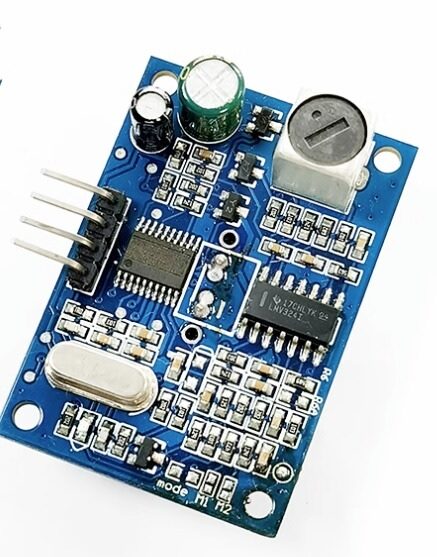
A86 JSN-SR04T Waterproof Ultrasonic Rangefinder Module Version 3.0
Waterproof ultrasonic distance sensor for outdoor robots. At 20Hz update rate, pairs well with a TFT display refreshing at 10-20 FPS for live distance readout.
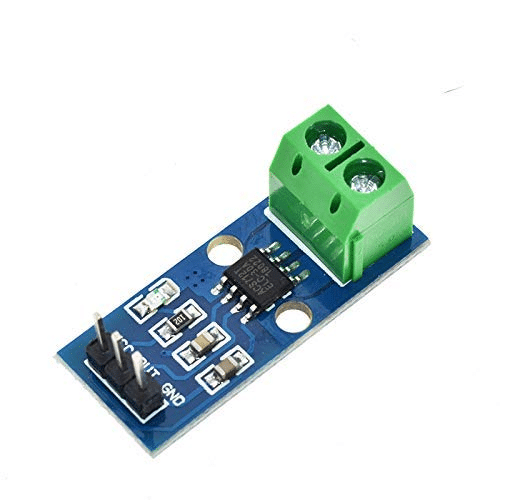
30A Range Current Sensor Module ACS712
Monitor motor current in real time on your robotics display. The 30A variant handles heavy-duty robot motors and actuators, readable via Arduino ADC.
Frequently Asked Questions
Q: What refresh rate do I actually need for a robotics display?
For dashboards showing sensor numbers (temperature, voltage, distance), 2–5 FPS is sufficient. For live waveform displays (current vs time, PID error plots), 10–20 FPS. For video-like displays (camera feed overlays), 30+ FPS. Most maker robotics displays fall in the 2–20 FPS category.
Q: Does OLED burn-in affect robotics displays?
Burn-in is a real concern if the display shows static content (like a label “Motor RPM:”) for hundreds of hours while pixels in that region stay lit. Mitigate by using a screen saver (blank display after 10 minutes of inactivity) and periodically inverting display colours. For robotics in active use, burn-in is rarely an issue.
Q: Can I use multiple displays on one ESP32?
Yes — multiple SPI displays share the MOSI, SCLK, and MISO lines but have separate CS (chip select) pins. Switch between displays by toggling the CS pin. I2C displays (like SSD1306) can be connected with different I2C addresses (0x3C and 0x3D). Driving multiple displays simultaneously reduces per-display FPS proportionally.
Q: Why does my TFT display tear (show partial frames)?
Tearing occurs when the display controller reads the GRAM buffer while the host is writing new data. Use hardware vertical sync (VSync) if your display supports it, or synchronise writes to the display’s internal refresh cycle. On TFT_eSPI, DMA-based transfers minimise (but don’t eliminate) tearing. A full-screen filled with a single colour is the most tearing-prone operation.
Q: Is a 128×64 OLED fast enough for displaying motor encoder counts in real time?
Yes — an SSD1306 over I2C at 400kHz (fast I2C) can refresh the full 128×64 screen at approximately 25 FPS. Over SPI at 4MHz, it is much faster (around 120 FPS). For encoder counts changing at 1kHz, average and display at 10–25 FPS — the human eye cannot read numbers faster than ~5 FPS anyway.
Choose the Right Components for Your Robotics Display
Zbotic stocks sensors, display modules, and microcontroller boards optimised for robotics projects, with fast delivery across India. Whether you are a student building your first line-follower or an engineer developing an industrial robot HMI, we have the components you need.





Add comment