
Flex sensors are one of the most versatile components in the maker and robotics toolkit. Whether you are building a sign-language glove, a rehabilitation monitoring device, a robotic hand, or a VR controller, the flex sensor is the go-to component for measuring bending and flexion. In this comprehensive tutorial, we will explore how flex sensors work, how to wire them up with Arduino, write working code, and build real-world projects around bending detection.
What Is a Flex Sensor?
A flex sensor is a variable resistor that changes its resistance in response to bending or flexion. When the sensor is flat, it has a nominal resistance (typically 10 kΩ to 50 kΩ depending on the model). As you bend the sensor — either along its length or across its surface — the resistance increases proportionally to the degree of bend. This makes it ideal for any application where you need to detect or measure angle and movement.
The most common flex sensors available to hobbyists come in two sizes: 2.2 inches and 4.5 inches. The longer version offers greater sensitivity and is preferred for full-finger detection on gloves, while the shorter version suits smaller joints or compact enclosures.
Flex sensors have found their way into consumer electronics (Nintendo Power Glove used them in the 1980s!), medical rehabilitation devices, industrial robot fingers, VR and AR interaction gloves, and musical instruments that respond to hand gestures.
How Does a Flex Sensor Work?
The core of a flex sensor is a strip of flexible substrate (usually polyimide) coated with a resistive carbon-based ink. When the sensor is straight, the conductive particles in the ink are evenly distributed, giving a stable nominal resistance. When you bend the sensor, the substrate stretches on one side, causing the conductive particles to separate slightly, which increases electrical resistance.
This relationship between bending angle and resistance change is roughly linear over the usable range of the sensor, making it easy to map ADC readings to real-world angles using simple math or a lookup table.
Key formula: Using a voltage divider circuit with a fixed resistor R_fixed and the flex sensor R_flex, the output voltage is:
V_out = V_in × R_fixed / (R_fixed + R_flex)
Your Arduino reads V_out via an analog pin and you can calculate R_flex, then map it to a bend angle.
Types of Flex Sensors
There are two major variants you will encounter:
- Unidirectional flex sensors: These are the standard type. They only change resistance when bent in one direction (the direction the resistive coating faces). Bending in the opposite direction has minimal effect. The SparkFun-style sensors fall in this category.
- Bidirectional flex sensors: These change resistance when bent in either direction, useful for applications where the sensor can flex both ways, such as a wrist joint or a spring mechanism.
You will also encounter stretch sensors, which measure elongation rather than bending, but flex sensors remain the most common choice for glove-based projects.
Key Specifications
Before selecting a flex sensor, review these critical parameters:
- Flat resistance: Typically 10 kΩ (2.2″) or 25 kΩ (4.5″)
- Resistance at 90° bend: Typically 40 kΩ to 100 kΩ
- Operating voltage: Up to 5V DC (use in voltage divider, not direct current)
- Lifecycle: Around 1 million bends before noticeable degradation
- Operating temperature: -35°C to +80°C
- Repeatability: ±2% — suitable for relative measurements, not precision absolute angle sensing
For applications requiring higher precision, consider combining flex sensors with IMUs (accelerometers/gyroscopes) for sensor fusion.
Wiring Flex Sensor to Arduino
The flex sensor is a passive component — it has no polarity. Connect it using a simple voltage divider:
- Pin 1 (top of flex sensor): Connect to Arduino 5V
- Pin 2 (bottom of flex sensor): Connect to one end of a 47 kΩ resistor AND to Arduino analog pin A0
- Other end of 47 kΩ resistor: Connect to GND
The 47 kΩ resistor is chosen to be in the middle of the sensor’s resistance range (10–100 kΩ), giving you maximum ADC resolution across the full bending range. You can experiment with values between 22 kΩ and 100 kΩ depending on your sensor’s specific characteristics.
For a 5-finger gesture glove: Use 5 flex sensors, each with its own voltage divider resistor, connected to A0 through A4 on Arduino Uno (or use an analog multiplexer for more fingers).
Arduino Code for Bending Detection
Here is a complete Arduino sketch that reads the flex sensor, converts it to a resistance value, and maps it to a bend angle:
// Flex Sensor Bending Detection
// Zbotic.in - Sensors & Measurement Tutorial

const int FLEX_PIN = A0;    // Analog pin connected to flex sensor
const float VCC = 5.0;      // Supply voltage
const float R_DIV = 47000.0; // Voltage divider resistor (47 kΩ)

// Calibration values (measure these for your specific sensor)
const float STRAIGHT_RESISTANCE = 10000.0;  // Resistance when flat (~10 kΩ)
const float BEND_RESISTANCE = 70000.0;       // Resistance at 90° bend

void setup() {
  Serial.begin(9600);
  pinMode(FLEX_PIN, INPUT);
  Serial.println("Flex Sensor Bending Detection Ready");
}

void loop() {
  // Read the raw ADC value (0-1023)
  int rawADC = analogRead(FLEX_PIN);

  // Convert ADC reading to voltage
  float voltage = rawADC * VCC / 1023.0;

  // Calculate flex sensor resistance using voltage divider formula
  // V_out = VCC * R_DIV / (R_FLEX + R_DIV)
  // Rearranged: R_FLEX = R_DIV * (VCC / V_out - 1)
  float flexResistance = R_DIV * (VCC / voltage - 1.0);

  // Map resistance to bend angle (linear approximation)
  float bendAngle = map(flexResistance, STRAIGHT_RESISTANCE, BEND_RESISTANCE, 0, 90);
  bendAngle = constrain(bendAngle, 0, 90);

  Serial.print("Raw ADC: ");
  Serial.print(rawADC);
  Serial.print(" | Resistance: ");
  Serial.print(flexResistance / 1000.0, 1);
  Serial.print(" kΩ | Bend Angle: ");
  Serial.print(bendAngle, 1);
  Serial.println("°");

  delay(100);
}
Upload this sketch, open Serial Monitor at 9600 baud, and bend the sensor to see live resistance and angle readings.
Building a Gesture Detection Glove
A gesture detection glove using flex sensors is one of the most popular and impactful projects in the maker community. Here is how to build a basic version:
Components needed
- 5× flex sensors (2.2″ for fingers)
- 5× 47 kΩ resistors
- Arduino Uno or Nano
- A tight-fitting glove (lycra or cotton works well)
- HC-05 Bluetooth module (for wireless)
- Small LiPo battery + charger module
Mounting the sensors
Sew or glue the flex sensors along the back of each finger, running from the knuckle to the fingertip. The resistive side should face downward (toward the palm side) so bending the finger increases resistance. Route thin wires along the back of the hand to the Arduino mounted on the wrist.
Gesture mapping code logic
Read all 5 flex sensors simultaneously. Normalize each reading to a 0–100 range where 0 = straight and 100 = fully bent. Then define gesture thresholds:
- Fist (all fingers bent >70): Trigger action A
- Open hand (all fingers <20): Trigger action B
- Peace sign (index and middle <20, others >60): Trigger action C
- Thumbs up (only thumb <20): Trigger action D
Transmit gesture codes over Bluetooth to a receiving device (phone, Raspberry Pi, or another Arduino) for further processing. This forms the basis of a sign language translator, a robot arm controller, or a VR input device.
Joint and Posture Monitoring Applications
Beyond gloves, flex sensors have important applications in healthcare and biomechanics:
Knee and elbow rehabilitation
Attach a flex sensor across a joint brace to track range of motion during physiotherapy exercises. Log data to an SD card or send it via Bluetooth to a smartphone app that shows progress graphs. This gives physiotherapists objective data instead of subjective patient reporting.
Spinal posture monitor
Mount a longer 4.5″ flex sensor along the lower back region of a back brace. When the user slouches beyond a set threshold, trigger a vibration motor haptic feedback alert. This is a well-proven project for correcting desk-worker posture habits.
Finger prosthetics
In prosthetic hand development, flex sensors on the healthy hand can be used to mirror movements on a myoelectric prosthetic, providing an intuitive control interface.
Calibration Tips for Accurate Readings
Flex sensors vary in their exact resistance values even within the same batch. For best results, always calibrate each sensor individually:
- Measure flat resistance: Hold the sensor straight and record the ADC value. This is your 0° baseline.
- Measure 90° resistance: Bend the sensor to a precise 90° angle (use a protractor jig) and record the ADC value.
- Update constants in code: Replace STRAIGHT_RESISTANCE and BEND_RESISTANCE with your measured values.
- Filter noise: Take 10 readings and average them to reduce electrical noise:
int sum = 0; for(int i=0; i<10; i++) sum += analogRead(FLEX_PIN); int avg = sum / 10; - Temperature compensation: Flex sensor resistance changes slightly with temperature. If your application is in a variable-temperature environment, add a temperature sensor (like the DS18B20) and apply a correction factor.

BMP280 Barometric Pressure & Altitude Sensor
Pair with your flex sensor glove for altitude-aware gesture projects or environmental logging alongside motion detection.
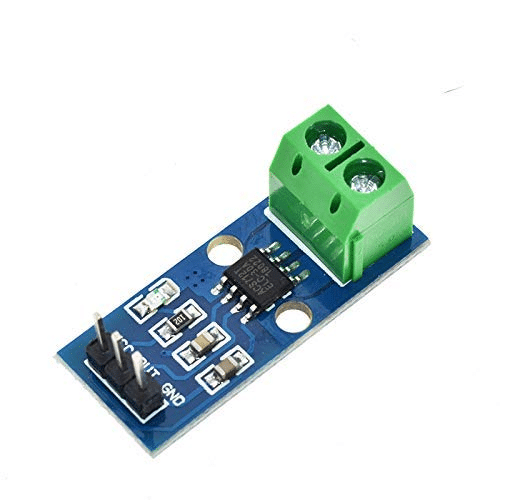
ACS712 Current Sensor Module
Use in glove-controlled motor driver circuits to monitor current draw from robotic fingers or actuators driven by your gesture glove.
More Project Ideas with Flex Sensors
- Piano glove: Map each finger’s bend angle to a musical note. Bend further for higher pitch.
- Drone controller: Replace joystick inputs with hand tilts and finger bends for intuitive drone flight control.
- Exoskeleton control: Use a glove with flex sensors to control an exoskeleton or robot arm at a distance.
- Gaming controller: Create custom game controllers for PC games using HID emulation via an Arduino Leonardo.
- Animal motion research: Attach lightweight flex sensors to animal leg joints to study gait patterns in small mammals.
- Shoe bend detector: Mount in the sole of a shoe to detect foot arch flexion during running, for gait analysis.
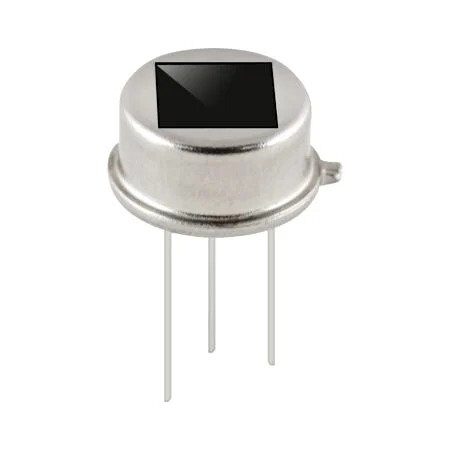
B2X2 PIR Motion Sensor
Complement your flex sensor glove project with PIR-based presence detection to trigger systems only when a person is present.
Frequently Asked Questions
Can I use a flex sensor with a 3.3V Arduino?
Yes. Flex sensors work with 3.3V supply voltage as well. Simply adjust your VCC constant in the code to 3.3 and use a 3.3V-tolerant ADC reference. The readings will be slightly less precise due to lower voltage swing, but fully functional.
How do I make the flex sensor readings more stable?
Add a small 100nF capacitor between the analog pin and GND to filter high-frequency noise. Also, average multiple readings in code (10–20 samples). Keep wires short and use shielded cable in electrically noisy environments.
How many flex sensors can Arduino Uno handle?
Arduino Uno has 6 analog inputs (A0–A5), so you can directly connect up to 6 flex sensors. For a full hand (10 fingers or both hands), use an analog multiplexer like the CD4051 (8-channel) or MCP3008 (8-channel SPI ADC).
What is the difference between a 2.2″ and 4.5″ flex sensor?
The 2.2″ sensor is suitable for single finger joints or small mechanisms. The 4.5″ sensor covers the full length of an adult finger from knuckle to tip and gives a larger resistance change for the same bend angle, making it easier to detect subtle bends.
Can flex sensors measure angles precisely?
Flex sensors have a repeatability of about ±2% and are affected by temperature and aging. They are excellent for relative angle measurements and gesture detection, but for high-precision absolute angle sensing, combine them with IMUs or use dedicated rotary encoders at the joint.
Ready to Build Your Gesture Glove?
Explore our full range of sensors and modules at Zbotic.in — India’s trusted source for Arduino components, robotics parts, and maker electronics. We offer fast shipping, competitive pricing, and expert support for your projects.







Add comment