
FPV Drone Simulator Training: Best Apps Before Flying Real
Every experienced FPV pilot will tell you the same thing: put in simulator hours before you touch real hardware. It’s the single best piece of advice in the hobby, and the pilots who ignore it pay for it — literally — in crashed quads, broken props, and bent frames.
The good news is that today’s FPV simulators are extraordinarily realistic. The physics engines have matured to the point where time in the sim genuinely translates to real-world flight skill. And with Steam prices under ₹1,000, the return on investment is astronomical compared to even one crashed quad.
This guide covers the best FPV drone simulator apps available in 2024, how to use them effectively, what training plan to follow, and how to connect your real radio controller to get the most authentic experience possible.
- Why Simulator Training is Non-Negotiable
- Hardware You Need to Get Started
- Best FPV Simulator Apps Reviewed
- Velocidrone: The Racer’s Choice
- Liftoff: Beautiful and Realistic
- Uncrashed: Best for Beginners
- Free Simulator Options
- Structured Training Plan: Zero to First Real Flight
- Connecting Your Radio to a Simulator
- From Simulator to Real Flight: What Changes
- Frequently Asked Questions
- Conclusion
1. Why Simulator Training is Non-Negotiable
Let’s put real numbers on this. A typical 5-inch FPV racing quad build costs ₹12,000–₹20,000. A crash that bends all four arms, breaks two motors, and cracks the frame costs ₹4,000–₹8,000 to repair. As a beginner, you will crash. Multiple times. Hard.
Without simulator training, you might crash 15–20 times before you develop the muscle memory to fly confidently. That’s ₹60,000–₹1,60,000 in repair costs that simulator time eliminates. A ₹900 simulator is, without exaggeration, one of the best investments you can make in this hobby.
What Simulators Actually Train
FPV flight in acro (manual) mode requires a completely different type of muscle memory than any other physical skill. Your brain must learn to:
- Interpret spatial orientation from a 2D video feed with no depth perception
- Control four axes simultaneously (throttle, pitch, roll, yaw) with fine motor precision
- React instinctively to proximity and obstacles without conscious thought
- Manage throttle in 3D space, not just altitude
- Maintain mental model of drone orientation when inverted or in extreme attitudes
None of these skills can be properly trained in Angle mode (the self-leveling beginner mode). They require acro mode, and the only safe place to learn acro mode from scratch is in a simulator.
2. Hardware You Need to Get Started
Before you choose a simulator, let’s make sure your setup is right:
A Radio Controller (Critical)
Do NOT use a keyboard or gamepad for FPV simulator training. Keyboard inputs are digital (on/off), FPV sticks are analog (variable). Gamepads have spring-centering on both axes, but FPV throttle should have no center spring. Training with a keyboard or gamepad builds the wrong muscle memory.
If you don’t yet own a radio, the most popular choices in India are:
- RadioMaster TX16S Mark II: The gold standard, EdgeTX firmware, multi-protocol. ~₹8,000–₹10,000
- RadioMaster Boxer: Compact version, excellent for travel. ~₹7,000
- RadioMaster Zorro: Gamepad-style, popular with simulator users. ~₹6,500
- BetaFPV LiteRadio 3: Budget option, ELRS built-in, excellent for simulator-only use. ~₹3,500
USB Connection
Most radios connect to a PC via USB (HID mode) or a dongle. The RadioMaster TX16S and Boxer connect directly via USB and are recognised by all major simulators automatically. You may need to set the radio to “Joystick” or “HID” mode in the radio’s USB settings.
PC Requirements
FPV simulators are relatively demanding for games. Minimum recommended specs:
- CPU: Intel Core i5 / AMD Ryzen 5 (6th gen or newer)
- GPU: Nvidia GTX 1060 / AMD RX 580 or equivalent
- RAM: 8GB minimum, 16GB recommended
- Storage: 20–40GB SSD (HDD causes stutters which affect timing feel)
3. Best FPV Simulator Apps Reviewed
Here is a comparison of the major FPV simulator apps currently available:
| Simulator | Price (Steam) | Physics Quality | Best For |
|---|---|---|---|
| Velocidrone | ~₹900 | Excellent (racing) | Racing practice |
| Liftoff | ~₹900 | Very Good | Freestyle + racing |
| Uncrashed | ~₹600 | Good (beginner friendly) | Absolute beginners |
| DRL Simulator | Free | Good | Casual + budget |
| Orqa FPV.SkyDive | Free | Very Good | Free best option |
| FPV Air 2 | ~₹500 | Moderate | Low-end PC users |
4. Velocidrone: The Racer’s Choice
Velocidrone is considered the most accurate FPV racing physics engine available. Built specifically for racing, it’s the simulator most used by competitive pilots to prepare for real-world events. The Multi-GP championship series even uses Velocidrone for qualifying events.
Strengths
- Racing physics: The most realistic gate-to-gate corner cutting simulation available
- Multiple quad configs: Race drones, freestyle builds, long-range — all with distinct physics
- Track editor: Build custom tracks to match your local club’s layout
- Multiplayer: Race against other pilots online — real competitive practice
- Telemetry: Detailed flight data overlays help you analyse and improve your lines
Weaknesses
- Graphics are functional but not beautiful
- Freestyle physics are less polished than Liftoff
- Steep learning curve — beginners can feel overwhelmed by the racing-focused UI
Verdict
If racing is your goal, Velocidrone is the mandatory choice. If you’re purely a beginner, start with Uncrashed and graduate to Velocidrone once you can fly gates consistently.
5. Liftoff: Beautiful and Realistic
Liftoff offers a more balanced experience than Velocidrone. The physics are excellent (though some racing-focused pilots argue Velocidrone’s racing physics are slightly better), and the environments are significantly more detailed and visually appealing.
Strengths
- Environment quality: The best-looking environments of any FPV sim — forests, warehouses, urban spaces
- Quad customisation: Extensive drone builder lets you recreate your exact real-world build including PID settings
- Freestyle-friendly: The physics feel very natural for freestyle manoeuvres
- Workshop: Download community tracks, quads, and environments
- Tutorial system: Built-in guided tutorials for beginners
Weaknesses
- More GPU-demanding than Velocidrone
- Multiplayer less active than Velocidrone
Verdict
Best all-rounder. If you can only buy one simulator, Liftoff is the most versatile choice for Indian beginners who haven’t yet decided whether they want to focus on racing or freestyle.
6. Uncrashed: Best for Absolute Beginners
Uncrashed is designed specifically with beginners in mind. The physics are somewhat simplified compared to Velocidrone and Liftoff — intentionally so. The drone responds a little more predictably, giving beginners time to develop basic stick reflexes without being immediately overwhelmed by realistic drone dynamics.
Why Uncrashed Works for Beginners
- The drone is slightly more forgiving in extreme attitudes
- Environments are visually clear with obvious depth cues
- Structured beginner missions guide you from hover to basic manoeuvres
- Cheaper than Velocidrone and Liftoff on Steam
Recommendation
Start with Uncrashed for the first 5 hours, then switch to Liftoff or Velocidrone. Don’t stay in Uncrashed too long — graduating to realistic physics early is important for real-world skill transfer.
7. Free Simulator Options
Orqa FPV.SkyDive
The best free FPV simulator. Built by Orqa (the Croatian FPV goggles company), SkyDive has surprisingly good physics and a clean interface. Available as a free download from the official website. Highly recommended as a starting point before committing to a paid simulator.
DRL Simulator
The official Drone Racing League simulator, available free on Steam. Good for casual practice but the physics are slightly gamified (more forgiving than reality). Works well for very early beginners who want to understand FPV before investing in a paid sim.

1/3″ CMOS 700TVL Mini FPV Camera 2.1mm Lens PAL/NTSC
Once your simulator hours are complete, this is the FPV camera to start with on your first real build. Budget-friendly, lightweight, and compatible with all standard analog FPV setups.
View on Zbotic8. Structured Training Plan: Zero to First Real Flight
Here is a structured 30-hour training plan used by experienced FPV coaches to take complete beginners to real-flight readiness:
Phase 1: Stabilised Mode Orientation (Hours 1–5)
Use Angle mode (self-leveling). Focus areas:
- Understanding stick inputs and their effect on drone movement
- Hovering in place — throttle management, position hold
- Basic directional flight: forward, backward, sideways
- Orientation recovery: what to do when you lose track of which way the drone is facing
Goal: Hover for 60 seconds without drifting more than 2 meters. Navigate a simple square course without crashing.
Phase 2: Acro Mode Introduction (Hours 5–15)
Switch to acro mode. This will feel completely different — possibly terrifying. That’s normal.
- Hours 5–7: Hovering in acro mode. Just keep it in the air.
- Hours 7–10: Basic forward flight and gentle turns. No flips yet.
- Hours 10–13: Figure-8 patterns, direction reversals, low-altitude flying.
- Hours 13–15: Gate passes at walking speed. Learn to thread through a gap consistently.
Goal: Complete a simple track with 10 gates without crashing 5 consecutive times.
Phase 3: Speed and Aggression (Hours 15–25)
- Progressive throttle increase — learn to maintain lines at higher speed
- Banked turns (leaning into corners), not flat turns
- Power loops and split-S (the two fundamental freestyle manoeuvres)
- Proximity flying — flying close to virtual obstacles intentionally
Goal: Complete a racing track at 70% speed without crashing. Execute clean power loops in open space.
Phase 4: Race Ready (Hours 25–30)
- Lap time consistency — not fastest, but consistent
- Race starts (launching from standing start with other drones)
- Overtaking and defended lines
- Crash recovery: returning to flight quickly after a crash (in real flying, quickly relocating and relaunching is a skill)
Goal: Complete 10 laps of a racing track with improving (not necessarily fast) lap times. You are ready for real hardware.

35A V2.1 2-5S 4-in-1 Brushless ESC for RC Drone FPV Racing
The ESC to graduate to when your simulator training is complete. A 4-in-1 stack simplifies the wiring on your first real FPV build enormously — letting you focus on flying, not debugging.
View on Zbotic9. Connecting Your Radio to a Simulator
Getting your real radio controller connected to the simulator is critical — don’t skip this step and use a keyboard.
RadioMaster TX16S / Boxer / Zorro
- Connect radio to PC via USB-C cable
- Power on the radio and navigate to USB mode → select Joystick
- Open the simulator — it should auto-detect the radio as a game controller
- In the simulator’s controller settings, map axes: Roll=CH1, Pitch=CH2, Throttle=CH3, Yaw=CH4 (Mode 2 — standard for most Indian pilots)
Other Radios
Radios with USB HID support (FrSky Taranis, Jumper T-series, BetaFPV radios) work similarly. Radios without HID support need a USB trainer cable or USB dongle, which converts the trainer port signal to a USB HID input.
Stick Mode
Ensure your radio is in Mode 2 (throttle on left stick, no spring return to center on left stick up-down axis). Mode 1 (common in some older Indian RC traditions) puts throttle on the right stick. Mode 2 is the global standard for FPV — learn it from the start.
10. From Simulator to Real Flight: What Changes
You’ve completed 30 simulator hours. You’re flying gates cleanly. Now you boot up a real quad. Here’s what will feel different:
Wind and Air Turbulence
Simulators don’t perfectly replicate real wind and ground-effect turbulence. Your first flights outside may feel wobbly compared to the simulator. This is normal — your brain will adapt within the first 2–3 flights.
Latency Difference
Real FPV goggles + camera + transmitter introduce latency that the simulator doesn’t fully replicate. Most analog FPV systems have 20–30ms of latency. Some pilots find this makes the real drone feel “sluggish” compared to the instant-response simulator. Acclimate in a large open area first.
Video Quality
Real analog FPV video has noise, static, and RF interference. The perfect digital clarity of a simulator does not match reality. Your brain needs time to process and fly on noisier, lower-quality video.
Fear Factor
The psychological weight of “this crash costs real money” is real and can tighten your flying instinctively. Acknowledge it, accept that you will still crash, and fly conservatively until your confidence builds.
Battery Anxiety
Simulators give unlimited battery. Real flights last 3–6 minutes. You’ll need to build the habit of checking voltage in the OSD and landing at 3.6V per cell minimum.
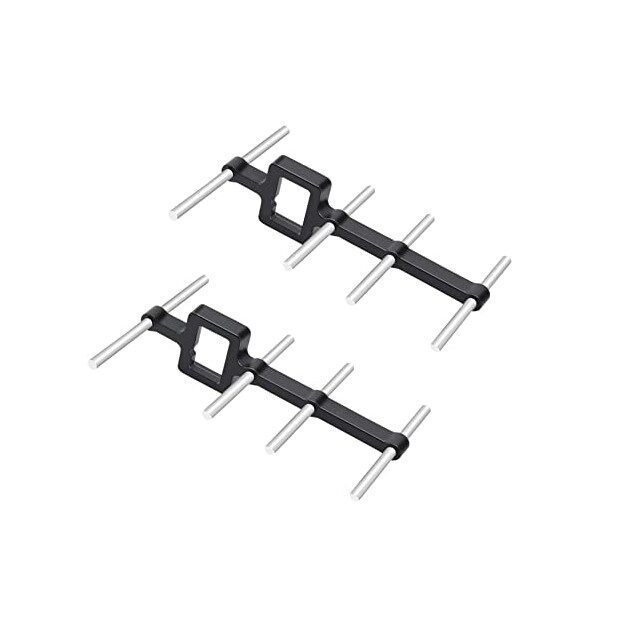
2.4GHz Yagi-UDA Drone Signal Booster
As you grow from beginner to intermediate pilot and start flying at longer ranges, this directional antenna booster significantly extends your 2.4GHz RC link range and reliability.
View on ZboticFrequently Asked Questions
How many hours of simulator training do I need before flying real?
Most coaches recommend 20–30 hours as a minimum baseline. This is enough to develop basic acro mode control and avoid the most catastrophic beginner crashes. However, 50+ hours in the simulator before your first flight outdoors gives you a much higher confidence baseline and significantly fewer repair bills.
Can I use a PS4/Xbox controller instead of an RC radio for the simulator?
Technically yes, but it’s strongly discouraged. Gamepads have spring-centering on both sticks — RC radios should not spring-centre on the throttle axis. Flying with a gamepad builds the wrong muscle memory. If budget is the constraint, buy the BetaFPV LiteRadio 3 (~₹3,500) — it’s a real RC radio that works perfectly for simulator training.
Is FPV skill transferable from simulator to real flight?
Yes, significantly. The muscle memory for stick control transfers very directly. Most pilots who put in 20+ simulator hours report that their first real flights are noticeably more controlled than pilots who skipped the sim. The main adjustment is getting used to real-world latency, video quality, and wind.
Which FPV simulator is best for Indian pilots with a low-end PC?
FPV Air 2 runs on the lowest hardware specs among the paid options. Orqa FPV.SkyDive is free and runs on modest hardware. DRL Simulator (free on Steam) also runs well on integrated graphics, though physics are less realistic. Avoid Liftoff if your GPU is older than 2016.
Do I need VR goggles for the simulator?
No. Most FPV pilots train on a standard monitor in simulator mode (a window view from the front of the drone). VR goggles add immersion but are not necessary for skill development. The muscle memory being built is in your hands — the display type matters much less than the input device (your radio).
Conclusion
FPV drone simulators are the single best tool available to new pilots. They compress months of expensive real-world learning into weeks of risk-free practice on a ₹900 software investment. The pilots who take simulator training seriously arrive at their first real flight with confident control, good situational awareness, and an intact wallet.
The recommendation is clear: before you spend a rupee on real hardware beyond your radio controller, download Orqa FPV.SkyDive (free) or pick up Liftoff or Velocidrone on Steam. Set your radio to Mode 2 acro. Crash as many virtual quads as it takes. Your real quad will thank you.
Ready to Move from Simulator to Real Hardware?
When your simulator hours are done, Zbotic.in has everything you need to build your first real FPV drone — ESCs, cameras, power boards, and more, delivered across India.
Shop FPV Components at Zbotic






Add comment