
Deploying an ESP32 watchdog timer to prevent freeze in production environments is not optional — it is a fundamental requirement for any IoT device that runs unattended. Whether your ESP32 is monitoring a cold-storage unit in Pune, controlling an irrigation pump in a farm in Nashik, or logging power consumption at a factory in Surat, a software bug, memory leak, or network timeout can lock up the processor indefinitely. Without a watchdog, the only solution is a physical site visit to press the reset button. With a properly configured watchdog, the device resets itself within seconds and resumes normal operation automatically.
Types of Watchdog Timers in ESP32
The ESP32 implements a multi-level watchdog architecture that most other microcontrollers do not have. Understanding the difference between them is essential for correct configuration.
| WDT Type | Acronym | What it watches | Default timeout |
|---|---|---|---|
| Main System WDT | MWDT0/1 | Timer group hardware timers | 8.3 s |
| Task WDT | TWDT | FreeRTOS tasks | 5 s |
| Interrupt WDT | IWDT | Interrupt service routines | 300 ms |
| RTC WDT | RTCWDT | Entire system (deep sleep safe) | Configurable |
The Task WDT and Interrupt WDT are the two you will interact with most often in Arduino and ESP-IDF development. The RTC WDT is useful for deep-sleep applications where you want a guaranteed wakeup even if the wakeup source fails.

Ai Thinker NodeMCU-32S ESP32 Development Board – IPEX Version
A production-grade ESP32 development board suitable for deploying watchdog-protected IoT sensor nodes in industrial environments.
Task Watchdog Timer (TWDT)
The Task WDT monitors FreeRTOS tasks. Any task that is registered with the TWDT must call esp_task_wdt_reset() within the configured timeout period. If a task fails to do so — because it is stuck in an infinite loop, blocked on a semaphore, or waiting for a network response that never comes — the TWDT triggers a reset.
In Arduino framework, the main loop() runs inside a FreeRTOS task called loopTask. The Arduino ESP32 core automatically subscribes this task to the TWDT with a 5-second timeout. This means if your loop() takes more than 5 seconds to complete a single iteration, you will see a WDT reset printed to Serial Monitor.
Common causes of TWDT triggers in Arduino ESP32 code:
- Blocking HTTP requests without a timeout configured
- Waiting for a server response in a
while(client.available())loop that never terminates - Long
delay()calls — usevTaskDelay()in FreeRTOS tasks instead - Deadlocks from improper mutex usage in multi-core code
- DNS resolution failures that block indefinitely
To feed the watchdog manually within a long-running operation:
#include "esp_task_wdt.h"

// In a long operation:
for (int i = 0; i < 10000; i++) {
  // ... heavy processing ...
  if (i % 100 == 0) {
    esp_task_wdt_reset();  // feed the watchdog every 100 iterations
  }
}
Interrupt Watchdog Timer (IWDT)
The Interrupt WDT has a very short default timeout of 300 ms and watches Interrupt Service Routines (ISRs). The rule for ISRs is simple: get in, do minimal work, get out. If an ISR runs for more than 300 ms, the IWDT fires a panic and resets the system.
Best practices for ISRs on ESP32:
- Never call
delay(),Serial.print(), or any blocking function inside an ISR - Never use
malloc()ornewinside an ISR (heap operations are not interrupt-safe) - Use
volatileflags: set a flag in the ISR, check and act on it inloop() - For data transfer from ISR to task, use FreeRTOS queues with
xQueueSendFromISR()
Configuring WDT in Arduino Framework
The Arduino ESP32 core (version 2.x and 3.x) exposes a simplified WDT configuration API:
#include "esp_task_wdt.h"

#define WDT_TIMEOUT_SEC 30  // 30 seconds

void setup() {
  Serial.begin(115200);

  // Configure Task WDT with 30 second timeout
  esp_task_wdt_config_t wdt_config = {
    .timeout_ms = WDT_TIMEOUT_SEC * 1000,
    .idle_core_mask = (1 << portNUM_PROCESSORS) - 1,
    .trigger_panic = true  // cause a full panic with stack trace
  };
  esp_task_wdt_reconfigure(&wdt_config);

  // Subscribe the current task (loopTask) to the WDT
  esp_task_wdt_add(NULL);

  Serial.println("WDT configured: 30 second timeout");
}

void loop() {
  // Feed the watchdog at the top of each loop iteration
  esp_task_wdt_reset();

  // Your main application code here
  doNetworkOperations();
  readSensors();
  publishData();

  delay(5000);
}
Setting trigger_panic = true is important for production: it causes a full panic dump to Serial before reset, logging the stack trace of the task that caused the timeout. You can capture these logs via a secondary UART to a flash memory chip for post-mortem debugging.
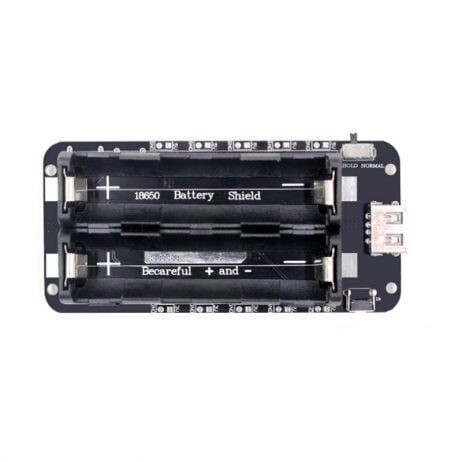
2 x 18650 Lithium Battery Shield V8 Mobile Power Expansion for ESP32 ESP8266
Provides reliable battery-backed power for unattended ESP32 deployments where mains power failure must not cause permanent system lockup.
Configuring WDT in ESP-IDF
If you are using the native ESP-IDF framework (recommended for serious production firmware), the WDT configuration is more granular. You can configure separate timeouts for the pre-timeout interrupt stage and the full reset stage:
#include "esp_task_wdt.h"
#include "driver/timer.h"

void app_main(void) {
  // Initialize WDT with 10 second timeout
  ESP_ERROR_CHECK(esp_task_wdt_init(10, true));

  // Subscribe idle tasks on both cores
  ESP_ERROR_CHECK(esp_task_wdt_add(NULL));

  // Create a FreeRTOS task
  xTaskCreate(sensor_task, "sensor_task", 4096, NULL, 5, NULL);
}

void sensor_task(void *pvParameters) {
  // Subscribe THIS task to WDT
  esp_task_wdt_add(NULL);

  while (1) {
    // Reset WDT at the start of each cycle
    esp_task_wdt_reset();

    // Do work...
    read_sensor_data();
    publish_to_mqtt();

    vTaskDelay(pdMS_TO_TICKS(5000));  // non-blocking 5 second delay
  }
}
The critical difference between Arduino delay() and ESP-IDF vTaskDelay() is that vTaskDelay() yields the CPU to other tasks while waiting, whereas delay() burns CPU cycles in a busy loop — which still feeds the WDT but wastes energy and prevents other tasks from running.
Production-Grade Reset Recovery Patterns
Pattern 1: Non-Volatile Reset Counter
Store a reset counter in NVS (Non-Volatile Storage) that increments on every WDT reset. After 3 consecutive WDT resets, enter a safe mode (basic sensor readings only, no complex network operations) to prevent a reset loop:
#include <Preferences.h>

Preferences prefs;

void setup() {
  prefs.begin("wdt", false);
  esp_reset_reason_t reason = esp_reset_reason();
  if (reason == ESP_RST_TASK_WDT || reason == ESP_RST_WDT) {
    int count = prefs.getInt("rst_count", 0) + 1;
    prefs.putInt("rst_count", count);
    Serial.printf("WDT reset count: %dn", count);
    if (count >= 3) {
      enterSafeMode();  // simplified, stable operation
    }
  } else {
    prefs.putInt("rst_count", 0);  // clear on clean boot
  }
}
Pattern 2: External Hardware Watchdog
For the highest reliability applications, combine the internal ESP32 WDT with an external hardware watchdog IC like the MAX6369 or TPS3825. The ESP32 toggles a GPIO pin at a fixed interval; if the pin stops toggling, the external WDT pulls the ESP32 EN (enable) pin LOW, forcing a hard reset even if the CPU is completely locked up and the internal WDT is not firing.

30Pin ESP32 Expansion Board with Type-C and Micro USB Dual Interface
Breaks out all GPIO pins including EN for connecting external watchdog ICs and relay circuits in industrial ESP32 deployments.
Pattern 3: Heartbeat Telemetry
Publish a heartbeat MQTT message every 60 seconds. On your server side, configure an alarm if no heartbeat is received for 5 minutes. This gives you remote visibility into whether the device is running normally, stuck in a WDT reset loop, or has completely lost power or connectivity.
Frequently Asked Questions
Does calling delay() in Arduino ESP32 trigger the watchdog?
It depends on the WDT timeout. The default Arduino ESP32 TWDT timeout is 5 seconds. A delay(6000) (6 seconds) will trigger a WDT reset. A delay(3000) will not. In general, avoid delays longer than your WDT timeout or call esp_task_wdt_reset() inside long delays. For delays longer than 1 second, it is better practice to use non-blocking timing with millis().
What is the minimum useful WDT timeout for an ESP32 IoT device?
The minimum timeout depends on your slowest expected operation. If an HTTPS request to a cloud server can legitimately take 15 seconds on a poor 2G connection, your WDT timeout must be at least 20 seconds. A common production value is 30–60 seconds, which is generous enough to not false-fire during slow network operations but short enough to recover quickly from a genuine lockup.
Can I disable the watchdog during a long OTA update?
Yes, and you should. The Arduino ESP32 core’s OTA handler disables the TWDT automatically during flash writes. If you are doing a custom OTA implementation, temporarily unsubscribe from the TWDT with esp_task_wdt_delete(NULL), perform the update, then re-subscribe and re-configure.
How do I check if my last reset was caused by the watchdog?
Call esp_reset_reason() in setup(). It returns an enum value. ESP_RST_TASK_WDT means the Task WDT fired, ESP_RST_WDT means the Interrupt WDT fired, and ESP_RST_INT_WDT means an ISR ran too long. Log this value over MQTT as part of your device’s boot telemetry to remotely diagnose reliability issues.
Does the watchdog fire during Wi-Fi connection attempts?
The Wi-Fi connection process (especially the association and DHCP phases) runs in its own FreeRTOS tasks managed by the ESP-IDF Wi-Fi stack. The TWDT is configured by default to ignore the idle tasks and the Wi-Fi tasks. Your loopTask is what needs to be fed. During WiFi.begin() with a blocking wait loop, call esp_task_wdt_reset() inside the while loop to prevent a timeout.
Build Reliable Production IoT Devices
Zbotic stocks quality ESP32 modules, power supplies, and sensors for professional IoT deployments across India. Fast delivery, genuine components.







Add comment