
The WEMOS D1 Mini ESP8266 compact board project scene in India has exploded over the last few years, and for good reason. This tiny board packs a full Wi-Fi SoC into a footprint barely larger than a postage stamp, making it the go-to choice for hobbyists, students, and engineers who want wireless connectivity without the bulk of a full Arduino Uno plus Wi-Fi shield. Whether you are building a smart home sensor, an IoT dashboard feeder, or a portable data logger, the D1 Mini delivers performance that far exceeds its size and price.
What Is the WEMOS D1 Mini?
The WEMOS D1 Mini is a miniature Wi-Fi development board built around the Espressif ESP8266EX SoC. It measures just 34.2 mm × 25.6 mm, runs at 80 MHz (overclockable to 160 MHz), carries 4 MB of flash memory, and exposes 11 digital I/O pins along with one analogue input (0–3.2 V range, 10-bit ADC). The USB-to-serial chip on most variants is either a CH340G or CP2104, which means you plug it straight into a laptop USB port and the board is immediately programmable.
What sets the D1 Mini apart from a bare ESP-01 module is that it brings out nearly all the GPIO pins, includes an onboard 3.3 V LDO regulator so you can power it from 5 V USB, and ships with a well-documented shield ecosystem. You can stack a relay shield, an OLED display shield, a motor driver shield, or a battery shield on top of each other in seconds — no soldering required on the main board.
In the Indian maker market the D1 Mini competes directly with the NodeMCU v3, but wins on size. The NodeMCU footprint is too wide for a standard breadboard (it blocks all tie-point holes), while the D1 Mini leaves one column free on each side. That alone makes it far easier to prototype with.
Pinout and GPIO Reference
Understanding the D1 Mini pinout is essential before you start any project. The board uses Arduino-style pin labels (D0–D8, A0, TX, RX) that map to internal ESP8266 GPIO numbers, and this mapping trips up many first-timers.
| Board Pin | ESP8266 GPIO | Notes |
|---|---|---|
| D0 | GPIO16 | No interrupt, no PWM, used for deep sleep wake |
| D1 | GPIO5 | I2C SCL, safe to use |
| D2 | GPIO4 | I2C SDA, safe to use |
| D3 | GPIO0 | Boot mode pin — avoid pulling LOW at startup |
| D4 | GPIO2 | Onboard LED (active LOW), boot pin |
| D5 | GPIO14 | SPI SCK, safe to use |
| D6 | GPIO12 | SPI MISO |
| D7 | GPIO13 | SPI MOSI |
| D8 | GPIO15 | SPI CS, must be LOW at boot |
| A0 | ADC0 | 0–3.2 V analogue input, 10-bit |
A key rule: avoid using D3, D4, and D8 as general-purpose outputs because they affect the boot process. If you connect a pull-down to D8 or pull D3 LOW during power-on, the ESP8266 will enter flash mode instead of running your sketch. Stick to D1, D2, D5, D6, D7 for hassle-free GPIO in most projects.
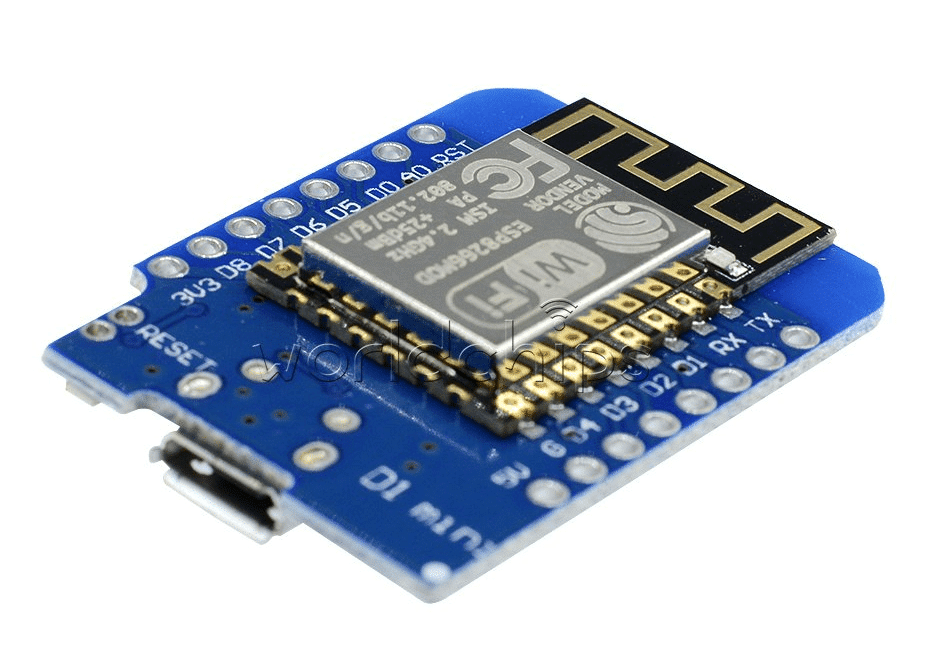
D1 Mini V2 NodeMCU 4M Bytes Lua Wi-Fi IoT Development Board Based ESP8266
The classic D1 Mini with 4 MB flash and Lua/Arduino support — the ideal starting point for any ESP8266 compact project.
Setting Up the Arduino IDE for D1 Mini
Getting the D1 Mini running in Arduino IDE takes about five minutes if you follow these steps carefully:
- Install the CH340 driver — On Windows, download the CH340G driver from the manufacturer’s website. macOS Big Sur and later include it natively. Linux already has it in the kernel.
- Add ESP8266 board support — In Arduino IDE, go to File → Preferences and paste this URL in the Additional Board Manager URLs box:
https://arduino.esp8266.com/stable/package_esp8266com_index.json. Then open Tools → Board → Boards Manager, search for esp8266, and install the package (version 3.x is recommended). - Select the correct board — Choose Tools → Board → ESP8266 Boards → LOLIN(WEMOS) D1 R2 & mini.
- Set upload speed — 921600 baud works reliably on most machines. If you see upload errors, drop to 460800.
- Flash size — Set to 4MB (FS:2MB, OTA:~1019 KB) to use the LittleFS file system partition.
- Upload a Blink sketch — Use
LED_BUILTINwhich maps to D4/GPIO2. The onboard LED is active-LOW sodigitalWrite(LED_BUILTIN, LOW)turns it ON.
If you prefer PlatformIO, add board = d1_mini and platform = espressif8266 to your platformio.ini and the toolchain is downloaded automatically.
5 Beginner Projects You Can Build Today
Project 1: Wi-Fi Temperature Monitor with DHT11
Connect a DHT11 sensor to D2, load the DHT library, and serve a simple HTTP page that shows live temperature and humidity. The ESP8266 runs its own web server on port 80 — just open the board’s IP address in any browser on the same Wi-Fi network. Total cost: under ₹200 including the D1 Mini and DHT11.
Project 2: MQTT Smart Home Node
Install the PubSubClient library and connect the D1 Mini to a Mosquitto broker running on a Raspberry Pi or a cloud MQTT service like HiveMQ. Publish sensor readings every 30 seconds and subscribe to a topic to toggle a relay. This is the foundation of almost every DIY smart home system in India.

DHT11 Digital Relative Humidity and Temperature Sensor Module
The most popular starter sensor for D1 Mini projects — plug it into D2 and you have a live temperature/humidity feed in minutes.
Project 3: Deep Sleep Weather Station
Pair the D1 Mini with a BME280 sensor on I2C (D1=SCL, D2=SDA). Every 15 minutes the board wakes from deep sleep, reads temperature, humidity, and pressure, posts the data to ThingSpeak or a custom REST API, then goes back to sleep. Deep sleep current is around 20 µA, so two AA batteries can last weeks.
Project 4: Web-Controlled RGB LED Strip
Connect an RGB LED strip through a MOSFET or use a WS2812B strip on D5. Serve a colour picker HTML page from SPIFFS/LittleFS stored on the 4 MB flash. Users on the same network open the page and change colours in real time without any cloud dependency — great for festivals and home décor.
Project 5: OTA Firmware Update System
Use the ArduinoOTA library to update firmware over Wi-Fi. This is essential for any deployed device where physical access is inconvenient. Set a password, add the OTA loop to your main sketch, and push new firmware directly from Arduino IDE. This is the professional way to maintain a fleet of D1 Mini nodes around the house.
Integrating Sensors with D1 Mini
The D1 Mini works with almost any sensor that runs on 3.3 V logic. Here are the most common integrations used in Indian projects:
I2C Sensors (BMP280, BME280, SSD1306 OLED)
Connect SDA to D2 and SCL to D1. The Wire library is included in the ESP8266 Arduino core. Run an I2C scanner sketch first to confirm the sensor address — BME280 is usually 0x76 or 0x77, SSD1306 OLED is 0x3C.

BMP280 Barometric Pressure and Altitude Sensor I2C/SPI Module
Combines temperature and pressure sensing on I2C — perfect for weather station projects with the D1 Mini.
OneWire Sensors (DS18B20)
The DS18B20 digital temperature sensor uses the OneWire protocol — connect data to any free GPIO (D5 is a good choice), add a 4.7 kΩ pull-up resistor to 3.3 V, and use the DallasTemperature library. You can daisy-chain up to 10 sensors on a single wire, each addressable by its unique 64-bit ROM code.
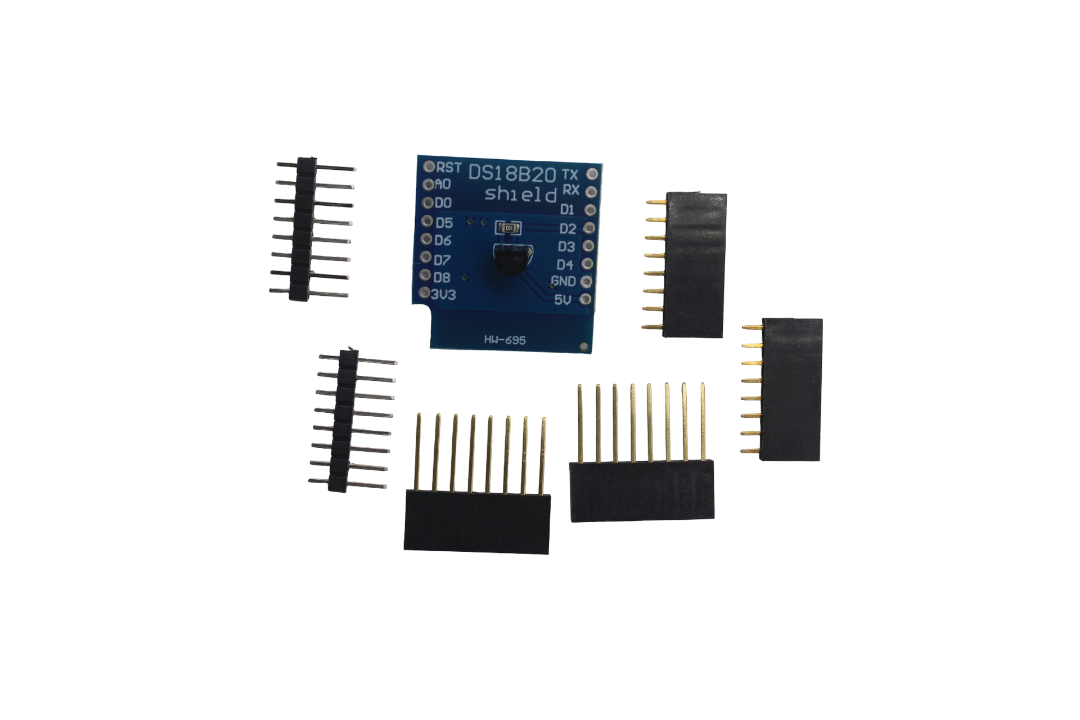
DS18B20 Module for D1 Mini Temperature Measurement Sensor Module
A purpose-built DS18B20 breakout designed specifically for the D1 Mini form factor — includes the pull-up resistor on board.
Analogue Sensors
The D1 Mini has a single ADC pin (A0) that reads 0–3.2 V and returns values 0–1023. For 5 V sensors like the LM35, you must add a voltage divider (10 kΩ + 22 kΩ) to bring the output within range. Note that Wi-Fi activity slightly affects ADC accuracy, so for best results disable Wi-Fi momentarily during a reading or use an external I2C ADC like the ADS1115.
Running D1 Mini on Battery Power
The D1 Mini draws around 70–80 mA during active Wi-Fi transmission and drops to about 20 µA in deep sleep. For battery-powered projects:
- 3.7 V Li-Po (single cell): Connect directly to the 3.3 V pin bypassing the onboard regulator for maximum efficiency, but only if your supply is a stable regulated 3.3 V source. Feeding raw Li-Po to the 5 V pin works too — the onboard LDO handles 4.2–5.5 V input.
- 18650 Li-Ion cells: Use a dedicated 18650 battery shield that stacks directly on the D1 Mini’s headers. These shields include charging circuits, protection ICs, and a 5 V boost converter. The 2×18650 shield from Zbotic gives you a large capacity power bank style form factor.
- Deep sleep strategy: Connect D0 to RST using a short jumper wire. Call
ESP.deepSleep(900e6)to sleep for 15 minutes. The D0 GPIO16 pulse wakes the chip by momentarily resetting it.
Frequently Asked Questions
Is the WEMOS D1 Mini compatible with all Arduino libraries?
Most libraries that do not rely on AVR-specific hardware (like direct register manipulation) work fine. The ESP8266 Arduino core emulates the standard Arduino API. Libraries for I2C sensors, display drivers, HTTP clients, and MQTT all work without modification. Hardware-specific libraries that reference PORTB or DDRD will not compile.
What is the maximum current the D1 Mini GPIO can source or sink?
Each GPIO pin can source or sink up to 12 mA. The total GPIO current budget is 45 mA. Never drive a buzzer, motor, or relay coil directly from a GPIO pin — always use a transistor or MOSFET as a buffer. For LEDs, use a 330 Ω resistor to keep current around 5–8 mA per LED.
Can I run two D1 Minis on the same Wi-Fi network?
Yes, any number of D1 Minis can coexist on the same Wi-Fi access point, limited only by your router’s DHCP table size. For large deployments (20+ boards), assign static IPs to avoid DHCP renewal delays. You can also configure them in mesh mode using the PainlessMesh library.
Why does my D1 Mini keep disconnecting from Wi-Fi?
The most common causes are: (1) the power supply cannot sustain the 300 mA peak current spikes during Wi-Fi TX bursts — use a 1 A USB adapter, never a PC USB hub port; (2) the router’s DHCP lease time is short and the reconnection handler is not implemented in code; (3) the ESP8266 is overheating due to poor ventilation. Add WiFi.setAutoReconnect(true) and WiFi.persistent(false) in your setup.
What is the difference between the D1 Mini and D1 Mini Pro?
The D1 Mini Pro has an external antenna connector (IPEX/u.FL) that dramatically improves Wi-Fi range, 16 MB of flash instead of 4 MB, and a smaller overall footprint. It costs about 30–40% more. Choose the Pro version for projects installed inside metal enclosures or in locations far from the router.
Ready to Start Your D1 Mini Project?
Zbotic stocks genuine D1 Mini boards, sensors, shields, and accessories — all shipped from India with fast delivery. Explore our full ESP8266 and IoT collection for everything you need.






Add comment