
When building a vibration-sensing project with Arduino or any microcontroller, you’ll quickly run into two popular options: the SW-420 vibration sensor and the ADXL345 accelerometer. Both detect vibration and motion, but they work in entirely different ways and are suited for very different use cases. Choosing the wrong one can mean inaccurate results, wasted time, or unnecessary cost.
This in-depth guide compares the SW-420 vs ADXL345 vibration sensor head-to-head — covering working principles, output type, sensitivity, power consumption, interfacing, and ideal project use cases — so you can make the right choice every time.
1. Quick Overview: SW-420 vs ADXL345
Before diving into the details, here’s a high-level summary of the two sensors:
- SW-420 is a simple, low-cost vibration switch module. It outputs a digital HIGH or LOW signal — essentially “vibration detected” or “no vibration.” It uses a spring-coil or metallic ball mechanism inside a sealed tube. There is no measurement of magnitude, direction, or frequency.
- ADXL345 is a full 3-axis digital accelerometer from Analog Devices. It measures acceleration (including vibration) along X, Y, and Z axes with high resolution. It communicates via I2C or SPI and provides 13-bit data readings that you can analyze for magnitude, direction, and frequency content.
In short: SW-420 = presence/absence of vibration; ADXL345 = detailed vibration measurement.
2. SW-420 Vibration Sensor In Depth
The SW-420 module is built around a simple vibration-sensitive switch — typically a spring contact or a metallic ball inside a small cylindrical shell. When the module is at rest, the contacts are connected (or disconnected, depending on variant). When vibration or tilt occurs, the internal mechanism shifts and the contact state changes, producing a digital output.
Key Features of SW-420
- Working voltage: 3.3V to 5V (broad compatibility)
- Output type: Digital (D0 pin — HIGH or LOW)
- Sensitivity adjustment: On-board potentiometer (some modules)
- Operating temperature: -10°C to +70°C
- Dimensions: Typically 32mm × 14mm (module form)
- Current draw: Very low (~1–3 mA)
- Interface: 3-pin (VCC, GND, D0) or 4-pin (VCC, GND, D0, A0 on modules with comparator)
How the SW-420 Works
Inside the plastic cylinder of the SW-420 is either a spring coil wrapped around a central rod, or a small metallic ball in a chamber. At rest, gravity keeps the ball against the contacts at the bottom, completing a circuit. When vibration hits, the ball bounces off the contacts — breaking continuity — and the LM393 comparator on the module converts that to a clean digital signal on D0.
This is a non-directional, threshold-based detection. You only know vibration happened — not how strong, in what direction, or at what frequency.
SW-420 Advantages
- Extremely cheap (usually under ₹50–₹80 per module in India)
- No library required — just read a digital pin
- Works with 3.3V and 5V systems directly
- Minimal processing overhead
- Great for simple alarm, notification, or trigger applications
SW-420 Limitations
- No vibration magnitude information
- No axis information
- Cannot detect frequency or waveform
- Prone to false triggers from strong EMI
- Not suitable for data logging or vibration analysis
3. ADXL345 Accelerometer In Depth
The ADXL345 is a small, thin, low-power, 3-axis accelerometer from Analog Devices. It measures static acceleration (like gravity) as well as dynamic acceleration (vibration, shock, motion). The measurement range is selectable: ±2g, ±4g, ±8g, or ±16g. Resolution is up to 13 bits, giving 4 mg/LSB at the ±16g range.
Key Features of ADXL345
- Working voltage: 2.0V to 3.6V (3.3V typical; modules usually include a 3.3V regulator)
- Output type: Digital I2C (0x53 / 0x1D) or SPI
- Axes: 3 (X, Y, Z)
- Measurement range: ±2g / ±4g / ±8g / ±16g (selectable)
- Resolution: 13-bit at 16g (4 mg/LSB)
- Output data rate: 0.1 Hz to 3200 Hz (32 rates configurable)
- Current draw: ~140 µA in measurement mode, ~0.1 µA in standby
- Built-in FIFO: 32-level FIFO buffer
- Interrupt pins: INT1, INT2 — configurable for tap, double-tap, freefall, activity, inactivity
How the ADXL345 Works
The ADXL345 uses MEMS (Micro-Electro-Mechanical Systems) technology. A tiny silicon proof mass is suspended by micro-fabricated springs. When acceleration is applied, the mass deflects, changing the capacitance between comb-like fingers. An on-chip ADC converts this to a 13-bit digital value for each axis. The chip has sophisticated digital processing including tap detection, activity/inactivity detection, and a 32-level FIFO to store readings without continuous polling.
ADXL345 Advantages
- 3-axis measurement provides directional information
- High resolution (13-bit) allows fine vibration analysis
- Configurable data rate up to 3200 Hz for fast events
- Built-in interrupt for tap, double-tap, freefall
- FIFO buffer reduces MCU polling burden
- Ultra-low power standby current
- Can distinguish orientation (tilt sensing)
ADXL345 Limitations
- Requires I2C or SPI library (more code complexity)
- Higher price than SW-420 (₹150–₹250 for module)
- Needs 3.3V logic (most modules include level shifting)
- More wiring (at minimum 4 wires for I2C, 6 for SPI)
- Requires more processing to interpret data meaningfully
4. Full Spec Comparison Table
| Feature | SW-420 | ADXL345 |
|---|---|---|
| Output Type | Digital (HIGH/LOW) | Digital (I2C / SPI) |
| Axes | None (non-directional) | 3-axis (X, Y, Z) |
| Vibration Magnitude | No | Yes (13-bit) |
| Measurement Range | N/A (threshold) | ±2g to ±16g |
| Operating Voltage | 3.3V – 5V | 2.0V – 3.6V (module: 3.3–5V) |
| Current Draw | ~1–3 mA | ~140 µA (measurement) |
| Interface Complexity | Very easy (digitalRead) | Moderate (I2C library) |
| Built-in Interrupts | No | Yes (tap, freefall, activity) |
| FIFO Buffer | No | 32-level |
| Approx. Cost (India) | ₹40 – ₹80 | ₹150 – ₹250 |
| Best For | Simple alarms, triggers | Analysis, logging, precise detection |
5. Wiring the SW-420 with Arduino
The SW-420 module is a 3-pin (or 4-pin) device. Wiring it to Arduino Uno is straightforward:
| SW-420 Pin | Arduino Uno Pin |
|---|---|
| VCC | 5V |
| GND | GND |
| D0 | Digital Pin 2 |
If using a 4-pin module, A0 (analog) can be connected to any Arduino analog input for a variable voltage output (though with the SW-420 switch it still only outputs full HIGH/LOW on the analog side in practice).
6. Wiring the ADXL345 with Arduino (I2C)
| ADXL345 Pin | Arduino Uno Pin |
|---|---|
| VCC | 3.3V |
| GND | GND |
| SDA | A4 (SDA) |
| SCL | A5 (SCL) |
| CS | 3.3V (for I2C mode) |
| SDO/ALT | GND (address 0x53) or 3.3V (0x1D) |
Note: Most GY-291 breakout modules for the ADXL345 include a 3.3V regulator and level-shifting resistors, making them 5V-compatible for both power and I2C lines. Always check your specific module’s datasheet.
7. Sample Code: SW-420 Vibration Alert
// SW-420 Vibration Sensor - Basic Detection
const int vibPin = 2;
const int ledPin = 13;

void setup() {
  pinMode(vibPin, INPUT);
  pinMode(ledPin, OUTPUT);
  Serial.begin(9600);
  Serial.println("SW-420 Vibration Sensor Ready");
}

void loop() {
  int state = digitalRead(vibPin);
  if (state == HIGH) {
    digitalWrite(ledPin, HIGH);
    Serial.println("Vibration Detected!");
    delay(200); // debounce
  } else {
    digitalWrite(ledPin, LOW);
  }
}
This is all you need for simple vibration detection with the SW-420. No library, no complex protocol — just a digitalRead().
8. Sample Code: ADXL345 Vibration Measurement
// ADXL345 - Read X, Y, Z acceleration
// Requires: Adafruit ADXL345 + Adafruit Unified Sensor libraries
#include <Wire.h>
#include <Adafruit_Sensor.h>
#include <Adafruit_ADXL345_U.h>

Adafruit_ADXL345_Unified accel = Adafruit_ADXL345_Unified(12345);

void setup() {
  Serial.begin(9600);
  if (!accel.begin()) {
    Serial.println("ADXL345 not found!");
    while (1);
  }
  accel.setRange(ADXL345_RANGE_4_G);
  Serial.println("ADXL345 Ready");
}

void loop() {
  sensors_event_t event;
  accel.getEvent(&event);

  float x = event.acceleration.x;
  float y = event.acceleration.y;
  float z = event.acceleration.z;

  // Calculate total magnitude
  float mag = sqrt(x*x + y*y + z*z);

  Serial.print("X: "); Serial.print(x);
  Serial.print(" | Y: "); Serial.print(y);
  Serial.print(" | Z: "); Serial.print(z);
  Serial.print(" | Magnitude: "); Serial.println(mag);

  if (mag > 12.0) { // threshold in m/s²
    Serial.println("*** Strong Vibration Detected! ***");
  }
  delay(50);
}
Install the Adafruit ADXL345 and Adafruit Unified Sensor libraries via the Arduino Library Manager before compiling. The ADXL345 magnitude reading gives you a continuous numeric value you can analyze, log, or threshold as needed.
9. Which Sensor for Which Project?
Choose SW-420 When:
- Anti-theft alarm — Vehicle or asset alarm that triggers a buzzer or SMS when disturbed
- Mailbox or door notifier — Alert when the mailbox is opened or a door is knocked
- Earthquake early warning (basic) — Simple trigger to sound an alarm on ground tremor
- Vibration-triggered camera — Wildlife camera that captures photos when an animal steps nearby
- Washing machine monitor — Alert when a cycle completes (vibration stops)
- Any project where you only need YES/NO vibration detection with minimal code
Choose ADXL345 When:
- Machine condition monitoring — Track bearing wear by measuring vibration magnitude trend over time
- Pedometer / step counter — Count footsteps by detecting repetitive vertical acceleration pulses
- Gesture recognition — Detect shake, tilt, single-tap, double-tap gestures
- Drone/robot stabilization — Feed real-time acceleration data to a PID controller
- Structural health monitoring — Log bridge or building vibration for engineering analysis
- Free-fall detection — Protect hard drives or detect drops using built-in freefall interrupt
- Any project needing quantitative vibration data, direction, or frequency content
Can You Use Both Together?
Absolutely. A common architecture in industrial IoT uses the SW-420 as a wake-up trigger (very low power) that wakes a microcontroller from sleep mode, which then activates the ADXL345 to take a detailed measurement burst. This dramatically extends battery life while maintaining responsive detection.
10. Recommended Sensors from Zbotic
While we’ve focused on vibration and accelerometer sensors in this guide, all vibration-based projects need complementary sensing. Here are some great options available at Zbotic to pair with your vibration sensor setup:
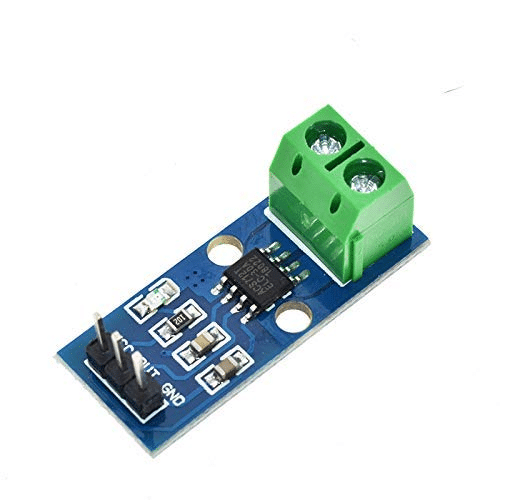
30A Range Current Sensor Module ACS712
Pair with your vibration sensor in machine monitoring — track motor current draw alongside vibration to detect bearing failure before it happens.

MQ-135 Air Quality/Gas Detector Sensor Module
Complete your industrial safety monitor: combine vibration sensing with gas detection to catch machine failures AND hazardous emissions simultaneously.

BMP280 Barometric Pressure and Altitude Sensor I2C/SPI Module
Use alongside the ADXL345 on drone and UAV projects — combines altitude data with 3-axis acceleration for complete flight telemetry.
11. Frequently Asked Questions
Can the SW-420 measure vibration intensity?
No. The SW-420 is a simple switch-based sensor that only outputs a binary HIGH or LOW signal. It cannot measure vibration intensity, magnitude, frequency, or direction. If you need those measurements, use the ADXL345 or a similar MEMS accelerometer.
What is the I2C address of the ADXL345?
The ADXL345 has two possible I2C addresses: 0x53 (when the SDO/ALT ADDRESS pin is connected to GND) and 0x1D (when SDO is connected to VCC). The default on most GY-291 modules is 0x53.
Which sensor is better for a theft alarm?
For a simple theft alarm, the SW-420 is the better choice. It’s cheaper, easier to wire, requires no library, and reliably detects any physical disturbance. An ADXL345 is overkill for this use case unless you also want to log the magnitude of the shock event.
Can the ADXL345 detect freefall?
Yes. The ADXL345 has a built-in freefall detection feature. You can configure a threshold (in g) and a time duration. When all three axes simultaneously report acceleration below the threshold for the specified duration, an interrupt fires on the INT1 or INT2 pin. This is commonly used to protect hard drives and detect dropped devices.
Is the ADXL345 compatible with ESP8266 and ESP32?
Yes. The ADXL345 works with ESP8266 (NodeMCU) and ESP32 via I2C. Use the SDA and SCL pins of the respective board. The Adafruit ADXL345 library is compatible with both. Note that these boards operate at 3.3V, which is perfectly matched to the ADXL345’s native 3.3V operation.
What is the maximum data rate of the ADXL345?
The ADXL345 supports output data rates up to 3200 Hz (3200 samples per second). This is configurable via the BW_RATE register. For most vibration monitoring applications, 100–800 Hz is sufficient and keeps power consumption low.
12. Conclusion
The SW-420 and ADXL345 serve genuinely different purposes, despite both being called “vibration sensors.” If your project just needs to know whether vibration occurred — for an alarm, a trigger, or a notification — the SW-420 is perfect. It’s cheap, simple, and reliable for that task.
If your project needs to know how much vibration, in which direction, or wants to analyze frequency content over time, the ADXL345 is the right tool. Yes, it costs a bit more and needs a library, but the quantitative, multi-axis data it provides opens up far more advanced applications.
For most beginners, start with the SW-420 to understand the concept. Then graduate to the ADXL345 when your project requirements demand it. Both sensors are readily available at Zbotic with fast shipping across India.





Add comment