
The Raspberry Pi 5 AI Kit represents a landmark moment for affordable edge computing in India. Announced in mid-2024 and now available through Indian distributors, the AI Kit combines Raspberry Pi’s M.2 HAT+ with the Hailo-8L neural processing unit (NPU) to deliver 13 TOPS (Tera Operations Per Second) of AI inferencing capability at under Rs 12,000 for the complete kit. For Indian students, researchers, and embedded engineers who want to run local AI models without cloud subscriptions or expensive GPU hardware, this guide is your complete roadmap.
What Is the Raspberry Pi AI Kit?
The Raspberry Pi AI Kit is an official accessory bundle consisting of two components:
- Raspberry Pi M.2 HAT+: The same PCIe 2.0 M.2 HAT used for NVMe SSDs, now accommodating the Hailo AI module
- Hailo-8L M.2 Module: A dedicated M.2 2242 form-factor neural processing unit delivering 13 TOPS of AI compute
The Hailo-8L is not a general-purpose compute chip like a GPU. It is a purpose-built inference accelerator designed specifically to run neural network models — particularly convolutional neural networks (CNNs) for computer vision tasks — at maximum efficiency with minimal power consumption. The Hailo-8L consumes only about 1.5W at full load, compared to 75–150W for even a budget GPU. This makes it ideal for battery-powered and embedded applications.
The 13 TOPS figure means the Hailo-8L can perform 13 trillion arithmetic operations per second — comparable to Google’s Coral Edge TPU (4 TOPS) and significantly ahead of Intel’s Neural Compute Stick 2 (4 TOPS). It falls below the full Hailo-8’s 26 TOPS, but the L variant is sufficient for real-time inference with most standard models at resolutions up to 1080p.
Key capabilities:
- Real-time object detection (YOLOv5/v8): 60+ FPS at 640×640 resolution
- Real-time instance segmentation (YOLOv8): 30+ FPS
- Face detection and landmark estimation: 30+ FPS
- Pose estimation: 30+ FPS
- Image classification (ResNet-50): 600+ inferences per second
- Semantic segmentation: 15+ FPS

Raspberry Pi 5 Model 16GB RAM
The 16GB Raspberry Pi 5 is the optimal base for AI Kit projects — ample RAM for pre/post-processing pipelines and running multiple models or services simultaneously.
Hardware Setup: Installing the AI HAT+
The physical installation of the AI Kit is identical to installing the M.2 HAT+ for NVMe storage. Here is the complete procedure:
Required Hardware
- Raspberry Pi 5 (4GB or 8GB/16GB RAM recommended for AI workloads)
- Raspberry Pi AI Kit (includes M.2 HAT+ and Hailo-8L module)
- Official Raspberry Pi 5 27W USB-C power supply
- MicroSD card or NVMe SSD with Raspberry Pi OS (64-bit, latest version)
- Active cooler for the Raspberry Pi 5 (strongly recommended — AI inference heats the Pi 5 significantly)
Installation Steps
Step 1: Power off the Pi 5 completely and disconnect all cables. The AI Kit module is NOT hot-pluggable.
Step 2: Install the Hailo-8L M.2 module into the M.2 HAT+. Insert at approximately 30 degrees, press flat, and secure with the M.2 mounting screw. The module fits in the 2242 slot.
Step 3: Connect the PCIe FFC ribbon cable between the M.2 HAT+ and the Pi 5’s J7 PCIe connector. The 16 mm ribbon cable is included. Orientation matters — check the official Raspberry Pi documentation for the correct cable orientation (connector tabs face up on the Pi 5 end).
Step 4: Mount the HAT+ to the Pi 5 using the 11 mm standoffs, connecting the 40-pin GPIO header. Ensure firm, even contact across all 40 pins.
Step 5: Install the active cooler on the Pi 5’s BCM2712 SoC. AI inference tasks sustained over several minutes will push the Pi 5 toward its thermal limits, causing CPU throttling that slows down pre/post-processing.
Software Setup: Hailo SDK and rpicam-apps
The Raspberry Pi OS has built-in support for the Hailo AI Kit since the October 2024 release. Here is the complete software setup:
Step 1: Update Your System
sudo apt update && sudo apt full-upgrade -y
sudo reboot
Step 2: Install Hailo Software Stack
sudo apt install hailo-all -y
sudo reboot
The hailo-all meta-package installs the HailoRT runtime library, the PCIe driver, the Python bindings (hailo_platform), and the rpicam-apps integration. This single command is all you need for the base stack.
Step 3: Verify the Hailo Device is Detected
hailortcli fw-control identify
You should see output showing the Hailo-8L device with firmware version and device ID. If this command fails, the PCIe connection is not working — check the ribbon cable orientation and ensure the module is fully seated.
Step 4: Install TAPPAS Core
sudo apt install rpicam-apps hailo-tappas-core -y
TAPPAS (Task And Pipeline Platform Acceleration Software) is Hailo’s GStreamer-based framework for building real-time video AI pipelines. It includes pre-built pipeline definitions for common tasks like object detection, face detection, and pose estimation.
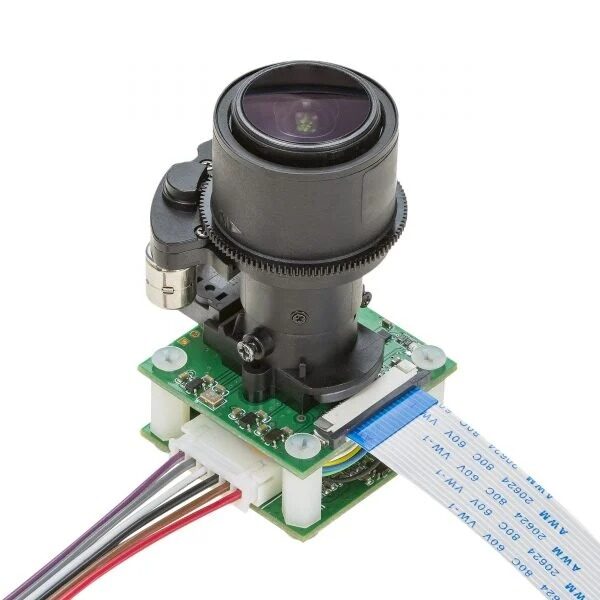
Arducam 5MP 1080p Pan Tilt Zoom PTZ Camera for Raspberry Pi
A motorised PTZ camera that pairs perfectly with the Raspberry Pi AI Kit for smart surveillance applications — auto-track subjects detected by the Hailo NPU.
Running Your First AI Models
Once the software stack is installed, you can immediately run Hailo’s example applications:
Object Detection with YOLOv8 (Camera)
rpicam-hello -t 0 --post-process-file /usr/share/rpi-camera-assets/hailo_yolov8_inference.json --lores-width 640 --lores-height 640
This command opens the camera, runs YOLOv8s through the Hailo NPU, and overlays bounding boxes with class labels on the live preview. You should see 30+ FPS with detection boxes around detected objects.
Using the Hailo Python API Directly
For custom applications, the hailo_platform Python package gives you direct control over model loading and inference:
from hailo_platform import HEF, VDevice
import numpy as np

hef = HEF('/path/to/model.hef')
with VDevice() as target:
    infer_model = target.create_infer_model(hef)
    with infer_model.configure() as configured_model:
        input_data = np.random.float32((1, 3, 640, 640))
        job = configured_model.run([input_data])
        output = job[0]
        print('Output shape:', output.shape)
Converting Custom Models to Hailo Format
To run your own PyTorch or TensorFlow models on the Hailo NPU, you must compile them to Hailo’s proprietary HEF format using the Hailo Dataflow Compiler (DFC). The DFC runs on an x86 Linux machine (not on the Pi itself) and requires a Hailo developer account for access. The process involves: ONNX export, Hailo parsing, quantisation calibration, compilation, and HEF file generation. Hailo’s Model Zoo provides pre-compiled HEF files for 100+ popular models including ResNet, EfficientDet, YOLOv5/v8, DeepSORT, and more.
Edge AI Use Cases for India
The Raspberry Pi AI Kit’s combination of low cost, low power, and real-time performance opens up exciting application possibilities for the Indian market:
Smart Agriculture – Crop Disease Detection
Deploy Pi 5 AI Kit nodes in greenhouse farms (hydroponics, polyhouses) across Maharashtra, Karnataka, and Andhra Pradesh. Camera-equipped nodes run plant disease detection models continuously, alerting farmers via SMS when early-stage disease symptoms are detected — before they spread and cause significant crop loss.
Industrial Quality Control
Indian SME manufacturers performing visual inspection of products (PCBs, pharmaceuticals, textiles) can replace expensive proprietary machine vision systems costing Rs 5–10 lakhs with Pi 5 AI Kit-based systems at under Rs 25,000. Defect detection models running at 60 FPS on the Hailo NPU are fast enough for most production line speeds.
Smart Retail and Footfall Analytics
Indian retailers using the Pi 5 AI Kit for in-store analytics: footfall counting, zone dwell time analysis, queue length monitoring, and shelf occupancy detection — all processed locally without sending customer footage to any cloud service.
Traffic Monitoring and Parking Management
Municipal corporations and private parking operators in Indian cities can deploy Pi 5 AI Kit nodes for vehicle counting, license plate recognition, and illegal parking detection at a fraction of the cost of dedicated ANPR cameras.

Raspberry Pi 5 Model 4GB RAM
The 4GB Raspberry Pi 5 offers the best balance of performance and price for AI Kit projects — ample RAM for video processing pipelines and running companion services.
Limitations and How to Work Around Them
The Raspberry Pi AI Kit is impressive but has real limitations that Indian developers should understand before committing to it for a project:
Model Compilation Requirement: Every model must be compiled to Hailo’s HEF format before running. This requires the Hailo Dataflow Compiler on an x86 machine and a developer account. Workaround: Use Hailo’s Model Zoo pre-compiled models, or request compilation through Hailo’s community forums.
No LLM Support: The Hailo-8L is optimised for convolutional networks and cannot run transformer-based large language models efficiently. For LLM inference on Pi 5, use llama.cpp on the CPU (very slow) or a different accelerator.
PCIe Bandwidth Shared with NVMe: The Pi 5 has only one PCIe 2.0 x1 lane. When using the AI Kit, you cannot simultaneously use an NVMe SSD through the same interface. Workaround: Boot from a USB 3.0 SSD instead of NVMe when using the AI Kit.
Thermal Management: Sustained AI inference at 60 FPS will heat the Pi 5 significantly. Workaround: Install the official active cooler and ensure your enclosure has adequate ventilation.
Frequently Asked Questions
What is the difference between the Raspberry Pi AI Kit and AI HAT+?
The AI Kit includes both the M.2 HAT+ board and the Hailo-8L module together as a bundle. The AI HAT+ is a newer, more integrated product that includes the Hailo-8L directly on the HAT board (no separate M.2 module), making installation simpler. Both deliver the same 13 TOPS performance. The AI HAT+ also comes in a 26 TOPS variant using the full Hailo-8 chip.
Can I use the Hailo NPU with Python OpenCV?
Yes. Hailo provides Python bindings that integrate with OpenCV pipelines. You can capture frames with OpenCV, preprocess them into the correct format, run inference through the Hailo API, and then post-process and visualise results with OpenCV. Hailo’s GitHub provides example scripts demonstrating this integration.
Does the AI Kit work with Raspberry Pi 4?
No. The Raspberry Pi AI Kit specifically requires the Raspberry Pi 5 because it connects via the Pi 5’s PCIe 2.0 interface (the J7 connector). The Raspberry Pi 4 and earlier models have no PCIe connector, so the AI Kit is physically and electrically incompatible.
Is 4GB RAM sufficient for the AI Kit, or do I need 8GB?
For single-model inference tasks like object detection from a camera, 4GB RAM is adequate. For complex pipelines with multiple models, high-resolution video processing, or running a web server alongside AI inference, 8GB provides more comfortable headroom.
Where can I buy the Raspberry Pi AI Kit in India?
The Raspberry Pi AI Kit is available through authorised Raspberry Pi distributors in India including Zbotic, Element14 India, and Robu.in. Zbotic offers competitive pricing with fast delivery across India and genuine Raspberry Pi products.
Start Your Edge AI Journey with Raspberry Pi
Shop Raspberry Pi 5, AI Kit, cameras, and accessories at Zbotic India. All products are genuine and in-stock for fast delivery across India.







Add comment