
Setting up an ESP32 Zigbee coordinator for local smart home control is the path to true independence from cloud platforms like Amazon, Google, and Tuya. Zigbee is the backbone of millions of smart home devices worldwide — from Philips Hue bulbs and IKEA TRADFRI to Xiaomi sensors and Sonoff switches. With the ESP32-H2 or ESP32-C6 (both of which support 802.15.4 for Zigbee), you can build a coordinator that manages an entire Zigbee mesh network locally, with no internet dependency and no vendor lock-in. This guide shows you exactly how to do it.
Zigbee Basics: Why It Beats Wi-Fi for Smart Homes
Zigbee operates on the IEEE 802.15.4 standard in the 2.4 GHz band, but unlike Wi-Fi, it is designed specifically for low-power mesh networking. Each Zigbee device can act as a router (if mains-powered) and relay messages from other devices, extending the network range dramatically without any additional infrastructure. A typical Zigbee device consumes just 1–30 mW during transmission versus Wi-Fi’s 100–300 mW — enabling battery life measured in years rather than weeks for sensors.
For Indian homes and apartments, Zigbee’s mesh capability is particularly valuable. In a typical 2BHK or 3BHK apartment, the number of walls between the main door and bedroom can weaken Wi-Fi smart home devices. Zigbee devices create a self-healing mesh where each mains-powered smart plug or light bulb automatically extends coverage to battery-powered sensors. A network of 20–30 devices in a 1,500 sq ft apartment is easily achievable with excellent reliability.
The other major advantage for Indian users is local processing. When your internet goes down during a power cut (as happens frequently in tier-2 and tier-3 cities), your Zigbee smart home continues to work perfectly. Lights respond, door locks operate, and automations run — all without touching the internet. This is impossible with pure cloud-dependent Wi-Fi smart home systems.
ESP32 Zigbee Support: H2 vs C6 vs Other Chips
Espressif added native 802.15.4 support with the ESP32-H2 and ESP32-C6 chips. Here is a comparison:
| Feature | ESP32-H2 | ESP32-C6 |
|---|---|---|
| CPU | RISC-V 96 MHz | RISC-V 160 MHz |
| Wi-Fi | No | Yes (Wi-Fi 6) |
| Bluetooth | BLE 5.3 | BLE 5.3 |
| Zigbee/Thread | Yes (802.15.4) | Yes (802.15.4) |
| Best Use | Dedicated Zigbee device/coordinator | Coordinator bridging Zigbee to Wi-Fi/MQTT |
For a Zigbee coordinator that bridges your Zigbee network to Home Assistant over Wi-Fi (the most common use case), the ESP32-C6 is the better choice because it handles both 802.15.4 (Zigbee) and Wi-Fi simultaneously. The ESP32-H2 is ideal for end devices and routers that only need Zigbee/BLE and need the lowest possible power consumption.
An alternative approach that works well today is using a conventional ESP32 paired with a CC2652 or EFR32MG21 radio co-processor. Projects like Zigbee2MQTT with a TI CC2652-based USB stick (like the SONOFF Zigbee 3.0 USB Dongle Plus) are mature and stable — this is the recommended path if you want to get started immediately while ESP32-C6 Zigbee SDK matures further.

Ai Thinker ESP32-C3-01M Wi-Fi + BLE Module
The ESP32-C3 is an excellent gateway companion chip for bridging Zigbee coordinator data to Wi-Fi/MQTT networks, running on the efficient RISC-V core.
Setting Up the ESP32 Zigbee Coordinator
The Espressif Zigbee SDK (esp-zigbee-sdk) is available on GitHub and provides complete coordinator, router, and end device examples. Follow these steps to set up a coordinator:
- Install ESP-IDF v5.1.3+ — the Zigbee SDK requires ESP-IDF v5.x. Earlier versions do not support it
- Clone esp-zigbee-sdk:
git clone --recurse-submodules https://github.com/espressif/esp-zigbee-sdk.git - Navigate to the coordinator example:
cd esp-zigbee-sdk/examples/esp_zigbee_coordinaor - Configure target chip:
idf.py set-target esp32c6(or esp32h2) - Configure application:
idf.py menuconfig→ Component config → Zigbee → set channel mask, PAN ID - Build and flash:
idf.py build flash monitor
The coordinator example initialises the Zigbee stack as coordinator, opens the network for joining, and logs any devices that join. From here, you extend it to handle cluster commands (reading sensor values, sending on/off commands to lights, etc.).
Key Zigbee concepts you need to understand for coordinator development:
- PAN ID: Your network’s identifier (0x1234 by default). Change this if you have neighbours with Zigbee networks
- Channel: Zigbee uses channels 11–26 (2.4 GHz). Avoid channels that overlap with your Wi-Fi (channel 1→Zigbee 11-12, channel 6→Zigbee 16, channel 11→Zigbee 21-22)
- Clusters: Zigbee’s application layer protocol. Each cluster represents a function (on/off, temperature measurement, door lock, etc.)
- Endpoints: Logical devices within a physical Zigbee node. A smart socket might have endpoint 1 for the plug and endpoint 2 for energy metering
Pairing Zigbee Devices to Your Coordinator
Pairing (called “joining” in Zigbee terminology) requires the coordinator to open its network for a set time window. In the esp-zigbee-sdk, call esp_zb_bdb_start_top_level_commissioning(ESP_ZB_BDB_MODE_NETWORK_STEERING) to open the network for 180 seconds.
To put most commercial Zigbee devices into pairing mode:
- Philips Hue bulbs: Power cycle 6 times quickly (on 2s, off 2s) — bulb will blink three times to confirm pairing mode
- IKEA TRADFRI bulbs: Power cycle 6 times, or use the TRADFRI remote (hold reset button 10 seconds)
- Xiaomi/Aqara sensors: Hold the reset button for 5 seconds until LED blinks
- Sonoff Zigbee switches: Hold the pairing button for 5 seconds until LED starts rapid blinking
Once paired, devices appear in your coordinator’s routing table with their 16-bit network address. The coordinator can now send cluster commands directly to any paired device.
Integration with Home Assistant for Local Control
Home Assistant is the leading open-source home automation platform and has excellent Zigbee support via the ZHA (Zigbee Home Automation) integration and Zigbee2MQTT. For an ESP32-based coordinator, the recommended integration path today is:
- Run Zigbee2MQTT on a Raspberry Pi or any Linux server (including a cheap Oracle Cloud free tier VM)
- Connect your ESP32-C6 Zigbee coordinator via USB to the same server — Zigbee2MQTT speaks to it via the EZSP or Znp protocol
- Zigbee2MQTT publishes device states and accepts commands via MQTT topics (e.g.,
zigbee2mqtt/living_room_light) - Home Assistant connects to the same MQTT broker and auto-discovers all Zigbee devices via MQTT discovery
This architecture gives you 100% local control — Home Assistant and Zigbee2MQTT can run entirely on your home server with zero internet connectivity required. Automations, voice control (via local Whisper STT), and dashboards all operate locally. For Indian users with frequent internet outages or data-conscious households, this is enormously valuable.
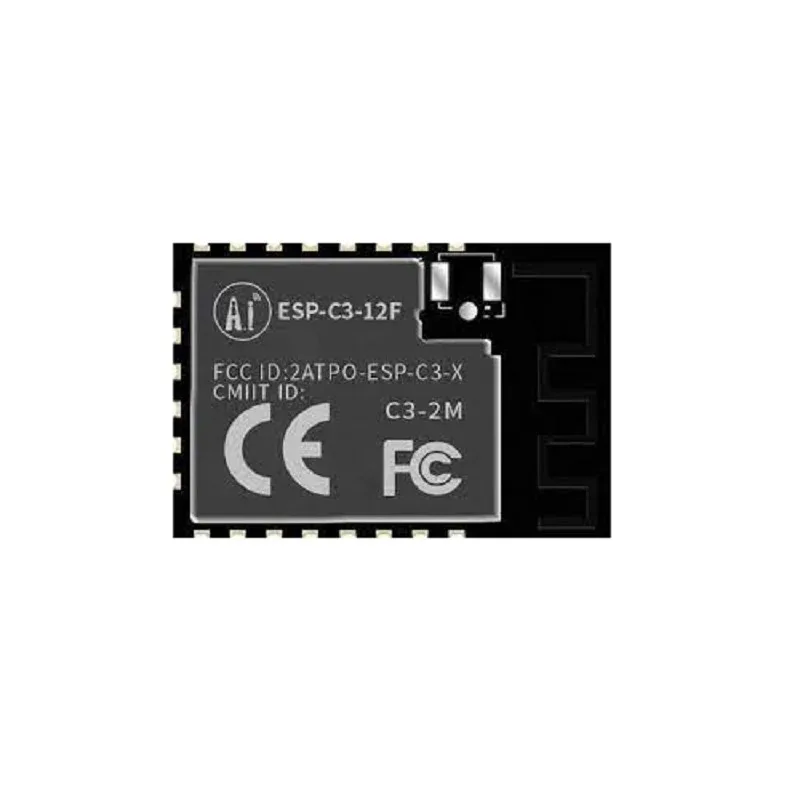
Ai-Thinker ESP32-C3-12F Wi-Fi + BLE Module
A production-grade ESP32-C3 module with 4MB flash and embedded antenna — ideal for building compact, always-on IoT gateway nodes in your smart home setup.
Zigbee Network Design Tips for Indian Homes
Indian home construction uses reinforced concrete walls that are thicker than typical Western drywall construction. This affects Zigbee signal propagation. Here are specific tips:
- Minimum one router per room: Place at least one mains-powered Zigbee device (smart plug, light switch) in each room. These act as routers and extend coverage through walls
- Keep coordinator central: Place your coordinator (connected to your Home Assistant server) as centrally as possible — ideally in the living room or near the home server location
- Avoid 2.4 GHz congestion: In apartment complexes with dozens of Wi-Fi networks, Zigbee channel selection is critical. Use a Zigbee channel scanner to find the least congested channel before deployment
- Mesh redundancy: The Zigbee mesh is self-healing, but aim for at least two router-capable devices within range of each end device for resilience
- UPS for coordinator: Your Zigbee coordinator and Home Assistant server should be on a UPS. During power cuts (common in many Indian localities), you want your smart home automations and security monitoring to continue uninterrupted

Waveshare ESP32-C3 0.71inch Round Display Development Board
Build a compact smart home status display node showing Zigbee network status, device count, and automation states — a perfect companion to your coordinator setup.
Frequently Asked Questions
Can I use an existing ESP32 (non-H2/C6) as a Zigbee coordinator?
A standard ESP32, ESP32-S2, or ESP32-S3 does not have native 802.15.4 hardware, so it cannot run Zigbee directly. However, you can pair one with an external Zigbee radio module. The most mature approach is using a UART-connected CC2652 module (like the EBYTE E72-2G4M20S1E) where the ESP32 runs the host-side Zigbee stack and communicates with the radio over UART. This is a more complex setup but gives you access to the ESP32’s powerful Wi-Fi for MQTT bridging alongside Zigbee.
What is the maximum number of devices a Zigbee network supports?
The Zigbee 3.0 specification supports up to 65,535 devices in theory. In practice, a well-designed home network with a capable coordinator (ESP32-C6 or commercial stick) comfortably handles 100–200 devices. Each router device can support up to 32 direct children. For most Indian homes with 20–50 smart devices, scalability is never a concern.
How does Zigbee compare to Z-Wave for the Indian market?
Z-Wave operates at 865.1 MHz in India (Region IN, added in Z-Wave 700 series). Z-Wave hardware is expensive — a single Z-Wave smart plug costs ₹3,000–₹5,000 versus ₹400–₹800 for equivalent Zigbee hardware. Z-Wave’s frequency advantage (better wall penetration than 2.4 GHz) is partially offset by its lower network bandwidth and fewer devices per network (232 maximum). For budget-conscious Indian DIY smart home builders, Zigbee is the clear choice. Z-Wave makes sense only for premium installations where price is no concern.
Will my ESP32 Zigbee coordinator work with Matter devices?
Matter is a new smart home standard that uses Thread (802.15.4) as the underlying transport for battery-powered devices, alongside Wi-Fi and Ethernet. ESP32-C6 and ESP32-H2 both support Thread in addition to Zigbee, and Espressif has released Matter SDK examples. A Thread Border Router (which your ESP32-C6 can also serve as) bridges Matter Thread devices to your IP network. However, Matter and Zigbee are different protocols and devices certified for one are not directly compatible with the other without a translation layer.
Build Your Local Zigbee Smart Home with Zbotic
Get all the ESP32 modules, sensors, and IoT components you need to build a fully local, cloud-free smart home. Zbotic delivers across India with competitive prices and genuine components.


Add comment