
ESP32 CAN bus integration opens up a fascinating world of automotive diagnostics and vehicle data logging projects. The ESP32 microcontroller includes a built-in CAN controller (called TWAI — Two-Wire Automotive Interface), making it one of the most capable and affordable options for DIY automotive projects in India. Whether you want to build a custom instrument cluster, a real-time OBD scanner, or a vehicle data logger for your car or bike, the ESP32 gives you professional-grade capabilities at a fraction of the cost of commercial automotive tools.
In this guide, we will cover the CAN bus protocol, how to interface the ESP32 with OBD-II, write code to read diagnostic data, and explore practical projects you can build for your Indian vehicle.
CAN Bus Basics: What Every Maker Should Know
Controller Area Network (CAN) is a robust serial communication protocol developed by Bosch in the 1980s specifically for automotive applications. It is now standard in virtually every modern car, motorcycle, truck, and even many industrial machines. CAN uses a two-wire differential bus (CAN-H and CAN-L) that is highly resistant to electrical noise — critical in the electromagnetically noisy environment of an automobile.
Key characteristics of CAN bus:
- Speed: Standard CAN runs at up to 1 Mbps. Most automotive networks use 500 kbps (high-speed CAN) or 125 kbps (low-speed CAN).
- Multi-master: Any node on the bus can transmit at any time. Collision is resolved by message priority (lower ID = higher priority).
- Message-based: Each message has an 11-bit or 29-bit identifier and up to 8 bytes of data.
- Error detection: CAN includes cyclic redundancy check (CRC), bit stuffing, and ACK slots — making it far more reliable than UART or I2C.
In a modern car, there are typically multiple CAN buses — one high-speed network for powertrain/ABS (engine, transmission, brakes) and one lower-speed network for body controls (windows, lights, comfort features). The OBD-II port under your dashboard provides access to the powertrain CAN bus through a standardised interface.
ESP32 TWAI Controller Overview
The ESP32 includes a built-in CAN controller called TWAI (Two-Wire Automotive Interface) that is compatible with the CAN 2.0B specification. This means the ESP32 can:
- Transmit and receive standard (11-bit) and extended (29-bit) CAN frames
- Operate at any CAN bitrate from 25 kbps to 1 Mbps
- Filter incoming messages by ID to reduce CPU load
- Operate in Normal, Listen-Only, and Self-Test modes
The TWAI controller handles all the CAN protocol logic (framing, arbitration, error detection) in hardware. Your code only needs to configure it and call send/receive functions. However, the TWAI controller only provides the digital logic — it does not drive the differential bus signals required on the physical wire. For that, you need an external CAN transceiver chip.
Hardware Setup: ESP32 + MCP2551/TJA1050 Transceiver
The two most commonly used CAN transceiver ICs for DIY projects are the MCP2551 and TJA1050. Both are available on ready-made breakout modules in India for about ₹80-150 each. These chips convert the ESP32’s 3.3V logic signals to the differential CAN bus levels (CAN-H typically 2.75-4.5V, CAN-L 0.5-2.25V).
Wiring is straightforward:
| ESP32 Pin | Transceiver Pin | Notes |
|---|---|---|
| GPIO 5 (TX) | TXD | Any GPIO can be remapped in software |
| GPIO 4 (RX) | RXD | Any GPIO can be remapped |
| 3.3V | VCC | TJA1050 can use 3.3V directly |
| GND | GND | Common ground with vehicle |
| — | CANH → OBD-II Pin 6 | High-speed CAN-H line |
| — | CANL → OBD-II Pin 14 | High-speed CAN-L line |
The OBD-II port in your car provides +12V on Pin 16 and GND on Pins 4/5, so you can power your ESP32 directly from the vehicle without a separate battery.

Ai Thinker NodeMCU-32S ESP32 Development Board – IPEX Version
The best ESP32 board for CAN bus projects — features the built-in TWAI (CAN) controller, dual-core CPU, and Wi-Fi for real-time data streaming from your vehicle.
OBD-II Protocol and PID Codes
OBD-II (On-Board Diagnostics II) is the standardised diagnostic protocol mandated in all cars sold in India since approximately 2000-2005. It defines a standard connector (the 16-pin OBDII port) and a set of standard diagnostic services (called modes) and parameter IDs (PIDs).
The most useful OBD-II modes for makers:
- Mode 01: Current powertrain data (speed, RPM, coolant temp, fuel level, throttle position)
- Mode 03: Read stored diagnostic trouble codes (DTCs)
- Mode 04: Clear DTCs (reset the check engine light)
- Mode 09: Vehicle information (VIN, calibration IDs)
Common Mode 01 PIDs you can read from most cars:
| PID (hex) | Parameter | Formula | Unit |
|---|---|---|---|
| 0x0C | Engine RPM | (256×A + B) / 4 | rpm |
| 0x0D | Vehicle Speed | A | km/h |
| 0x05 | Coolant Temperature | A − 40 | °C |
| 0x2F | Fuel Level | A × 100/255 | % |
| 0x11 | Throttle Position | A × 100/255 | % |
Arduino Code to Read Vehicle Data
Using the ESP32’s built-in TWAI driver (available in ESP-IDF and Arduino framework):
#include <driver/twai.h>

#define TX_GPIO 5
#define RX_GPIO 4

void setup() {
  Serial.begin(115200);

  // Configure TWAI driver for 500 kbps (standard automotive)
  twai_general_config_t g_config =
    TWAI_GENERAL_CONFIG_DEFAULT((gpio_num_t)TX_GPIO,
                                (gpio_num_t)RX_GPIO,
                                TWAI_MODE_NORMAL);
  twai_timing_config_t t_config = TWAI_TIMING_CONFIG_500KBITS();
  twai_filter_config_t f_config = TWAI_FILTER_CONFIG_ACCEPT_ALL();

  if (twai_driver_install(&g_config, &t_config, &f_config) == ESP_OK) {
    Serial.println("TWAI driver installed");
  }
  if (twai_start() == ESP_OK) {
    Serial.println("TWAI driver started");
  }
}

void sendOBDRequest(uint8_t pid) {
  twai_message_t request;
  request.identifier = 0x7DF;  // OBD-II broadcast address
  request.data_length_code = 8;
  request.data[0] = 0x02;  // Number of additional bytes
  request.data[1] = 0x01;  // Mode 01 — current data
  request.data[2] = pid;
  request.data[3] = 0x00;
  request.data[4] = 0x00;
  request.data[5] = 0x00;
  request.data[6] = 0x00;
  request.data[7] = 0x00;
  twai_transmit(&request, pdMS_TO_TICKS(10));
}

void loop() {
  // Request engine RPM (PID 0x0C)
  sendOBDRequest(0x0C);
  delay(50);

  twai_message_t response;
  if (twai_receive(&response, pdMS_TO_TICKS(100)) == ESP_OK) {
    if (response.identifier == 0x7E8) {  // ECU response
      uint16_t rpm = ((response.data[3] * 256) + response.data[4]) / 4;
      Serial.printf("Engine RPM: %dn", rpm);
    }
  }

  // Request vehicle speed (PID 0x0D)
  sendOBDRequest(0x0D);
  delay(50);

  if (twai_receive(&response, pdMS_TO_TICKS(100)) == ESP_OK) {
    if (response.identifier == 0x7E8) {
      uint8_t speed = response.data[3];
      Serial.printf("Speed: %d km/hn", speed);
    }
  }

  delay(500);
}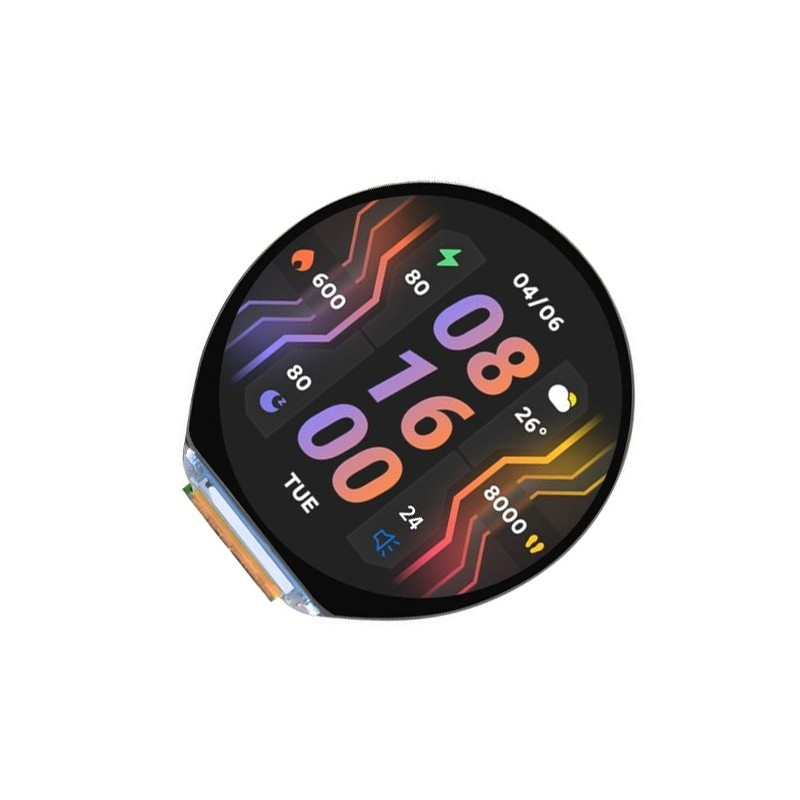
Waveshare ESP32-S3 1.46inch Round Display Development Board
Build a custom round dashboard gauge for your vehicle using this ESP32-S3 board with built-in 412×412 display — perfect for showing RPM, speed, and temperature.
Practical Automotive Projects with ESP32
1. Custom HUD (Heads-Up Display)
Mount a small OLED or TFT display on your dashboard to show speed, RPM, and coolant temperature in real time. Combined with a round display ESP32 board, you can create a professional-looking instrument cluster for a fraction of the cost of an aftermarket unit.
2. Trip Data Logger
Log vehicle speed, RPM, throttle position, and fuel level to an SD card for every journey. Analyse your driving habits, fuel efficiency, and engine health over time. Store data in CSV format for easy import into spreadsheets.
3. Remote Vehicle Monitor
Use the ESP32’s Wi-Fi to connect to a hotspot (your phone’s mobile data) and stream vehicle data to a cloud server. Get alerts if coolant temperature is too high, or track your vehicle’s location and speed remotely.
4. Check Engine Light Decoder
Use Mode 03 OBD-II requests to read Diagnostic Trouble Codes (DTCs) stored in the ECU. Display the fault code and its description on screen or send it to your phone — no need to visit a mechanic just to decode the check engine light.
Notes for Indian Vehicles
Most modern cars sold in India (post-2010) fully support OBD-II and will respond to standard PIDs. However, there are some important notes:
- Maruti Suzuki: Uses standard ISO 15765-4 CAN OBD-II. Most PIDs work well.
- Hyundai/Kia: Standard CAN OBD-II. Good PID coverage.
- Tata Motors: Newer models (Nexon, Harrier) use standard CAN. Older Indigo/Indica models may use K-Line (ISO 9141) instead of CAN.
- Two-wheelers: Hero, Bajaj, Honda, TVS flagship models increasingly use CAN bus. Use 250 kbps or 500 kbps and check manufacturer documentation.
- BS6 vehicles (2020+): All BS6-compliant vehicles sold in India are required to support OBD-II diagnostics. CAN bus at 500 kbps is standard.
Frequently Asked Questions
Can the ESP32 damage my car’s ECU?
No, if wired correctly. As a read-only listener on the CAN bus (Listen-Only mode), the ESP32 has zero impact on bus communication. Even in Normal mode, OBD-II diagnostic requests are a standard part of the protocol that every ECU is designed to handle. The risk is if you write arbitrary CAN frames to the bus — avoid this unless you know exactly what you are doing.
Do I need a CAN transceiver or can I connect the ESP32 directly?
You absolutely need a CAN transceiver (MCP2551 or TJA1050). The ESP32’s GPIO pins output 3.3V logic, but the CAN bus uses differential voltages that require a dedicated driver/receiver IC. Connecting directly will not work and could damage the ESP32 or the vehicle’s CAN bus.
What baud rate should I use for OBD-II?
Most modern cars use 500 kbps (ISO 15765-4 Type B). Older vehicles may use 250 kbps (Type A). If you are unsure, try 500 kbps first. Some luxury vehicles also have a 1 Mbps CAN network for certain subsystems.
Can I use this with motorcycles?
Yes, but motorcycles use a smaller OBD connector (typically a 3-pin Amphenol or a 6-pin connector) rather than the standard 16-pin car OBD-II port. The underlying CAN protocol is often the same. You will need a compatible cable or breakout adapter specific to your bike brand.
Start Your Automotive IoT Project
Shop ESP32 development boards and sensors for your CAN bus and automotive diagnostics projects at Zbotic — India’s trusted electronics store.






Add comment