Zbotic Logo Zbotic Logo
  • Home
  • Shop
  • Sale
  • 3D Print Service
  • PCB Service
  • B2B
  • Blogs
  • Contact Us
0 0

View Wishlist Add all to cart

0 0
0 Shopping Cart
Shopping cart (0)
Subtotal: ₹0.00

View cartCheckout

  • Shop
  • About Us
  • Contact Us
  • Reseller
  • Blogs
020 69134444
1800 209 0998
[email protected]
Help Desk
Facebook Twitter Instagram Linkedin YouTube
Zbotic Logo Zbotic Logo
0 0

View Wishlist Add all to cart

0 0
0 Shopping Cart
Shopping cart (0)
Subtotal: ₹0.00

View cartCheckout

All departments
  • 3D Print Service
  • 3D Printer
  • Batteries & Chargers
  • Development Boards
  • Drone Parts
  • EBike parts
  • Sensor Modules
  • Electronic Components
  • Electronic Modules
  • IoT and Wireless
  • Mechanical Parts and Workbench Tools
  • Motors & Drivers & Pumps & Actuators
  • DIY and Robot Kits
  • Show more
  • Home
  • Shop
  • Sale
  • 3D Print Service
  • PCB Service
  • B2B
  • Blogs
  • Contact Us
Return to previous page
Home Robotics & DIY

Clap Light Control Using Arduino and Sound Sensor

Clap Light Control Using Arduino and Sound Sensor

October 16, 2021 /Posted byshreyans001 / 0

Introduction :

In this project, we are making a clap lamp, which is turn ON/OFF with sound of clap or any other sound by using Sound Detector Sensor. The Sound Detector is a small board that combines a microphone and some processing circuitry. It detects the sounds of door knocks, claps, voice or any other sounds loud enough to picked up by the microphone.

How Does it Work?

We use a sound sensor that generates a high output whenever it detects a sound signal. We have to clap to generate a loud sound so the sensor will detect it. When you clap near the sound sensor the LED will go on when you clap again the LED goes off. There are two given circuits and you can make any one of your choices. One circuit is designed to turn on and off an AC bulb and the other is for an LED. 

Please work carefully with the AC load. 

Components Required:

  1. Small breadboard 
  1. Arduino Uno 
  1. Uno Cable 
  1. 1 Channel 5V Relay 
  1. Sound Sensor 
  1. Jumper Wire 
  1. 220V LED bulb 
  1. 5v 2Amp Power Adapter 
  2. 220-ohm resistor
Clap Light Circuit Zbotic
Clap Light Control Using Arduino and Sound Sensor 3
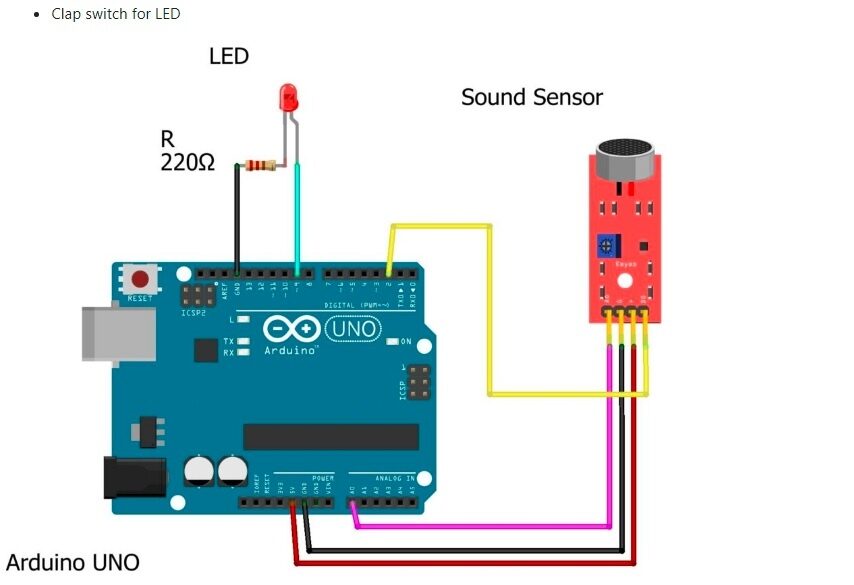
Clap Light LED Zbotic
Clap Light Control Using Arduino and Sound Sensor 4

Connections: 

Sound Sensor                         –                Arduino Uno 

+VCC                                      ->             +5V 

GND                                        ->            GND 

D0                                           ->           PIN No.2 

LED Connection: 

+Ve  ->  Arduino Pin No.4 

-Ve     -> GND 

Make the same connections for the sound sensor and LED as shown in the above diagram. After completing the circuit make sure to upload the given code.

CODE

  • Code for AC bulb clap switch
 //   
 int SoundSensor=2; // LM393 Sound Sensor Digital Pin D0 connected to pin 2  
 int LED=9;     // LED connected to pin 9  
 int RELAY=10;   // RELAY connected to pin 10  
 boolean LEDStatus=false;  
 void setup()  
 {  
  pinMode(SoundSensor,INPUT);  
  pinMode(LED,OUTPUT);   
  pinMode(RELAY,OUTPUT);  
  Serial.begin(9600); //initialize serial  
  digitalWrite(RELAY,HIGH); // RELAY High means OFF   
 }  
 void loop()   
 {  
  int SensorData=digitalRead(SoundSensor);   
  Serial.println(SensorData);//print the value  
   if(SensorData==1)  
   {  
   if(LEDStatus==false)  
   {  
     LEDStatus=true;  
     digitalWrite(LED,HIGH);  // LED ON  
     digitalWrite(RELAY,LOW); // RELAY OFF  
   }  
   else if(LEDStatus==true)  
   {  
     LEDStatus=false;  
     digitalWrite(LED,LOW);  // LED ON  
     digitalWrite(RELAY,HIGH); // RELAY OFF  
   }  
   }  
   }  
  • Code for LED clap switch
 // 
 int SoundSensor=2;  // LM393 Sound Sensor Digital Pin D0 connected to pin 2  
 int LED=9;      // LED connected to pin 9  
 boolean LEDStatus=false;  
 void setup()  
 {  
  pinMode(SoundSensor,INPUT);  
  pinMode(LED,OUTPUT);   
  Serial.begin(9600); //initialize serial  
 }  
 void loop()   
 {  
  int SensorData=digitalRead(SoundSensor);   
  Serial.println(SensorData);//print the value  
   if(SensorData==1)  
   {  
   if(LEDStatus==false)  
   {  
     LEDStatus=true;  
     digitalWrite(LED,HIGH); // LED ON  
   }  
   else if(LEDStatus==true)  
   {  
     LEDStatus=false;  
     digitalWrite(LED,LOW); // LED OFF  
   }  
   }  
   }  

5. Output

When sound of clapping or any other is detected by sensor, the lamp attached to module will illuminate.

If you have any query please write us at [email protected]

Hope you understand the project well and if you are facing any errors do inform us in the comments section below.

Share Post
  • Facebook
  • Linkedin
  • Whatsapp
ARDUINO ROBOTIC ARM
Robotic Arm
DIY0009.2
Automatic Hand Sanitizer Dispe...

Related posts

Svg%3E
Read more

Caterpillar Track Robot: Tank-Drive Build for All Terrain

April 1, 2026 0
When wheels lose grip on sand, gravel, grass, or loose surfaces, caterpillar tracks keep moving. A tank-track robot distributes its... Continue reading
Svg%3E
Read more

RC Car to Robot: Convert a Toy Car into an Autonomous Robot

April 1, 2026 0
That old RC toy car gathering dust can be transformed into an Arduino-controlled autonomous robot with just a few electronic... Continue reading
Svg%3E
Read more

Robotic Arm Kit India: Best Options for Students and Hobbyists

April 1, 2026 0
If you are a student or hobbyist looking to get into robotics, a robotic arm kit is one of the... Continue reading
Svg%3E
Read more

Sumo Robot: Competition Build Guide India

April 1, 2026 0
Sumo robot competitions are among the most exciting events in Indian robotics, pitting small autonomous robots against each other in... Continue reading
Svg%3E
Read more

Robot Arm Build: 6-DOF Servo Arm with Arduino Control

April 1, 2026 0
Building a 6-DOF robot arm with servo motors and Arduino is one of the most rewarding robotics projects you can... Continue reading

Add comment Cancel reply

Your email address will not be published. Required fields are marked

Facebook Twitter Instagram Pinterest Linkedin Youtube

Get the latest deals and more.

Download on Google Play Download on the App Store

Call us: 020 69134444 / 1800 209 0998

Monday - Saturday 09:30 AM - 06:00 PM
For Technical Supports Email: [email protected]
For Sales / Enquiries Email: [email protected]

  • My Account

    • Cart

    • Wishlist

    • Checkout

    • My Orders

    • Track Order

    • My Account

  • Information

    • FAQs

    • Blogs

    • Career

    • About Us

    • Contact Us

    • Payment Options

  • Policies

    • Privacy Policy

    • Terms & Conditions

    • GST Input Tax Credit

    • Shipping Return Policy

    • E-Waste Collection Points

    • Our Sitemap

© Zbotic.in is registered trademark of Moxie Supply Pvt Ltd – All Rights Reserved
Login
Use Phone Number
Use Email Address
Not a member yet? Register Now
Reset Password
Use Phone Number
Use Email Address
Register
Already a member? Login Now