
The Raspberry Pi CM4 carrier board ecosystem is one of the most powerful and flexible platforms in the embedded Linux world today. The Compute Module 4 (CM4) separates the brains of the Raspberry Pi — the BCM2711 SoC, RAM, and eMMC flash — from the connectors and interfaces, allowing engineers and makers in India to design or purchase carrier boards precisely tailored to their application. This buying guide covers everything you need to know to choose and set up the right CM4 carrier board for your project.
What Is the Raspberry Pi CM4?
The Raspberry Pi Compute Module 4 is a system-on-module (SOM) that packs the full capability of a Raspberry Pi 4 onto a compact 55 mm × 40 mm PCB with two high-density 100-pin connectors on the underside. Unlike the standard Raspberry Pi 4 Model B which has all connectors (USB, HDMI, Ethernet, GPIO) fixed to the board, the CM4 exposes almost all interfaces through these connectors and relies on a separate carrier board to bring them out to usable ports.
This design philosophy offers several critical advantages for product development:
- Reliability: No SD card slot — use eMMC or NVMe storage for significantly better longevity and read/write performance
- Custom form factor: Design or purchase a carrier board that fits exactly in your product enclosure
- Interface selection: Use only the interfaces your application needs, reducing cost and complexity
- Industrial hardening: Many carrier boards offer extended temperature ratings, ESD protection, and conformal coating options
- Longevity: CM4 has a minimum 5-year production guarantee — critical for commercial deployments
For Indian engineers building products for the BFSI, agri-tech, industrial automation, or digital signage sectors, the CM4 provides a path from prototype to production without a complete hardware redesign.
CM4 Variants: RAM, eMMC, and WiFi Options
The CM4 is available in 32 variants combining four RAM options, two eMMC options, and wireless/non-wireless configurations:
- RAM: 1GB, 2GB, 4GB, or 8GB LPDDR4
- eMMC storage: 0GB (Lite — uses microSD on carrier board), 8GB, 16GB, or 32GB
- Wireless: With WiFi/BT (2.4 GHz + 5 GHz 802.11ac, Bluetooth 5.0) or without
For most industrial and commercial applications in India, the recommended configuration is CM4 4GB RAM + 16GB eMMC + WiFi. If your carrier board provides its own wireless module or you are using wired Ethernet only, the non-wireless variant (slightly cheaper) is perfectly adequate. The Lite variant (no eMMC) is best when you want to use an NVMe SSD via a carrier board’s M.2 slot, as NVMe dramatically outperforms eMMC for read-heavy workloads.

Raspberry Pi 5 Model 4GB RAM
If you need a complete single-board computer rather than a module, the Raspberry Pi 5 4GB offers all CM4 capabilities in a ready-to-use form factor with all connectors included.
Types of CM4 Carrier Boards
The carrier board market for CM4 has expanded enormously since 2020. Here are the main categories:
1. Mini Carrier Boards
These are compact boards that expose just the essential interfaces: USB, HDMI, Ethernet, GPIO header, and a camera/display connector. Examples include the official Raspberry Pi CM4IO Board (full-size) and third-party mini boards from Waveshare, Seeed Studio, and various Chinese manufacturers. These are ideal for prototyping and small embedded applications. Typical size: 55 mm × 40 mm to 100 mm × 70 mm.
2. Full-Featured Development Carrier Boards
These replicate most of the Raspberry Pi 4 Model B’s feature set in a carrier format, often adding extras like M.2 slots, dual camera connectors, additional UART/CAN headers, or PoE. The Raspberry Pi CM4IO board itself is in this category. These are excellent for evaluation and development before designing a custom carrier.
3. NAS / Storage Carrier Boards
Designed specifically for network-attached storage, these boards include multiple SATA ports (typically 2–4), an M.2 slot, and Gigabit Ethernet. Boards like the Radxa CM4 IO Board with SATA expander or Tofu NAS carrier board turn the CM4 into a capable 4-bay NAS server — a popular project among Indian home lab enthusiasts given India’s growing NAS market.
4. Industrial Carrier Boards
These carrier boards are designed for harsh environments with features like -40°C to +85°C operating temperature, DIN rail mounting, RS-485/CAN/Modbus interfaces, isolated digital I/O, watchdog timers, and real-time clocks with battery backup. Boards from companies like Forlinx, Seeed reComputer, and DFRobot Compute Module IO Board fall in this category. Indian automation companies increasingly use these for SCADA, HMI, and PLC applications.
5. PoE Carrier Boards
Power-over-Ethernet carrier boards receive both data and 5V/3.3V power from a single Ethernet cable using an onboard PoE PD controller (IEEE 802.3af/at). These are ideal for camera nodes, door access panels, and remote sensor stations where running a separate power cable is impractical.
How to Choose the Right CM4 Carrier Board
Choosing the right carrier board depends on matching your application’s requirements. Work through this checklist systematically:
1. Storage Needs: Do you need eMMC (fast, reliable, onboard) or will you use a microSD or NVMe SSD? If using CM4 Lite, ensure the carrier board has a microSD slot or M.2 slot. For high-read databases or media servers, choose a board with M.2 NVMe support.
2. Display Output: How many displays do you need? Most carrier boards provide 1 or 2 HDMI ports. For dual-display signage applications, ensure you get a board with two micro-HDMI or HDMI ports connected to both CM4 display outputs.
3. USB Ports: The CM4 has 1× USB 2.0 port internally, but many carrier boards add a USB hub IC to provide 2–4 USB-A ports. Check whether you need USB 3.0 (only available via the CM4’s PCIe lane through a USB 3.0 controller IC).
4. Networking: Standard Gigabit Ethernet is available on virtually all carrier boards. If you need dual Ethernet (for routing/gateway applications), or industrial fieldbus protocols (RS-485, CAN, Modbus), choose accordingly.
5. GPIO Compatibility: If you have existing HATs or shields designed for the standard 40-pin Raspberry Pi header, ensure your chosen carrier board provides the same 40-pin header in the same pinout.
6. Form Factor and Mounting: Measure your enclosure carefully. The CM4 itself is 55 × 40 mm; the carrier board adds to this. For DIN rail applications in India’s electrical panels, specifically look for DIN-rail compatible carrier boards.
7. Power Input: Carrier boards typically accept 5V via USB-C, barrel jack, or screw terminals. Industrial boards often support 9–30V DC wide voltage input — important for 12V or 24V industrial power supplies common in Indian factories.
8. Camera Support: The CM4 supports two MIPI CSI-2 camera interfaces. If computer vision or video streaming is part of your application, ensure the carrier board breaks out both CSI connectors and they are accessible with the cameras you plan to use.
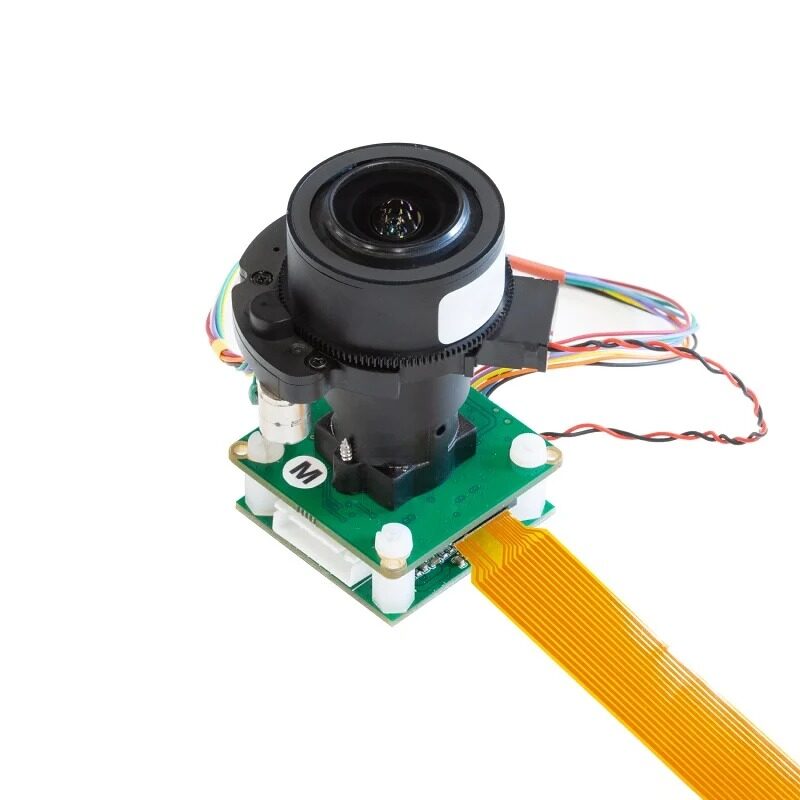
Arducam 12MP IMX477 Pan Tilt Zoom IR-Cut Camera
A professional-grade 12MP camera with motorised pan, tilt, and zoom for CM4-based security or inspection systems — compatible with CM4 carrier boards that have CSI connectors.
Step-by-Step CM4 Setup Guide
Once you have your CM4 and carrier board, follow these steps to get your system running:
Step 1: Seat the CM4 on the Carrier Board
The CM4 connects to the carrier board via two 100-pin high-density connectors on the underside. These are not standard board-to-board connectors — they use a Hirose DF40 series connector (or compatible). Align the CM4 carefully, ensuring all pins are lined up, and press firmly and evenly. You should hear/feel a slight click when fully seated. Never force it at an angle.
Step 2: Flash the OS Using Raspberry Pi Imager (eMMC)
For CM4 with eMMC (not Lite), you cannot simply use a microSD card. You need to put the CM4 into USB Mass Storage mode:
- Locate the nRPIBOOT jumper or button on your carrier board (check the board’s documentation — position varies by manufacturer)
- Set this jumper / hold the button before powering on
- Connect the carrier board to your PC via its USB-C or micro-USB port (the data port, not just the power port)
- Power on the carrier board
- Install the
rpiboottool from Raspberry Pi’s GitHub - Run
rpiboot— the eMMC will appear as a USB drive - Use Raspberry Pi Imager to flash Raspberry Pi OS (64-bit) to the eMMC
- Remove the nRPIBOOT jumper and reboot
Step 3: Enable Required Interfaces
Boot into Raspberry Pi OS and run sudo raspi-config. Enable SSH, I2C, SPI, and the camera interface (if needed) under Interface Options. Also set your hostname and locale to Asia/Kolkata for accurate timestamps.
Step 4: Test All Carrier Board Features
Systematically test each feature your application uses: Ethernet connectivity, GPIO with a test LED, USB ports with a flash drive, display output, and camera if applicable. Discovering a hardware incompatibility now is far better than after deployment.

Raspberry Pi 5 Model 16GB RAM
For applications requiring maximum RAM — AI inference, large databases, or multi-threaded servers — the Raspberry Pi 5 16GB is the most powerful Pi available today.
Real-World Use Cases in India
The CM4 platform is seeing rapid adoption across multiple sectors in India:
Digital Signage: Shopping malls in Mumbai, Delhi, and Bengaluru are replacing expensive commercial media players with CM4-based signage solutions at a fraction of the cost. Carrier boards with dual HDMI and PoE enable clean, cable-minimal installations.
Agricultural IoT Gateways: With India’s focus on smart farming under the Digital Agriculture Mission, CM4-based edge gateways are being deployed to aggregate data from soil moisture sensors, weather stations, and drone imagery in rural areas with limited connectivity.
EV Charging Station Controllers: Several Indian EV charging startups use CM4 as the brain of their OCPP-compliant charging stations, leveraging the board’s Gigabit Ethernet, HDMI for the user display, and USB for RFID readers.
Industrial HMI Panels: Replacing proprietary SCADA/HMI hardware costing lakhs of rupees, custom CM4 panels running Qt or Node-RED provide identical functionality at dramatically lower BOM cost, and are increasingly popular among Indian system integrators.
Frequently Asked Questions
Can I use a standard Raspberry Pi 4 HAT on a CM4 carrier board?
Yes, provided the carrier board exposes the standard 40-pin GPIO header with the same pinout as the Raspberry Pi 4 Model B. Most development carrier boards do this. However, HATs that require specific physical dimensions or mounting holes may not fit depending on the carrier board’s form factor.
What is the difference between CM4 and CM4 Lite?
The CM4 Lite does not have onboard eMMC flash storage. Instead, it relies on a microSD card (or NVMe SSD if the carrier board supports it via PCIe). The Lite variant is cheaper and allows the use of faster storage, but requires a carrier board with a microSD slot or M.2 slot.
How do I flash OS on CM4 with eMMC if my carrier board has no nRPIBOOT jumper?
Some carrier boards expose a button rather than a jumper. Others label it differently (e.g., BOOT, RECOVERY). Check the manufacturer’s documentation carefully. If the feature is missing entirely (rare), you will need to use the CM4 Lite version with a microSD card, or look for an alternative carrier board.
Is the CM4 suitable for production in India’s climate?
The standard CM4 is rated 0°C to +85°C operating temperature, which covers the vast majority of Indian deployment environments. For outdoor or industrial enclosures in very hot regions (Rajasthan, Gujarat summers), choose industrial-grade carrier boards with heat sink provisions and conformal coating options.
Build Your CM4 Project with Zbotic
Zbotic stocks the full Raspberry Pi range including Compute Module 4 variants and accessories. Whether you are prototyping or planning a production deployment, find everything you need at Zbotic India.







Add comment