
When your IoT project outgrows a simple star network and you need sensors deployed across a wide area without running cables everywhere, the ESP32 mesh network using ESP-MESH is the answer. A mesh network allows each ESP32 node to act as both a data originator and a router — messages hop from node to node until they reach the gateway, effectively extending range far beyond what a single router WiFi setup can achieve. This tutorial covers everything from the basics of ESP-MESH architecture to building a working large-scale sensor array.
What Is ESP-MESH and How Does It Differ from ESP-NOW?
ESP-MESH is Espressif’s official mesh networking protocol built on top of the 802.11 WiFi standard. Unlike ESP-NOW (which works at the MAC layer without any WiFi infrastructure), ESP-MESH builds a software-defined mesh where each node acts as both a WiFi station (connecting upstream) and a WiFi access point (connecting downstream nodes). This creates a tree topology rooted at a node that has internet access — the root node.
Key differences between ESP-MESH and ESP-NOW:
| Feature | ESP-MESH | ESP-NOW |
|---|---|---|
| Max Nodes | 1000+ | 20 peers per device |
| Routing | Automatic multi-hop | Single hop only |
| Self-healing | Yes (automatic re-routing) | No |
| Payload size | Up to 1500 bytes | 250 bytes |
| Power consumption | Higher (full WiFi stack) | Lower |
| Complexity | Higher | Lower |
| Best for | Large-scale fixed deployments | Small, mobile, low-power networks |
Choose ESP-MESH when you have more than 20 nodes, need reliable self-healing, or require internet connectivity to be propagated to all nodes through the mesh. Choose ESP-NOW when you have fewer than 20 nodes, prioritise low power, and do not need automatic multi-hop routing.
Mesh Network Topologies: Tree, Star, and Hybrid
ESP-MESH uses a layered tree structure. The root node is at layer 0, intermediate nodes (routers) are at layers 1, 2, 3, etc., and leaf nodes (sensors with no children) are at the outermost layer. Espressif recommends keeping the tree to 6 or fewer layers for optimal stability.
The tree builds itself automatically: when a new node powers on, it scans for existing mesh nodes, evaluates their signal strength and layer depth, and connects to the best parent. If its parent goes offline, it re-parents to another node — this is the self-healing feature.
For a large agricultural sensor deployment across a 5-acre field, a 3-layer tree works well:
- Layer 0 (Root): 1 ESP32 near the field edge, connected to the farm’s WiFi router for cloud upload
- Layer 1 (Intermediate): 3–4 ESP32 nodes at strategic field positions, acting as signal repeaters
- Layer 2 (Leaf sensors): 20–30 ESP32 nodes with soil moisture, temperature, and humidity sensors spread across the field
Getting Started with Painless Mesh Library
While Espressif provides the official ESP-MESH SDK through ESP-IDF, for Arduino IDE users the painlessMesh library is the easiest starting point. It abstracts away the mesh internals and provides a simple callback-based API.
Install it via Arduino Library Manager: search for painlessMesh by Coopdis.

Ai Thinker NodeMCU-32S-ESP32 Development Board – IPEX Version
A solid ESP32 development board with IPEX antenna support — ideal for mesh network nodes that need reliable WiFi range and plenty of GPIO for sensor connections.
Here is a basic painlessMesh node sketch that broadcasts sensor data every 2 seconds:
#include <painlessMesh.h>

#define MESH_PREFIX   "ZboticMesh"
#define MESH_PASSWORD "meshpassword"
#define MESH_PORT     5555

Scheduler userScheduler;
painlessMesh mesh;

void sendMessage();
Task taskSendMessage(TASK_SECOND * 2, TASK_FOREVER, &sendMessage);

void sendMessage() {
  // Replace with actual sensor reading
  float temperature = 28.5;
  float humidity = 60.0;
  String msg = "{"nodeId":" + String(mesh.getNodeId()) +
               ","temp":" + String(temperature, 1) +
               ","hum":" + String(humidity, 1) + "}";
  mesh.sendBroadcast(msg);
  Serial.println("Sent: " + msg);
}

void receivedCallback(uint32_t from, String &msg) {
  Serial.printf("From %u: %sn", from, msg.c_str());
}

void newConnectionCallback(uint32_t nodeId) {
  Serial.printf("New node connected: %un", nodeId);
}

void changedConnectionCallback() {
  Serial.println("Mesh topology changed");
}

void setup() {
  Serial.begin(115200);
  mesh.setDebugMsgTypes(ERROR | STARTUP);
  mesh.init(MESH_PREFIX, MESH_PASSWORD, &userScheduler, MESH_PORT);
  mesh.onReceive(&receivedCallback);
  mesh.onNewConnection(&newConnectionCallback);
  mesh.onChangedConnections(&changedConnectionCallback);
  userScheduler.addTask(taskSendMessage);
  taskSendMessage.enable();
}

void loop() {
  mesh.update();
  userScheduler.execute();
}
All nodes run the same sketch. Every node broadcasts its sensor data, and every node receives broadcasts from all other nodes. The mesh handles routing automatically — a node three hops away from the root can still send data all the way to the root node without you writing any routing code.
Project: Building a 10-Node Temperature Sensor Array
Let us design a practical 10-node indoor temperature monitoring system for a large office building or warehouse. This is a common requirement in Indian industrial facilities for HVAC optimisation and energy audits.
Hardware per sensor node:
- 1x ESP32 development board
- 1x BME280 sensor (temperature + humidity + pressure)
- 1x 18650 battery shield with two cells (or 5V DC supply)

BMP280 Barometric Pressure and Altitude Sensor I2C/SPI Module
The BMP280 provides precise temperature and barometric pressure readings over I2C — a reliable choice for each sensor node in your ESP32 mesh deployment.
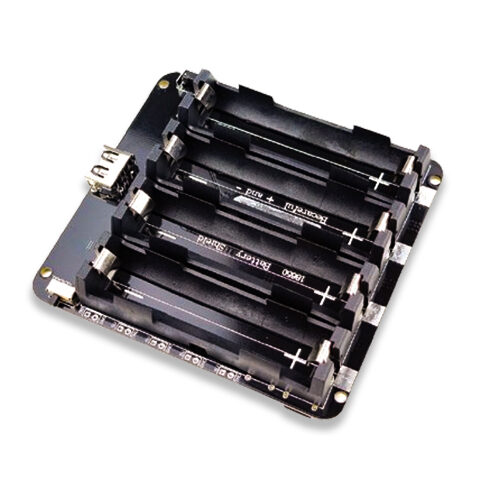
4 x 18650 Lithium Battery Shield V8/V9 for ESP32 with On-Off Button
For mesh nodes that need to run for weeks without attention, the 4-cell 18650 shield provides up to 4x the capacity — with an on/off switch for convenient field deployment.
The gateway node (root) runs an extended version of the mesh sketch that also connects to WiFi and POSTs received JSON data to an HTTP endpoint or MQTT broker. By using mesh.stationManual(ssid, password) on the root node, it simultaneously participates in the mesh and connects to your router.
Using Espressif’s Official ESP-MESH SDK
For production deployments, Espressif’s official esp_mesh.h library (part of ESP-IDF) gives you full control over mesh parameters:
- Max layer depth:
esp_mesh_set_max_layer(6) - Max children per node:
esp_mesh_set_ap_connections(6) - Self-organisation: Nodes automatically elect a root based on RSSI to the external router
- Mesh IE: Custom information elements in beacon frames for node identification
- Mesh PS (Power Save): Leaf nodes can use light sleep between transmissions
The official Espressif mesh examples (available in ESP-IDF under examples/mesh/) are the best starting point for production-grade deployments. The internal_communication example is particularly useful for understanding the data flow between mesh nodes and the gateway.
Self-Healing and Node Failure Recovery
Self-healing is ESP-MESH’s most important feature for reliable deployments. Here is how it works in practice:
- Parent node failure: A child node loses connection to its parent. It immediately starts scanning for alternative parent nodes with the same mesh ID and password.
- Re-parenting: The orphaned node connects to the best available alternative parent (based on RSSI and layer depth). This typically takes 5–30 seconds.
- Root node failure: If the root node fails, the mesh elects a new root from the connected nodes — choosing the node with the best RSSI to the external WiFi AP.
- Network partition: If the mesh splits into two disconnected segments, each segment elects its own root. When connectivity is restored (or a node physically moves between segments), they merge back into a single mesh.
In painlessMesh, you can detect topology changes via the onChangedConnections() callback and log events for monitoring. For the official ESP-IDF mesh, register a MESH_EVENT_PARENT_DISCONNECTED event handler to track node connectivity events.
Scaling Tips for Large Deployments
Here are battle-tested recommendations for deploying ESP32 mesh networks at scale in Indian industrial and agricultural settings:
Keep the Tree Shallow
Aim for no more than 4–5 layers. Every hop adds latency (typically 50–100ms per hop) and increases packet loss probability. A wide, shallow tree is more reliable than a tall, narrow one. Place intermediate relay nodes strategically to minimise depth.
Use Static Topologies for Critical Applications
In ESP-IDF mesh, you can fix a node’s parent using esp_mesh_set_parent() to prevent re-parenting from disrupting the network. For sensor arrays where nodes never move, static topologies reduce overhead and improve predictability.
Stagger Node Startup
If all 30 sensor nodes power up simultaneously after a power outage, the network takes longer to stabilise as all nodes compete to form the tree. Add a random startup delay of 1–5 seconds per node using delay(random(1000, 5000)) in setup to prevent this.
Monitor with MQTT
For large deployments, have the gateway root node publish not just sensor data but also mesh health metrics (number of connected nodes, layer depths, parent signal strengths) to an MQTT broker. This makes remote troubleshooting possible without physically visiting the site.
Frequently Asked Questions
How many ESP32 nodes can be in one ESP-MESH network?
Espressif officially supports up to 1000 nodes in a single ESP-MESH network. Practically, most deployments work best at 50–200 nodes. Beyond that, the tree management overhead increases, and careful network planning (channel selection, AP/station counts per node) becomes critical.
Does ESP-MESH work across multiple WiFi channels?
All nodes in an ESP-MESH network operate on the same WiFi channel. The root node determines the channel (based on the external router’s channel), and all other nodes automatically switch to that channel when joining the mesh. You cannot have nodes on different channels within the same mesh network.
Can I use ESP32-C3 or ESP32-S3 in a mesh network?
Yes, all ESP32 variants (original ESP32, C3, S2, S3) support ESP-MESH. The painlessMesh library also supports these variants. You can mix different ESP32 models in the same mesh network, which is useful when different nodes require different capabilities (camera on ESP32-CAM, display on ESP32-S3, low-cost leaf sensors on ESP32-C3).
What is the maximum data rate through an ESP-MESH network?
Theoretical WiFi throughput is 72 Mbps, but each mesh hop halves effective bandwidth (because the relay node must receive and then re-transmit). A 3-hop path effectively gives around 10–15 Mbps effective throughput. For sensor data (typically a few hundred bytes every few seconds), this is more than sufficient. ESP-MESH is not suitable for video streaming.
How does painlessMesh handle message routing versus ESP-IDF mesh?
painlessMesh uses a flooding broadcast approach — all messages are propagated to all nodes in the mesh. This is simple but inefficient for large networks. ESP-IDF’s official ESP-MESH uses a proper routing table with tree-based routing, sending messages only along the relevant branch of the tree. For networks above 20 nodes, the official ESP-IDF approach is significantly more efficient.
Scale Your IoT Project with ESP32 Mesh Networking
Find all the ESP32 boards, sensors, and battery shields for your mesh network deployment at Zbotic. Quality components, fast delivery across India.







Add comment